WhatsApp chat analyzers compared: privacy, reply times and exports
Compare six local chat analyzers by their current public documentation, including privacy, reply-time rules, sample-size limits and supported exports.
The short answer
- Choose an analyzer by the export it accepts, where it processes the file and the exact statistic you want, rather than a single best-tool ranking.
- Tera Chat and WhatSync document median reply times with different time cutoffs. ChatPeek describes average reply times; ChatStats offers distributions and monthly views.
- The six tools in the comparison table describe browser processing. The Android section also covers a native offline app. Published claims are not an independent privacy audit.
- Tera Chat's browser analyzer works without its Mac app. Its WhatsApp, Instagram and Telegram export tools are separate from the connected Mac inbox and AI replies.
For a private check of who texts first or replies faster, you need an export analyzer that works on your device. You do not need to give a tool your WhatsApp password or paste a private conversation into a chatbot.
We compared six browser tools against that job using their public product pages on 2 November 2026. The Android section adds a native app and another browser option for group statistics. Tera Labs makes Tera Chat, so this is a disclosed first-party comparison. We ran the reproducible example linked below through our own current analyzer. Competitor capabilities here are documentation claims, not results of hands-on testing or a security audit.
Choose by the result you need
| Tool | When to consider it | Published calculation or output | Chat processing described by the vendor |
|---|---|---|---|
| Tera Chat | Counts, conversation starts and typical replies across WhatsApp, Instagram or Telegram exports | Median reply gap under 24 hours; a start after at least six hours of quiet | Local browser processing; no account needed |
| WhatSync | WhatsApp statistics with a spreadsheet of the results | Median replies, skipping gaps over 12 hours; six-hour conversation starts | Local browser processing; free without sign-up |
| Chat X-Ray by Wild Garden | Reflection on a two-person WhatsApp chat with a minimum sample size | Median gaps of at most 12 hours, shown only after five qualifying replies; no per-person group reply times | Local browser processing; no account needed |
| ChatPeek | WhatsApp reply patterns and changes over time | Average replies, conversation starters and patterns by hour | Browser processing; described as free |
| ChatStats | Reply-time distributions and monthly views for WhatsApp or Telegram | Response distribution, monthly average replies and monthly initiations | Browser processing; includes optional browser saving and URL sharing |
| TryMyPost WhatsApp Wrapped | A visual recap to download as cards | Message share, starters, reply speed and activity; six-hour starts | Local browser processing; free card downloads have a watermark |
These are different choices, not a tested speed or accuracy ranking. For example, a visual recap is useful when you want a keepsake; a median with a documented rule is easier to inspect when you want to understand a number.
WhatsApp group statistics on Android: native app or browser?
For message counts and busy hours, an offline Android app is a reasonable choice. Chat Stats for WhatsApp by José Luis Galán documents per-person counts, hourly and weekday charts, date-range analysis and searchable chat text. Its developer says it is free, has no ads and does not request internet permission. These are current Google Play listing claims; we did not install or audit the app. It is a different product from chatstats.wtf in the table above.
Choose that native route if you want to share an export directly into an installed Android app or analyze a custom date interval. Tera’s statistics view analyzes the imported conversation as a whole; it does not provide an arbitrary start/end-date filter. The year selector belongs to the separate Wrapped view.
If you prefer to open a website, Tera’s chat analyzer reads the exported TXT or ZIP locally and shows a row for each participant, plus the group’s weekday/hour activity grid. It needs no Mac app, messaging login or installation. Toolspire is another browser option: its documentation lists participant counts, hourly and weekday charts, a heatmap and a copyable summary. Local processing is shared by several tools, not a unique Tera feature.
On Android, open the WhatsApp group, choose ⋮ → More → Export chat → Without media, then save the file. Open the analyzer in your browser and choose that file. The busiest cell combines all messages in the same weekday/hour across the exported period; it does not identify who was online. Check the first and last dates before treating the counts as the group’s full history.
See the browser output before choosing a tool
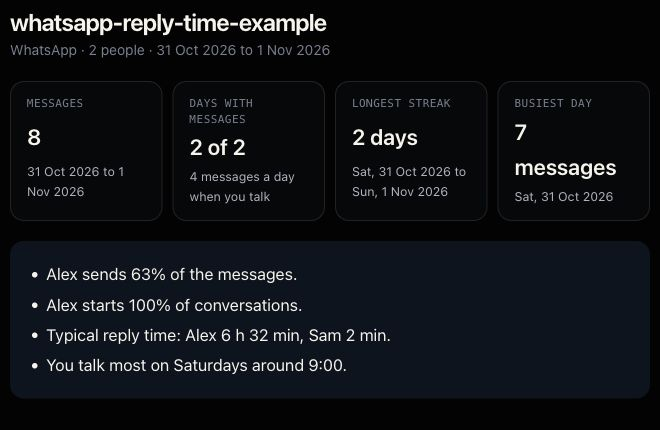
This is an actual capture from Tera’s existing analyzer using the eight-message fictional file. It is not a real couple’s conversation or a generated dashboard. The same file and step-by-step calculation let you check the result before choosing your own chat. The capture was made in desktop Chrome; it is not evidence of a separate physical-phone test.
The reply-time rule can change your answer
“Reply time” is not one standardized measurement. The mean and median can differ even with identical data. A tool also has to decide whether an overnight pause counts, which message starts the timer, and whether a sender change in a group is really a reply.
Our eight-message worked example shows these differences without using anyone’s private chat. Sam’s gaps are 2, 10 and 2 minutes: a two-minute median, but a four-minute-40-second mean. A separate 13-hour gap in the example qualifies under Tera Chat’s rule and falls outside the 12-hour window described by WhatSync.
Tera Chat measures from the immediately previous message when the sender changes. It includes only gaps shorter than 24 hours. The first imported message counts as a start, as does the first message after at least six hours of quiet. Those are counting conventions, not claims about anyone’s intentions.
If a product page says only “fastest replier” without defining the window or average, check its help before comparing the number with another app. An unreported detail in this comparison means we did not establish it from the page we checked; it does not prove the feature is absent.
What “nothing uploaded” does and does not establish
A file picker can read a file locally. The word “upload” on a button does not, by itself, tell you whether the file leaves the browser. Conversely, a privacy slogan does not prove the software follows it.
For Tera Chat’s analyzer, the file-reading and calculation logic is delivered to your browser. Load the page, disconnect from the internet, then choose your export file or a plain-text file containing the fictional example. You can also inspect browser network activity while analyzing it. The site records basic page and download-button counts, as described in our privacy policy; those counts do not contain the chat file or its messages.
Offline processing also does not make every later action private. An exported image, a saved browser copy or a share link can reveal information if you share it. Check what an output contains before sending it to anyone. We have not tested how competitors encode their share links or retain locally saved results.
Match the tool to your file
For WhatsApp, use the .txt file or ZIP produced by Export chat. A screenshot is a different input. You can export without media for a smaller file; the analyzer can still count the media placeholders present in the text.
Tera Chat also accepts Telegram Desktop JSON and Instagram message JSON. Use the Telegram analyzer or Instagram analyzer for the export instructions. Instagram can split a conversation across several message_*.json files, so selecting only one can leave out part of the history.
The imported file is the limit of what any export analyzer can know. Check the first and last dates and the number of parsed messages. Missing history cannot be recovered by choosing a different average. For reading a conversation rather than counting it, the WhatsApp viewer and PDF maker serves that separate job.
Browser statistics and the Mac app serve different needs
The free browser tools analyze a snapshot you select. They do not connect to your messaging account, monitor new messages, write replies or send anything. No Mac installation is required.
The connected Tera Chat Mac app is a separate product for bringing conversations together and drafting replies with AI. Its hardware requirements, account connections and AI data handling differ from the browser tools. Choose it only if that ongoing workflow is what you need.
For the simple question “who starts and how quickly do we reply?”, start with an export, a clear definition and a local analyzer. Treat the result as a description of the file, not a score for your relationship.
Frequently asked questions
Can I analyze a WhatsApp chat without uploading it to an AI?
Yes. A browser analyzer can calculate counts and timestamp patterns locally from an exported file. That does not require a chatbot, a messaging-account login or an AI model.
Why do two WhatsApp analyzers report different reply times?
They may use a mean instead of a median, include different gaps or handle bursts and missing messages differently. Compare definitions and use the same exported file.
Do I need a Mac to use Tera Chat's chat analyzer?
No. The free analyzer runs in a browser on phones and computers. The separate connected Tera Chat inbox is a Mac app; it is not required for analyzing an export.
Published . How we write and check our guides. Spotted something out of date? Email teralabsx@gmail.com.