Got their number? Keep it going on iMessage
Once you have their number, the chat moves to iMessage. Tera Chat for Mac reads your iMessage history right on your Mac and sends through Apple's Messages app, and helps you keep the chat going: one click writes your reply in your own style, it reminds you of birthdays and what people told you, and Auto-wish can send good morning for you. Nothing is uploaded to a Tera Chat server, and you can send photos and files.
Free · macOS 15 or later · Apple silicon
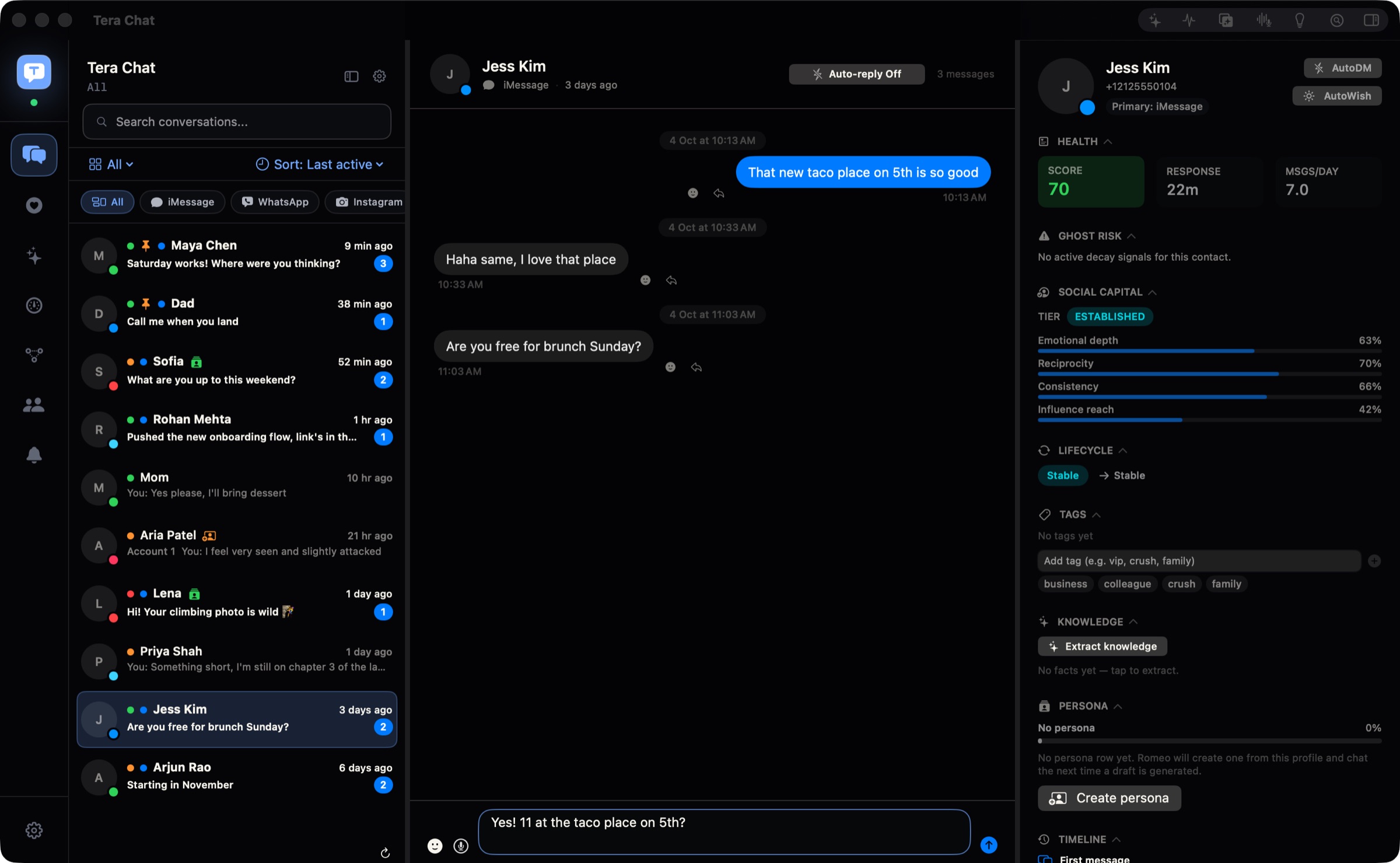
How to connect iMessage
- Tera Chat works from the Messages app on this Mac, so set up iMessage there first if you haven't.
- Open System Settings → Privacy & Security → Full Disk Access and turn on Tera Chat.
- Quit and reopen Tera Chat. Your iMessage history comes in.
- The first time you send, macOS asks once whether Tera Chat may control Messages. Allow it, and your replies go out through Messages.
- Optional: give Tera Chat access to Contacts, so people show by name instead of phone numbers and emails.
What works
- Every iMessage conversation in your Mac's Messages history, in one list with your other networks.
- Replies, plus photos and files.
- SMS threads that are already in your Mac's Messages history show up too.
- Search finds conversations and people, and your messages are also indexed in macOS Spotlight.
What Tera Chat adds to iMessage
- The reply button (needs AI): with the message box empty, click the sparkle and Tera Chat writes a reply in your style, with a different tone for each tag, so your date and your boss don't get the same reply.
- It remembers for you (needs AI): birthdays, anniversaries, trips and job changes caught from your chats, with a reminder before the day and Add to Calendar. Ask about this chat: "did they ever mention their birthday?"
- Auto-wish (free): turn it on for someone you're seeing and Tera Chat sends good morning, good night or a midday hello through Messages at a natural time each day.
- Missed cues (free): a nightly scan on your Mac flags questions you never answered and celebrations you missed, each with a Draft button.
- A health score for every contact (free), and fading chats surfaced before they go cold.
- Summaries (needs AI) of long threads with ⇧⌘S.
Auto-wish, the inbox, search, missed cues, fading-chat alerts and health scores are free and need no AI. The reply button, birthday reminders, summaries and Ask about this chat need AI: your own ChatGPT account (through OpenAI's Codex), your own Claude or Grok API key, or a Tera Chat AI plan. Autopilot runs on your ChatGPT account or any Tera Chat AI plan (in 5 chats on AI Plus, every chat on AI Pro and AI Max).
Limits, plainly
- It needs Full Disk Access, because macOS keeps your iMessage history in a protected database. That's optional: skip it if you don't want iMessage in Tera Chat, and turn it off any time in System Settings. Messages already imported stay; new ones stop arriving.
- Replies from Tera Chat go out as iMessage. It doesn't send SMS or RCS, so keep using Messages for texts to Android phones.
- Autopilot isn't available for iMessage.
- Reactions and quoted replies you add in Tera Chat aren't sent.
- Tera Chat doesn't notify you of every new message, so keep the Messages app's own notifications on.
Where your iMessage messages stay
Tera Chat reads your Messages history locally on your Mac. Your iMessages are never uploaded to a Tera Chat server. If you set up AI, the conversations it works on go to the provider you picked; on a Tera Chat AI plan they go to Anthropic's Claude through Tera Chat's server, which passes them on and doesn't keep them. More in is Tera Chat safe?
iMessage guides
- How to add iMessage to Tera Chat (and what Full Disk Access is for)
- What is Full Disk Access on Mac? Why messaging and AI apps ask for it
- How to use ChatGPT with iMessage on a Mac, and what it can't do
- How to summarize iMessage threads on a Mac
- iMessage search not working on Mac? Fixes for macOS 26 and 27
- How to text from a MacBook or Mac: iMessage, SMS, RCS and WhatsApp
Questions
Why does Tera Chat need Full Disk Access for iMessage?
macOS keeps your iMessage history in a protected database on your Mac, and Full Disk Access lets Tera Chat read it locally. It's optional: skip it if you don't need iMessage, and revoke it any time in System Settings. After granting it, quit and reopen Tera Chat.
Is my iMessage history uploaded anywhere?
Not to Tera Chat. Your messages, contacts and relationship stats are stored on your Mac and never uploaded to a Tera Chat server. If you set up AI, the conversations it works on go to the AI provider you chose.
Can Tera Chat send SMS or RCS to Android phones?
No. SMS threads already in your Mac's Messages history show up in Tera Chat, but replies from Tera Chat go out as iMessage. Use Messages for texts to Android phones.
Can I send photos from Tera Chat on iMessage?
Yes. iMessage is the one network where Tera Chat sends photos and files; on the others, sending is text only.
Does Autopilot work with iMessage?
No. Autopilot isn't available for iMessage, so Tera Chat never replies on iMessage by itself. The one thing it can send there on its own is an Auto-wish (good morning, good night or a midday hello), and only to people you turn it on for.
Is Tera Chat made by Apple?
No. Tera Chat is an independent Mac app made by Tera Labs. It isn't affiliated with or endorsed by Apple.