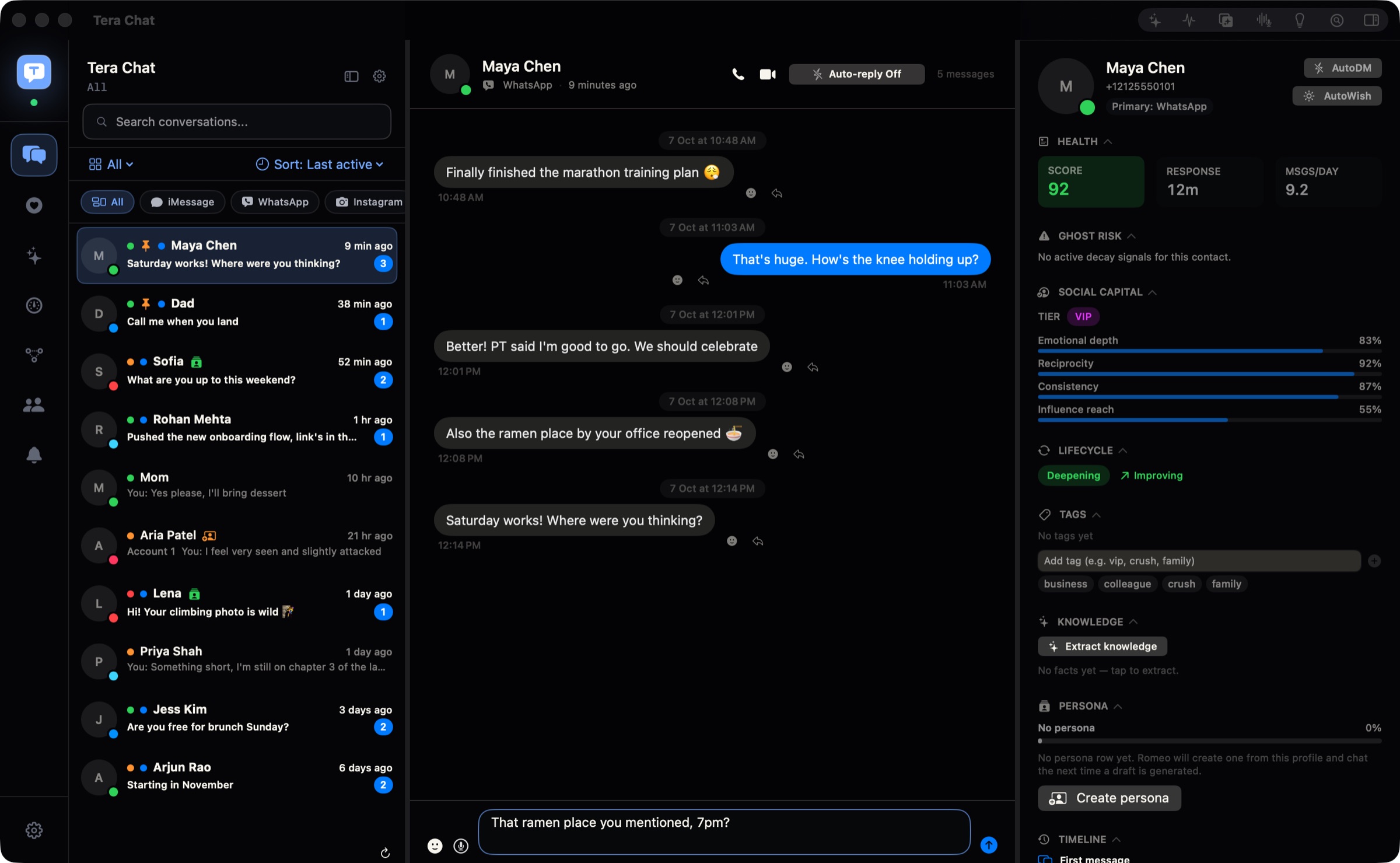
They texted an hour ago. I still don't know what to say.
One click.Reply written.
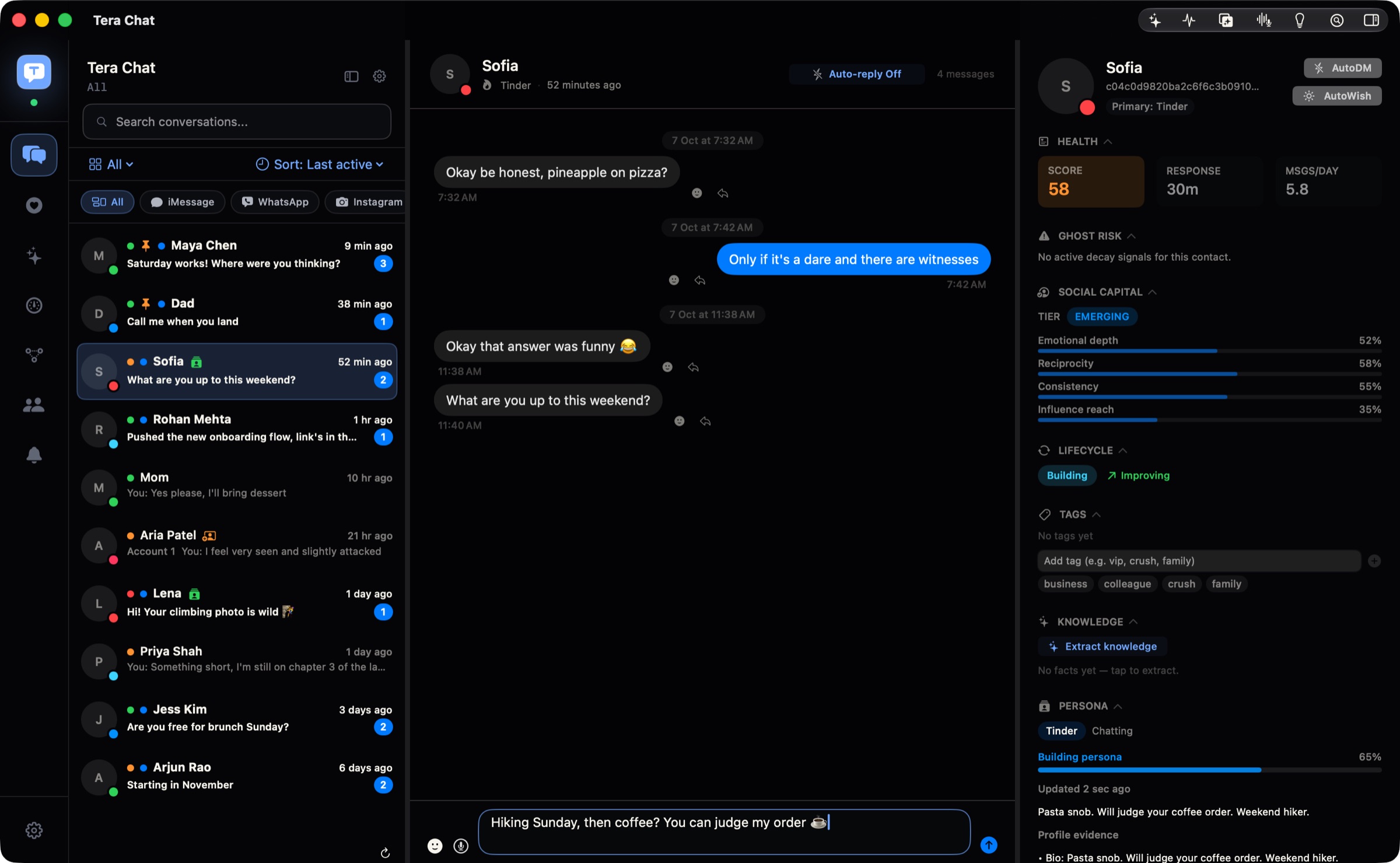
Press ✨ in the empty box. Tera Chat reads the chat and writes what you would say: your words, your emoji, your language. Send it, or change a word first.
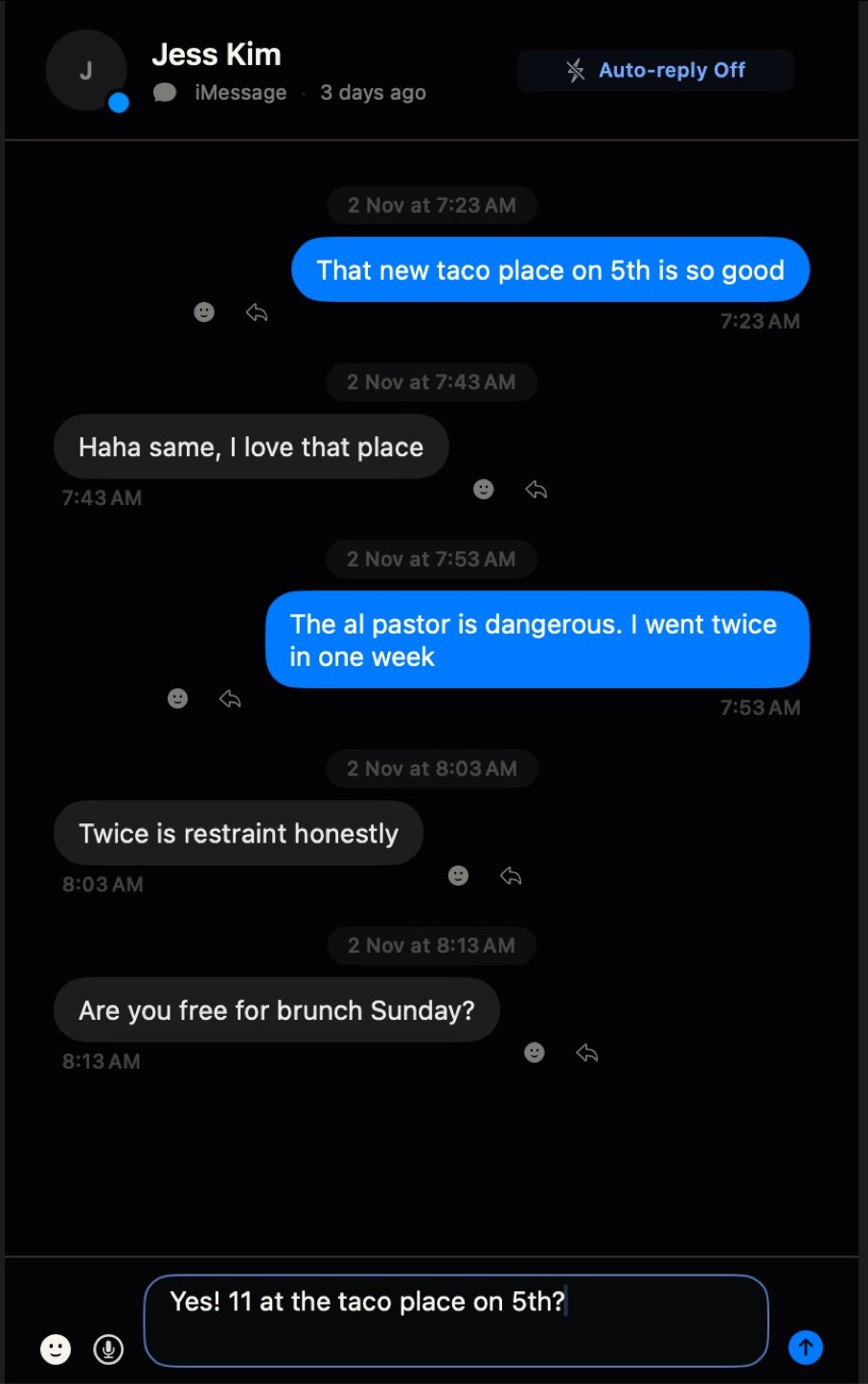
ChatGPT replies sound nothing like me.
It texts like you.
ChatGPT can write a reply, but it can't see your chats and it forgets you by tomorrow. Tera Chat learns from your own messages, and it knows you text a partner differently from friends or family. Every reply comes out in your voice.
It learns again about once a week. On a Mac, you can read and change what it learned in Settings. On Windows, it learns from your messages in the chat you have open.
✨ What it learns from your chats
- Length
- Short or long, like yours
- Emoji
- Yours, as often as you use them
- Capitals and full stops
- All lowercase and no full stop, if that's you
- Languages
- The chat's own, mixed ones too
- Who you're texting
- A partner, friends, family: each in their own tone
I can't be on my phone all day.
Autopilot keeps your chats going.
Pick the chats. Tera Chat gets the next reply ready in your style, and sends it for you where you switch that on. Quiet hours, limits and a stop button come built in.
Part of the AI plans
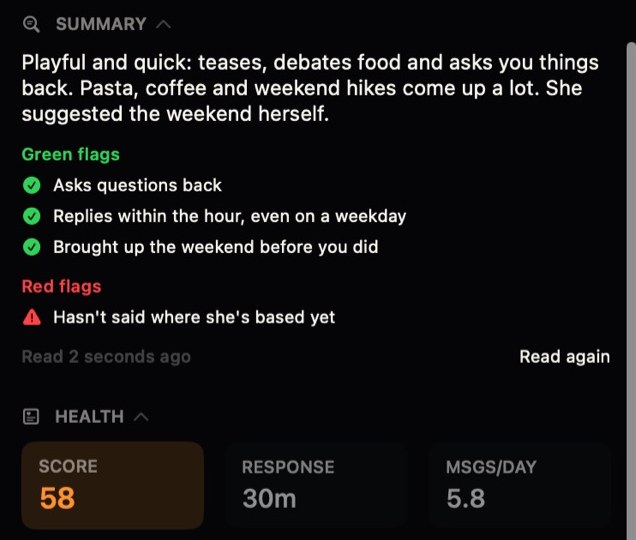
Is this person even worth my time?
Know who you're talking to.
Every person gets a summary: what they told you, their green flags, their red flags and how the chat is going. Ten seconds to read before you reply, or before you say yes to a date.
I forgot a birthday. Again.
It remembers what people tell you.
Birthdays, exams, trips, the food they love. Tera Chat keeps what people tell you, reminds you on the day and flags the question you never answered, so you always have something real to say.


WhatsApp, Instagram, Telegram, Tinder… I can't keep up 😩
Every chat app.One inbox.
Connect your apps once. Every message lands in one list on your computer, and you answer from there. The inbox is free, with no time limit.
- Telegram
- iMessage
- Tinder
- Bumble
- BumbleComing soon
- HingeComing soon
- MessengerComing soon
- SignalComing soon
- DiscordComing soon
- SnapchatComing soon
- XComing soon
- LINEComing soon
- ViberComing soon
Tera Chat is an independent app. It isn't affiliated with these services.
20 matches. Zero real conversations.
More dates. Less small talk.
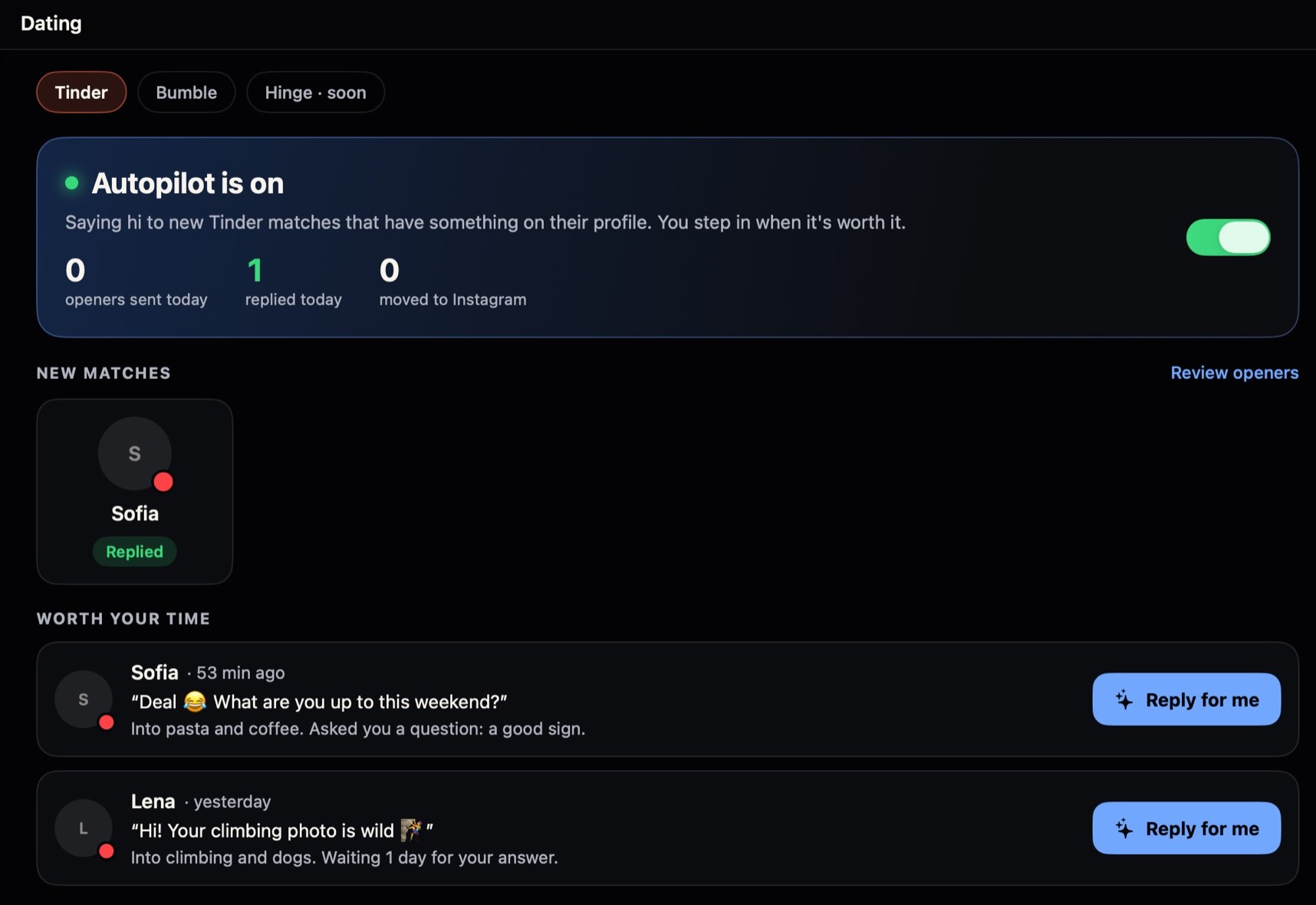
Tera Chat says hi to every new match with an opener about their profile, keeps the chat moving, and shows you who is worth your evening. You only pick who to meet.
- Moves to Instagram with them when they share it, and says hi there
- Swipes for you at the times you pick
- Date ideas from what they told you
- Tests two bios or photo orders and counts the matches each one gets
See Tera Chat for datingNot dating? One switch hides all of it.
And it doesn't stop there.
Good morning, sent on time.
AutoWish sends your good morning and good night texts by itself, written the way you write them. Even when you're still asleep.
Keep in touch
See who you're drifting away from, and get the first line to say hi again.
Sum up any chat
200 unread in the group? Read three lines instead.
Ask about a chat
"What time does the flight land?" Ask the chat and get the answer.
Search everything
One search box across every app you connected.
Insights
Which openers get replies, who is waiting on you, who is going cold.
35 languages
The app, your replies and the checkout speak your language.
Your own AI
On a paid plan, use your ChatGPT, Claude or Grok instead of the AI built in.
Touch ID lock
Your chats stay locked until your finger opens them.
Your first reply, in three steps.
Download Tera Chat
Free for Mac and Windows. Open it and look around: no account needed yet.
Connect your apps
Scan a code or sign in, the way you link a new device. Your chats show up in one list.
Press ✨
Sign in free, open a chat and get your reply written. 10 a day cost nothing.
Free app. 10 free AI replies every day. No card.
Your conversations live on your computer.
Tera Chat connects to your messaging accounts from your own computer. There's no Tera Chat server holding a copy of your inbox to leak, sell or subpoena. Read the privacy page
- 0
Messages on our servers
Your inbox is stored on your Mac or PC. On a Mac, settings and AI insights sync only through your own iCloud account; on Windows, they stay on the PC.
Keys stay on your computer
On a Mac, your AI keys live in the macOS Keychain; on Windows, Windows encrypts your Tera Chat sign-in for your account. Your chat sign-ins stay on your computer. AI only sees what the features you use or turn on need.
- 0
Third-party trackers
No ad or analytics SDKs in Tera Chat. Its own usage counts never include message text, and you can turn them off. No tracking cookies or third-party scripts on this site, not even a font service.
The app is free.Pay only for more AI.
Tera Chat for Mac and Windows is available now and free to download and use, with 10 free AI replies a day when you sign in. Paid AI plans are optional upgrades: chats on autopilot, more one-click replies, date ideas and reminders for what people tell you. Bigger plans have more AI. Cancel anytime.
Tera Chat
The app for Mac and Windows, with your chats in one place.
- WhatsApp, Instagram, Telegram and Tinder, plus iMessage and Bumble on a Mac
- Sign in free for 10 AI replies a day and openers for 10 matches
- Red flags in your chats
- Automatic updates
AI Plus
Autopilot for your top 20 chats.
- Autopilot in 20 chats, ready to send
- Openers for new matches
- One-click replies in your style, Tinder too
- Date ideas from what they told you
- Remembers birthdays and what they love
- Good morning texts that send themselves
- About 5,000 replies of AI a month
$9.99/month, tax included (plus sales tax in the US and Canada). Cancel anytime.
Or pay yearly: $99.99/year (2 months off), tax included (plus sales tax in the US and Canada).
AI Pro
Every chat on autopilot.
- Everything in Plus
- Autopilot in every chat
- On Tinder, Instagram, WhatsApp and Telegram
- 2× Plus's AI: about 10,000 replies a month
$19.99/month, tax included (plus sales tax in the US and Canada). Cancel anytime.
Or pay yearly: $199.99/year (2 months off), tax included (plus sales tax in the US and Canada).
AI Max
Five times the AI, for a busy inbox.
- Everything in Pro
- 5× Plus's AI: about 25,000 replies a month
$49.99/month, tax included (plus sales tax in the US and Canada). Cancel anytime.
Mac, Windows and Android today.iPhone next.
Mac
Available now
macOS 15 or later, Apple silicon
Windows
Available now
Windows 10 or 11, 64-bit
iPhone
Coming soon
On your phone right now? Email yourself the link and open it on your computer.
Questions, answered.
Is Tera Chat really free?
Yes. The app, for Mac and Windows, and the unified inbox are free with no time limit. Paid AI plans are optional and billed monthly or yearly. Cancel anytime.
Do I need to pay for AI?
No. Sign in to Tera Chat for 10 free AI replies per day and openers for 10 matches in total, with no AI account or API key to connect. The paid plans add more built-in AI and features such as Autopilot. On a Mac, a paid plan also lets you use ChatGPT through Codex, or your own Claude or Grok API key (provider limits and charges apply).
What do the paid plans add?
AI built into Tera Chat, with no keys or accounts to connect. Every plan has all of it: one-click replies in your style, replies in Tinder chats, date ideas, reminders, summaries and Autopilot (replies ready to send). AI Plus runs Autopilot in 20 chats; AI Pro and AI Max run it in every chat, with 2× and 5× Plus's monthly AI. A plan starts as soon as you check out, and you can cancel anytime.
Which computers does it run on?
Any Mac with Apple silicon (M1 or newer) running macOS 15 Sequoia or later, and any PC with 64-bit Windows 10 or 11.
Why does it ask for Full Disk Access?
Only for iMessage. macOS keeps your iMessage history in a protected database on your Mac, and Full Disk Access lets Tera Chat read it locally so your texts show up next to everything else. Skip it if you don't need iMessage, and revoke it any time in System Settings.
Where are my messages stored?
On your computer. Tera Chat connects to each network from your own computer and keeps your inbox and your sign-ins there. On a Mac, AI keys are stored in the macOS Keychain and your settings and AI insights sync through your own iCloud account. When you use an AI feature, the conversation it works on is sent to the AI provider you picked.
Will it send messages without me?
Not unless you turn that on. You send each message yourself, and automations are opt-in, with quiet hours, rate limits and an emergency stop.
How do updates work?
Tera Chat checks for new versions on its own, downloads them in the background and installs when you're not in the middle of something. On a Mac, every update is signed, so your Mac only accepts genuine Tera Chat builds.
Is there a Windows, Android, iPhone or web version?
There's a Windows version and an Android app. Tera Chat runs on Mac and on 64-bit Windows 10 or 11, free to download and use, with the same features apart from iMessage, which only works on a Mac. Tera Chat for Android is free on Google Play, for Android 8 or later. An iPhone app is on the way: leave your email on this page and we'll tell you the day it's out. There's no web version.
Get more out of every conversation.
Practical guides from the Tera Chat team.
Can you use Tinder on a Mac? Tinder.com, its limits and your other chats
Yes, you can use Tinder on a Mac at tinder.com. Here's how to set it up, which features stay phone-only, and how to keep Tinder next to your other chats.
Messaging on your MacBumble on a computer: the web app is gone. Here's what's left
Can you use Bumble on a computer? Not since Bumble shut its web app in October 2025. What still works on a Mac or laptop, and what to avoid, as of October 2026.
Messaging on your MacCan you use Hinge on a computer or Mac? (2026)
No: Hinge has no web, Mac or iPad version as of October 2026. Here are the real options for Hinge on a computer, and why you shouldn't sign in at app.hinge.co.
Messaging on your MacHow to combine WhatsApp, iMessage, Telegram and Instagram in one Mac app
How to combine WhatsApp and iMessage, plus Telegram and Instagram, in one Mac app: the three ways to do it and exactly what each network asks you to allow.
Messaging on your MacHow to use two WhatsApp accounts on one Mac (2026)
Can you use two WhatsApp accounts on a Mac? Not in one app: WhatsApp's multi-account feature is phone-only. The setups that work, checked October 2026.
Messaging on your MacWhatsApp for Mac in 2026: the app vs WhatsApp Web
WhatsApp for Mac in October 2026: the free native app, macOS 12.1+, four linked devices, the 14-day rule, calls on Mac and Web, and how to set it up.