Can you use Tinder on a Mac? Tinder.com, its limits and your other chats
Yes, you can use Tinder on a Mac at tinder.com. Here's how to set it up, which features stay phone-only, and how to keep Tinder next to your other chats.
The short answer
- Tinder has no Mac app, but Tinder for Web at tinder.com works in the latest versions of Safari, Chrome, Firefox and Edge on a Mac.
- On tinder.com you can swipe, match, chat, edit your profile and pay for a subscription; as of October 2026, Group Hangouts on the web only lets you continue group chats.
- You don't need an emulator: in Safari you can add tinder.com to your Dock as a web app with its own icon and notifications.
- Tinder's Terms of Use (effective 5 March 2026) ban third-party apps and services that directly interact with Tinder without written consent, AI included, so be careful with extensions and tools that connect to your account.
Yes, you can use Tinder on a Mac. There’s no Tinder app for Mac, but Tinder for Web at tinder.com runs in the latest versions of all major browsers (Tinder names Chrome, Firefox, Safari and Edge), and it lets you swipe, match, chat, edit your profile and manage a subscription. As of October 2026, the main gap is Group Hangouts: on the web you can continue its group chats but not use the rest of the feature.
This guide covers how to set Tinder up on a Mac so it behaves like an app, what works on the web and what doesn’t (from Tinder’s own help center), what Tinder’s terms say about third-party tools, and how to keep Tinder next to your other chats.
Is there a Tinder app for Mac?
No. Tinder’s App Store listing covers iPhone (iOS 16 or later), Apple Vision and Apple TV, with no Mac or iPad version (App Store). On a computer, Tinder points you to the web: its help center says that “along with our mobile apps, you can visit Tinder.com to use Tinder for Web” (Tinder Overview, updated 22 October 2026).
That means you don’t need to download anything. Ignore sites that offer a “Tinder for Mac” download: Tinder doesn’t make one.
How do you set up Tinder on a Mac?
It takes about two minutes, and three settings make a big difference: location, notifications and a Dock icon.
- Open tinder.com in an up-to-date browser (Safari, Chrome, Firefox or Edge).
- Log in, or click Create Account, choose a sign-in method, and verify your phone number or email if asked.
- Allow location. Tinder needs your location to show people near you. In Safari, go to Safari → Settings → Websites → Location and set tinder.com to Allow. In Chrome, go to Settings → Privacy and security → Site settings → Location (Tinder: location).
- Turn on notifications in two places: allow notifications for tinder.com in your browser, then in Tinder click your profile icon → Settings → Notifications.
- Give it a Dock icon (optional). In Safari, open tinder.com, click the Share button in the toolbar, choose Add to Dock, then click Add. Apple says you can receive notifications from a web app made this way “just like you would from any app” (Apple: Safari web apps).
A Dock web app also keeps Tinder out of your browser tabs, which helps if you share your screen at work.
What works on tinder.com, and what doesn’t?
Most of Tinder works on the web. The gaps are newer, video-based and group features. Here’s the status from Tinder’s help center, checked on 23 October 2026:
| Feature | On tinder.com? | What Tinder says |
|---|---|---|
| Swiping, matching and chatting | Yes | The free version lets you “match, chat, and connect” (Overview) |
| Editing your profile, photos and bio | Yes | Edit from the app or tinder.com |
| Subscriptions and purchases | Yes | Credit cards, plus Google Pay, PayPal and Venmo (web only) in some locations (payments) |
| Double Date | Yes, in select markets | Available to Android, iOS and web users while in testing (Double Date) |
| Group Hangouts | Partly | Group conversations continue on the web, but “no other Group functionalities are available” there (Group Hangouts) |
| Speed Date | Unclear | Tinder’s help page for Speed Date, which listed Android and iOS only, was taken down in October 2026 |
| ID + Photo Verification | Yes, in select test markets | Listed for iOS, Android and tinder.com |
| Notifications | Yes, through your browser | Managed in your browser’s settings |
The practical difference is notifications. On your phone, Tinder notifies you even when the app is closed. On a Mac, you’ll only see alerts if the browser (or the Dock web app) is allowed to send them, so keep the phone app too if you rely on alerts.
Do you need an emulator or the iPhone app?
No. Tinder.com is Tinder’s own way to use the service on a computer, so there’s no reason to install an Android emulator or a screen-mirroring tool from a third party, and we don’t cover them here.
If you really want the phone app on your Mac, Apple’s own iPhone Mirroring shows your iPhone’s screen in a window on your Mac and lets you use its apps with your keyboard and trackpad. It needs macOS Sequoia 15 or later on a Mac with Apple silicon (or a T2 chip), iOS 18 or later, the same Apple Account on both, and your iPhone locked and nearby. It isn’t available in the European Union, and your iPhone’s camera and microphone don’t work through it (Apple). For Tinder, the website is simpler.
What do Tinder’s rules say about third-party tools?
Tinder’s Terms of Use, effective 5 March 2026, list the things you agree not to do. Section 2c, item 22 bans using or developing “any third-party applications or services that directly interact with our Services” without Tinder’s written consent, “including but not limited to artificial intelligence or machine learning systems.” Section 4 says Tinder may ban someone who breaks the terms from its affiliates’ services too, naming Hinge, OkCupid, Match and others (Tinder Terms).
In plain terms: using tinder.com in your browser is fine, because that’s Tinder itself. Browser extensions and apps that log in to your account to swipe, read or send messages for you are the kind of tool the terms cover. Our guide to whether it’s against Tinder’s rules to use AI goes through what counts, including the difference between asking a chatbot for ideas and connecting a tool to your account.
How do you keep Tinder next to your other chats?
If Tinder is one of several apps you check, the tab problem gets old quickly: Tinder in one place, iMessage in Messages, WhatsApp in its own app, Instagram in another tab. Tera Chat is our Mac app that puts them in one list, so we’ll explain how it works and where it falls short. (For the general options, see how to combine WhatsApp, iMessage, Telegram and Instagram in one Mac app.)
How it connects to Tinder:
- In Tera Chat, click Dating → Tinder → Protected Browser. Tera Chat asks for Touch ID or your Mac password, then opens tinder.com in a private, isolated browser window.
- Sign in to Tinder in that window, the same way you would on the website.
- Back in Tera Chat, click Sync History.
The sign-in window uses a browser you already have, so Google Chrome, Brave or Microsoft Edge must be installed. Your Tinder sign-in stays on your Mac, in an isolated browser profile that only Tera Chat uses.
What works: you can read your Tinder chats, send text replies and see new matches in a New matches rail, next to your iMessage, WhatsApp, Telegram and Instagram conversations. You can’t send photos to Tinder from Tera Chat, and reactions you add in Tera Chat aren’t sent. Hinge is in beta and read-only, and Bumble isn’t available yet.
The rules, plainly: Tera Chat connects to your Tinder account, so it is the kind of third-party tool Tinder’s terms cover, and using it carries a risk to your account, including bans that can extend to other Match Group apps. Read what Tinder, Hinge and Bumble’s terms actually say before you connect it.
You stay the author. By default you read and send every message yourself, and Autopilot stays off until you turn it on. If you use AI (a Tera Chat AI plan, or your own ChatGPT account through Codex), Tera Chat can suggest an opener based on the match’s bio and prompts, or a draft when a chat goes quiet. Treat it as a first draft to rewrite in your own words:
Example chat, made up for this guide. Her bio mentions a pottery class she keeps failing.
Draft suggested: “Haha, how’s the pottery going? Made anything good yet?”
What you actually send: “ok I need an update on the pottery situation. are we at ‘lopsided bowl’ or ‘abstract art’ stage”
The draft gave you the topic; the rewrite sounds like you. That’s the line to hold: AI as a wingman, not a ghostwriter. For other AI dating assistants that work on a computer, see our guide to rizz app alternatives.
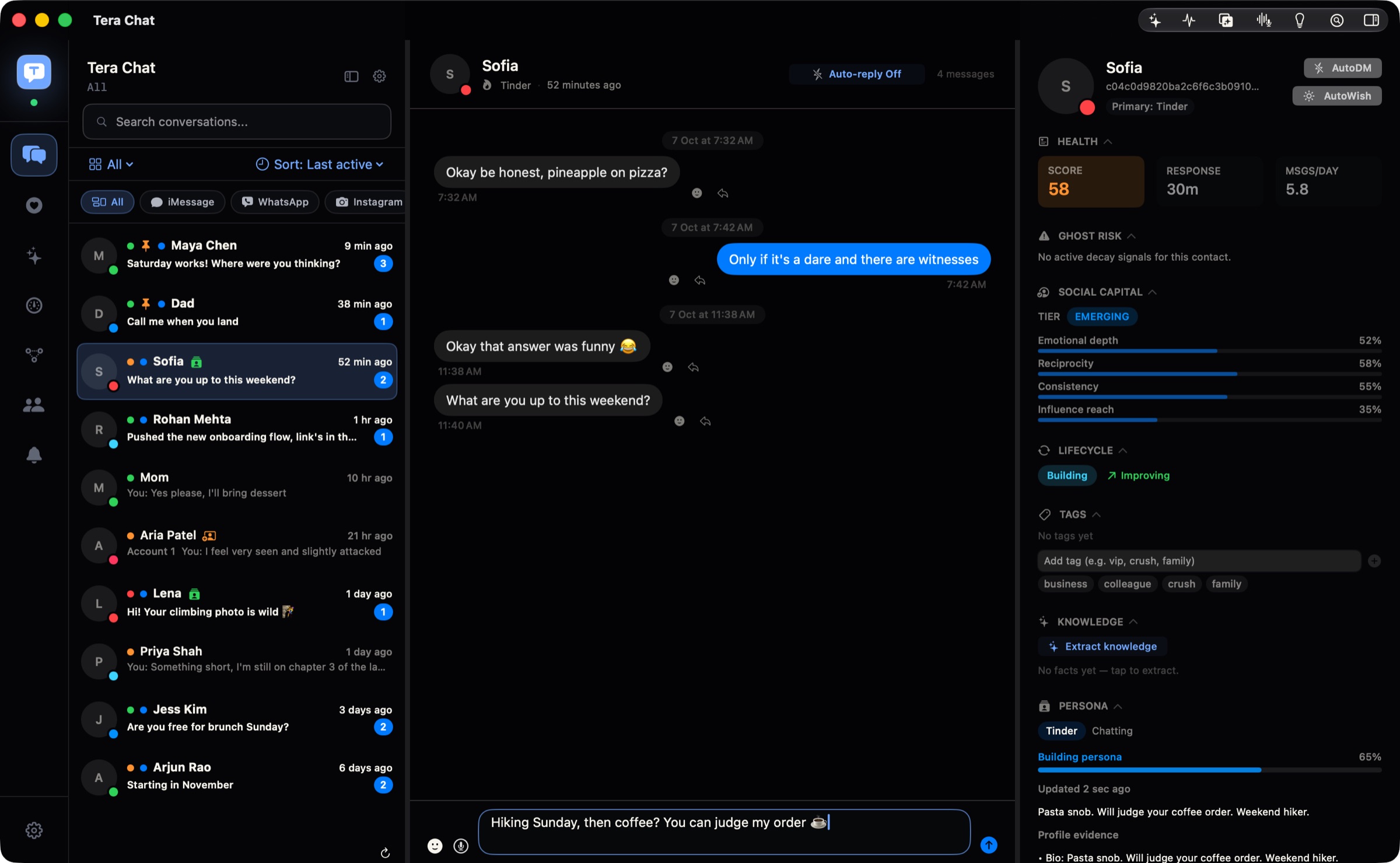
When a Tinder match shares their Instagram, Tera Chat helps you continue the conversation on Instagram, next to the Tinder chat it came from. Before you move a chat off Tinder, make sure you’re comfortable sharing that account, and be wary of anyone who pushes to move off the app quickly or asks for money. Our guide to moving from a dating app to Instagram or WhatsApp has a safety checklist.
A few tips for Tinder on a shared Mac
- Use your own macOS user account if anyone else uses the computer, so your browser stays signed in only for you.
- Log out on shared computers. In Tinder, go to your profile icon → Settings and log out before you walk away.
- Turn on a Focus before a screen share or presentation, so a match’s message doesn’t pop up on the projector.
The short version
Use tinder.com in Safari or Chrome, allow location and notifications, and add it to your Dock if you want it to feel like an app. Keep the phone app for full Group Hangouts and reliable notifications. If you also want to see how Hinge and Bumble work on a computer, our overview of dating apps on a Mac has the full status table, and the best messaging apps for Mac covers everything else you chat on.
Frequently asked questions
Is Tinder on the web free?
Yes. Tinder's help center says the free version lets you match, chat and connect, and tinder.com is part of that. Paid tiers (Plus, Gold, Platinum) can also be bought on the web.
Can I get Tinder notifications on my Mac?
Yes. Allow notifications for tinder.com in your browser's settings and turn them on in Tinder's own settings. If you add tinder.com to your Dock with Safari, the web app can send notifications like any other app.
Can I run the Tinder iPhone app on an Apple silicon Mac?
Not from the Mac App Store: as of October 2026, Tinder's listing covers iPhone, Apple Vision and Apple TV, not Mac or iPad. Apple's iPhone Mirroring can show the app from your own iPhone on your Mac, but outside the EU only.
Will using Tinder on a computer get me banned?
Not for using tinder.com, which is Tinder's own website. What its terms ban is using third-party apps or services that directly interact with Tinder without written consent, such as auto-swipe extensions or AI tools that connect to your account.
Published . How we write and check our guides. Spotted something out of date? Email hello@terachat.co.