Never wonder what to text on WhatsApp again
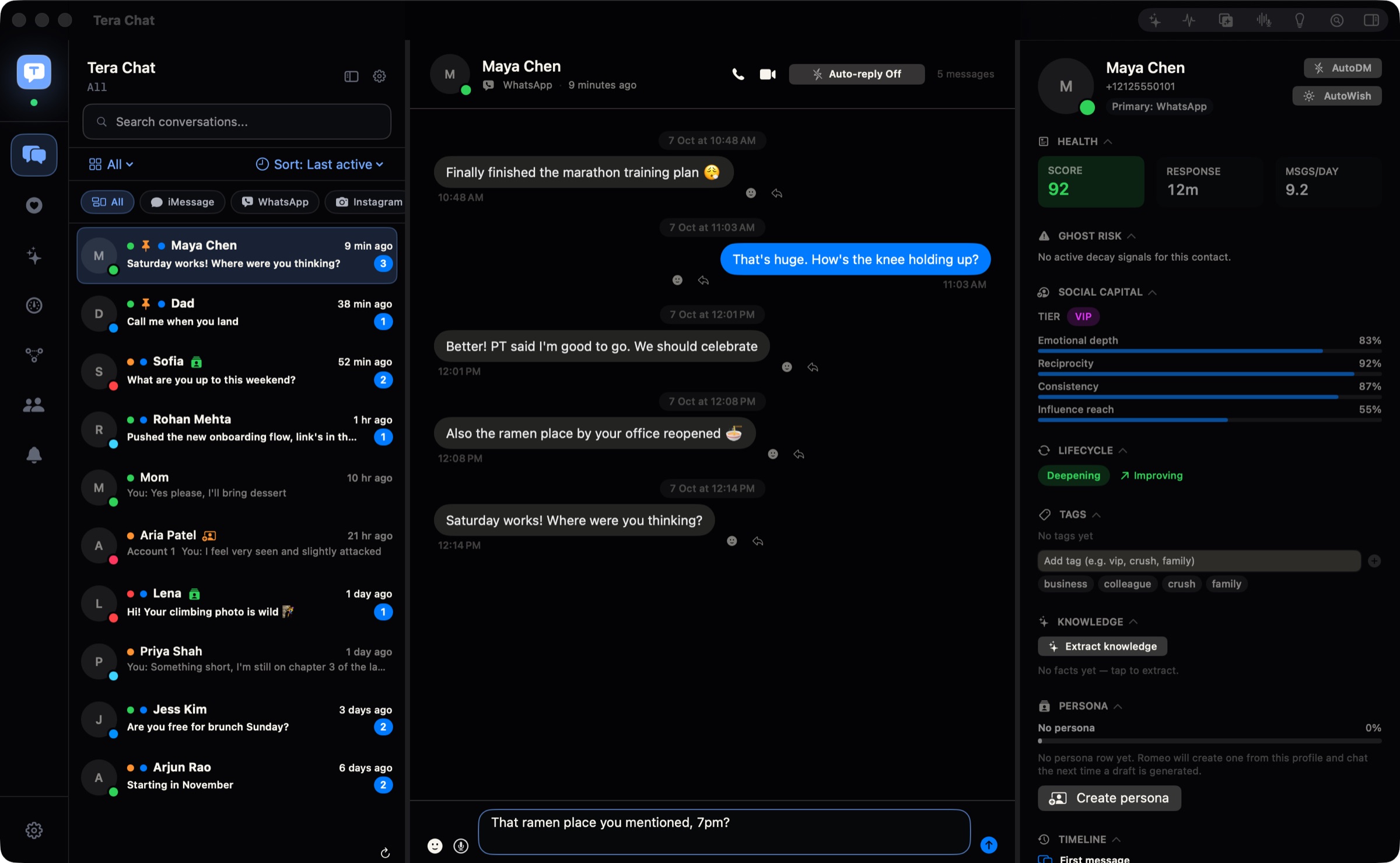
When a match gives you their number, the chat moves to WhatsApp, and that's often where it fizzles out. Tera Chat for Mac links to WhatsApp with a QR code, the way WhatsApp Web does, and helps you keep it going: one click writes your reply in your own style, it reminds you of their birthday, and Auto-wish can send good morning for you. Your WhatsApp chats sync in real time next to Tinder, Instagram and iMessage, and reading and replying is free.
Free · macOS 15 or later · Apple silicon
How to connect WhatsApp
- Download Tera Chat (free, for Apple silicon Macs on macOS 15 or later) and open it.
- Go to Settings → Messaging → WhatsApp and click Pair device. A QR code appears.
- On your phone, open WhatsApp, go to Settings → Linked Devices → Link a Device, and scan the code.
- That's it: your WhatsApp chats start syncing into the inbox.
What works
- Your chats and groups sync in real time, with media.
- You reply from your Mac in text.
- WhatsApp threads have their own filter chip, or sit mixed in with every other network, sorted by when you last talked.
- Search finds conversations and people, and your messages are also indexed in macOS Spotlight.
What Tera Chat adds to WhatsApp
- The reply button (needs AI): don't know what to say back? With the message box empty, click the sparkle and Tera Chat writes a reply in your style, from your slang to your emoji, with a different tone for a date, family or work.
- It remembers for you (needs AI): birthdays, trips and new jobs caught from your chats, with a reminder before the day. Ask about this chat: "what restaurant did she mention?"
- Auto-wish (free): turn it on for someone you're seeing and Tera Chat sends good morning, good night or a midday hello at a natural time each day, in words you've used with them before.
- Autopilot (off until you turn it on): keeps a chat going for you, with each reply waiting in Drafts for you to send.
- Missed cues and fading chats (free): questions you never answered and conversations going cold, flagged before it gets awkward.
- A health score for every contact (free): how two-way, recent, frequent and warm each chat has been over the last 30 days, so you see who's into it.
- Summaries (needs AI): ⇧⌘S sums up a busy group chat you've fallen behind on.
- Voice drafts: pick the audio file of a voice message someone sent you; Tera Chat transcribes it on your Mac and drafts your reply (the drafting needs AI).
Auto-wish, the inbox, search, missed cues, fading-chat alerts and health scores are free and need no AI. The reply button, birthday reminders, summaries and Ask about this chat need AI: your own ChatGPT account (through OpenAI's Codex), your own Claude or Grok API key, or a Tera Chat AI plan. Autopilot runs on your ChatGPT account or any Tera Chat AI plan (in 5 chats on AI Plus, every chat on AI Pro and AI Max).
Limits, plainly
- One WhatsApp account per Mac.
- Sending from Tera Chat is text only. Photos, files and voice notes still go through WhatsApp itself.
- WhatsApp calls open WhatsApp's own web app.
- A chat where someone has turned on WhatsApp's Restricted chat is closed to linked devices, so expect it not to come through to Tera Chat.
- Emoji reactions and quoted replies you add in Tera Chat aren't sent to WhatsApp.
- Tera Chat doesn't show a notification for every new message. Its notifications are for things like fading chats, life events, the weekly digest and reminders.
Where your WhatsApp messages stay
Your WhatsApp messages are stored on your Mac and never uploaded to a Tera Chat server, and the WhatsApp sign-in stays in Tera Chat's own storage on your Mac. If you set up AI, the conversations it works on go to the provider you picked; on a Tera Chat AI plan they go to Anthropic's Claude through Tera Chat's server, which passes them on and doesn't keep them. More in is Tera Chat safe?
WhatsApp guides
- WhatsApp for Mac in 2026: the app vs WhatsApp Web
- AI for WhatsApp replies in 2026: what Meta offers and what's allowed
- How to summarize a WhatsApp group chat (5 ways, with and without Meta AI)
- WhatsApp on Mac not syncing or stuck on "downloading recent messages": fixes that work
- How to connect WhatsApp, Telegram, Instagram and Tinder to Tera Chat
- Are all-in-one messaging apps safe? Bridges, bans and privacy in 2026
- Chat analyzer for WhatsApp, Instagram and Telegram (free tool, runs in your browser)
- WhatsApp chat viewer and PDF maker (free tool, runs in your browser)
- WhatsApp chat to Excel (CSV) (free tool, runs in your browser)
- WhatsApp Wrapped (free tool, runs in your browser)
Questions
Is Tera Chat an official WhatsApp app?
No. Tera Chat is an independent Mac app made by Tera Labs. It isn't affiliated with or endorsed by WhatsApp or Meta. It links to your WhatsApp account as a linked device, the same way WhatsApp Web does.
Can linking WhatsApp to Tera Chat get my account banned?
It's a risk to know about. Tera Chat isn't made by WhatsApp, and WhatsApp's help center warns that linking an account to an unofficial app or website may result in a temporary or permanent ban. Our guide to whether all-in-one messaging apps are safe explains how they connect and what that risk means.
Are my WhatsApp messages stored on a Tera Chat server?
No. They're stored on your Mac and never uploaded to a Tera Chat server. The WhatsApp sign-in stays in Tera Chat's own storage on your Mac. If you set up AI, the chats it works on go to the AI provider you chose.
Can I connect two WhatsApp accounts?
Not on one Mac: Tera Chat connects one WhatsApp account per Mac. Instagram is different, with up to three accounts.
Can I send photos and voice notes to WhatsApp from Tera Chat?
No. Sending to WhatsApp from Tera Chat is text only, so photos, files and voice notes still go through WhatsApp itself. Photos and files can be sent on iMessage.
Which AI writes the WhatsApp replies?
The one you pick. Free options: your own ChatGPT account through OpenAI's Codex app, or your own Claude or Grok API key, paid to your provider, with a daily spend cap. Or a Tera Chat AI plan with AI built in, cancel anytime. The inbox works without any AI.
Will Tera Chat reply on WhatsApp by itself?
Not unless you turn that on. Autopilot is off until you switch it on for a platform or a single chat. By default its replies then wait in Pending drafts for you to edit, dismiss or send with one click.
Can Tera Chat send good morning on WhatsApp for me?
Yes, with Auto-wish. Turn it on for someone you're seeing and Tera Chat sends good morning, good night or a midday hello at a natural time each day, in words you've used with them before. It's off until you turn it on for a person, needs no AI, and stays quiet while you're already talking.