How to connect WhatsApp, Telegram, Instagram and Tinder to Tera Chat
How to connect WhatsApp to Tera Chat with a QR code, plus Instagram, Telegram and Tinder sign-in step by step, what works on each, known limits and fixes.
The short answer
- WhatsApp connects in Settings → Messaging → WhatsApp → Pair device: scan the QR code with WhatsApp on your phone, the same way you'd link WhatsApp Web.
- Instagram connects in Settings → Messaging → Instagram accounts → Connect, on Instagram's own login page inside Tera Chat; you can add up to three accounts.
- Telegram (Settings → Messaging → Telegram → Sign in) and Tinder (Dating → Tinder → Protected Browser) sign in through a private browser window, which needs Google Chrome, Brave or Microsoft Edge installed; then click Sync History.
- Sending from Tera Chat is text only on WhatsApp, Instagram, Telegram and Tinder (photos and files go only on iMessage), and calls open WhatsApp's and Instagram's own websites.
- Hinge is in beta and read-only; Bumble is coming soon.
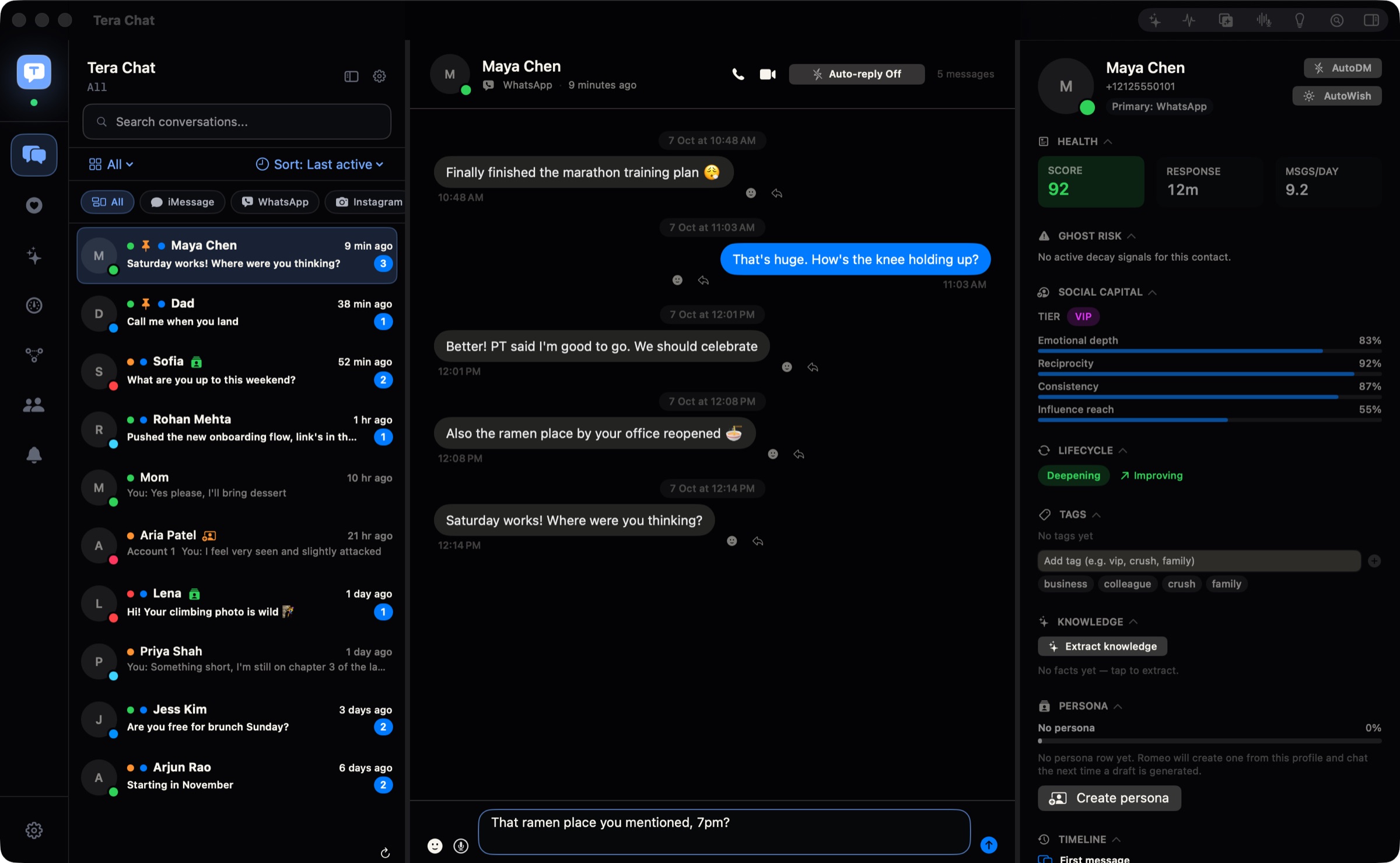
In Tera Chat, WhatsApp, Instagram and Telegram connect from Settings → Messaging, and Tinder from the Dating tab. WhatsApp pairs like WhatsApp Web, by scanning a QR code with your phone; Instagram signs in on Instagram’s own login page inside Tera Chat (up to three accounts); Telegram and Tinder sign in through a private browser window, which needs Google Chrome, Brave or Microsoft Edge installed, followed by a click on Sync History.
This guide covers each network step by step: where to click, what you’ll see, what works afterwards and what doesn’t. iMessage works differently (it uses a macOS permission rather than a sign-in), so it has its own guide. Each network also has a page of its own: WhatsApp, Telegram, Instagram and iMessage.
The four networks at a glance
| Network | Where in Tera Chat | How you sign in | Sending from Tera Chat | Worth knowing |
|---|---|---|---|---|
| Settings → Messaging → WhatsApp → Pair device | Scan a QR code with WhatsApp on your phone | Text only | Real-time sync, including media you receive. Calls open WhatsApp Web | |
| Settings → Messaging → Instagram accounts → Connect | Instagram’s own login page, inside Tera Chat | Text only | Up to three accounts. Calls open Instagram on the web | |
| Telegram | Settings → Messaging → Telegram → Sign in | Telegram’s web login, in a private browser window | Text only | Needs Chrome, Brave or Edge |
| Tinder | Dating → Tinder → Protected Browser | tinder.com, in a private browser window | Text only | Needs Chrome, Brave or Edge. Shows new matches |
Before you start
- Nothing to switch on first. Each network starts syncing as soon as it’s connected, and Tera Chat sends nothing on its own: you send each message yourself, and Autopilot is off until you turn it on. The getting started guide covers the rest of the setup.
- For Telegram and Tinder, make sure Google Chrome, Brave or Microsoft Edge is installed. You don’t need to use it or sign in to it: Tera Chat borrows it to open a separate, private window.
- For WhatsApp, have your phone with WhatsApp on it nearby.
How to connect WhatsApp to Tera Chat
Tera Chat connects to WhatsApp as a linked device, which you pair the same way you’d pair WhatsApp Web. There’s no browser involved.
- Open Settings (⌘,) → Messaging.
- Under WhatsApp, click Pair device. A QR code appears with the instruction “Scan this QR code with WhatsApp on your phone”.
- On your phone, open WhatsApp and go to the linked devices screen (WhatsApp’s help center has the current steps):
- iPhone: Settings → Linked devices → Link a device (on some versions, Link device).
- Android: tap ⋮ (More options) → Linked devices → Link a device.
- Confirm with Face ID, your fingerprint or your phone’s PIN if WhatsApp asks, then point the phone’s camera at the QR code on your Mac.
- Your WhatsApp chats start syncing into Tera Chat. Once paired, the WhatsApp section shows Reconnect and Sync now, and an ✕ to disconnect.
What works: your WhatsApp chats sync in real time, group names included, and photos, videos, voice messages and documents you receive are downloaded. You can reply with text.
What doesn’t: sending photos or files to WhatsApp from Tera Chat (text only), and reactions or quoted replies (they stay in Tera Chat). The Audio call and Video call buttons open WhatsApp Web inside Tera Chat rather than calling directly.
WhatsApp’s own rules still apply. You can link up to four devices to one phone, and you need to open WhatsApp on that phone at least every 14 days or linked devices, Tera Chat included, are logged out (WhatsApp).
How to connect Instagram to Tera Chat
Instagram signs in through Instagram’s real login page, shown inside Tera Chat.
- Open Settings → Messaging and find Instagram accounts: “Connect up to three accounts. Chats stay in one inbox; replies use the account that received them.”
- Click Connect. A sheet titled Sign in to Instagram opens Instagram’s own login page.
- Sign in with your Instagram username and password. If Instagram asks you to confirm it’s you (a code, or an approval in the Instagram app), do that in the same sheet.
- Watch the status change from Verifying login… to Syncing… to Connected.
- To add a second or third account, click Connect again on the next row.
What works: reading your Instagram DMs and replying with text. With more than one account, click the Instagram chip at the top of the inbox and use the All Instagram accounts picker to see one account at a time. Replies always go out from the account that received the conversation. Click Sync to refresh an account by hand; the ✕ disconnects an account but keeps its history in Tera Chat.
What doesn’t: sending photos or files (text only), calls (the audio and video buttons open Instagram on the web), and reactions or quoted replies (they stay in Tera Chat).
How to connect Telegram to Tera Chat
Telegram signs in through Telegram’s own website, in a private browser window that only Tera Chat uses.
- Open Settings → Messaging → Telegram and click Sign in.
- macOS may ask for Touch ID or your Mac password. Then a separate browser window opens Telegram’s web app.
- Sign in the way Telegram’s web app asks: scan the QR code it shows with Telegram on your phone, or log in with your phone number and the code Telegram sends you. If you use a Telegram two-step verification password, you’ll be asked for it.
- Back in Tera Chat, click Sync History. Tera Chat checks that the session is signed in, then imports your chats.
What works: reading your Telegram chats and replying with text. Tera Chat keeps them in sync in the background every couple of minutes.
What doesn’t: sending photos or files (text only). If none of Chrome, Brave or Edge is installed, the sign-in window can’t open (see the fixes below). Reactions and quoted replies stay in Tera Chat.
How to connect Tinder to Tera Chat
Tinder also signs in through a private browser window. Before you connect it, know the risk: Tinder’s and Hinge’s terms restrict third-party apps that connect to your account, AI included, and Tera Chat is that kind of tool. Is it against Tinder’s rules to use AI? quotes the clauses, and How Tera Chat works with Tinder and Hinge explains what it does and doesn’t do.
- Click Dating in the rail on the left, then the Tinder tab.
- Click Protected Browser. macOS asks for Touch ID or your Mac password.
- A private window opens tinder.com in an isolated profile that only Tera Chat uses. Sign in to Tinder there, the same way you would on the website.
- Back in Tera Chat, click Sync History. Tera Chat checks that you’re really signed in before it imports anything, and the status changes from Not connected to Connected.
- Use Close Window to close the browser window when you’re done. Your chats keep syncing in the background.
What works: your Tinder conversations and profile photos, a New matches rail showing matches who haven’t heard from you yet, and sending text. Tera Chat checks each message after sending it.
What doesn’t: sending photos or GIFs (text only), and reactions or quoted replies (they stay in Tera Chat). If you want to start over, the reset button clears only Tera Chat’s isolated Tinder profile, not your Tinder account.
What about Hinge and Bumble?
Hinge is in beta and read-only: you can see your Hinge conversations in Tera Chat but not send from it, and it needs a one-time setup that downloads about 2 GB. Bumble is coming soon; it isn’t available in Tera Chat yet.
Where your sign-ins are stored
Your WhatsApp, Instagram, Telegram and Tinder sign-ins stay on your Mac, in Tera Chat’s own storage, and for Telegram and Tinder in an isolated browser profile that only Tera Chat uses. Your messages are stored on your Mac and never uploaded to a Tera Chat server. Your AI keys and your Tera Chat account are the things kept in the macOS Keychain.
Tera Chat isn’t made or endorsed by WhatsApp, Meta, Telegram or Match Group, and each network’s own terms still apply to your account. Are all-in-one messaging apps safe? covers those risks across every app of this kind, and Is Tera Chat safe? covers Tera Chat specifically.
If something goes wrong
| Problem | What to do |
|---|---|
| The WhatsApp QR code expired before you scanned it | Click Pair device again for a fresh code |
| Pairing fails and you already have four linked devices | WhatsApp allows four. Remove one you no longer use from Linked devices on your phone, then pair again |
| WhatsApp stopped updating | Open WhatsApp on your phone, then click Pair device (it reads Reconnect while connected) or Sync now in Settings → Messaging → WhatsApp. If a QR code appears, for example because the phone went unused for 14 days, scan it again |
| The Telegram or Tinder window doesn’t open, with an error that Tera Chat “could not find” Chrome or Brave | Install Google Chrome, Brave or Microsoft Edge, then click Sign in or Protected Browser again |
| Sync History doesn’t import anything | Finish signing in inside the private window first (including any code or password), then click Sync History again |
| Instagram stays on Verifying login… | Complete any check Instagram shows in the sign-in sheet, then click Sync |
| Tinder logged you out | Click Protected Browser, sign in again, then Sync History |
| You’re not sure which Instagram account a reply will use | Replies use the account that received the chat. Check which account a conversation belongs to with the All Instagram accounts picker |
| You don’t get a notification for new messages | That’s by design: Tera Chat doesn’t notify you of every new message. Keep notifications on in the official apps if you need them |
If a network still won’t connect, email hello@terachat.co with the network and what you see on screen.
What to do next
With your apps connected, add iMessage if you haven’t, then turn on AI with your ChatGPT account or a Claude or Grok API key to get drafts in your texting style across every network. If you use Tinder, read how Tera Chat works with dating apps before you rely on it.
Frequently asked questions
Does connecting WhatsApp to Tera Chat log me out of WhatsApp on my phone?
No. Tera Chat pairs as a linked device, like WhatsApp Web, so your phone stays your main WhatsApp. WhatsApp allows up to four linked devices at a time.
Can I send photos on WhatsApp from Tera Chat?
No. WhatsApp sending from Tera Chat is text only, though photos, videos and other media you receive do sync. Photos and files can be sent on iMessage.
Why does Tera Chat need Chrome, Brave or Edge?
Telegram and Tinder sign in through a private, isolated browser window that Tera Chat opens using a browser you already have. If none of the three is installed, the window can't open.
Can I connect more than one Instagram account?
Yes, up to three. Their chats share one inbox, and each reply goes out from the account that received the conversation.
Where are my WhatsApp, Instagram, Telegram and Tinder sign-ins stored?
On your Mac, in Tera Chat's own storage, plus an isolated browser profile that only Tera Chat uses for Telegram and Tinder. They aren't uploaded to a Tera Chat server.
Published . How we write and check our guides. Spotted something out of date? Email hello@terachat.co.