A dating app inbox for your Mac: how Tera Chat works with Tinder and Hinge
Looking for a dating app for Mac? How Tera Chat handles Tinder chats, Hinge (beta, read-only) and Bumble (soon), what it can't do, privacy, and the terms risk.
The short answer
- Tera Chat puts your Tinder chats in the same Mac inbox as iMessage, WhatsApp, Telegram and Instagram; Hinge is in beta and read-only, and Bumble isn't available yet.
- Tinder signs in through a private browser window on your Mac (Chrome, Brave or Edge must be installed); sending from Tera Chat is text only.
- AI openers and replies are drafts you review, edit and send yourself; dating drafts need a Tera Chat AI plan or your own ChatGPT account through Codex.
- Tinder's and Hinge's terms restrict third-party apps that connect to your account, AI included. Tera Chat connects to your account, so using it is a risk to your dating account.
- Autopilot is off unless you turn it on, and its replies wait for you to send by default; keep the separate Beta auto-send switch off on dating apps.
Tera Chat is a Mac app that puts your Tinder conversations in the same inbox as iMessage, WhatsApp, Telegram and Instagram, with Hinge in beta (read-only) and Bumble not available yet. It signs in to Tinder through a private browser window on your Mac, shows new matches, and drafts openers and replies for you to edit and send yourself; nothing goes to a match until you send it. Because it connects to your dating account, it’s the kind of third-party tool Tinder’s and Hinge’s terms restrict, so read the risk box below before you connect.
This page explains what Tera Chat does with each dating app, what it can’t do, which AI you need, what stays on your Mac, and how to use the AI as a wingman rather than a ghostwriter.
Read this before you connect a dating app. Tinder’s Terms of Use (effective 5 March 2026, §2c item 22) and Hinge’s Terms of Service (effective 25 August 2025, §2c item 22) ban using third-party apps or services that directly interact with the service without written consent, “including but not limited to artificial intelligence or machine learning systems” (Tinder, Hinge). Tera Chat connects to your Tinder account (and Hinge, in beta), so it is the kind of tool those terms cover, and using it is a risk to your account. Tinder’s terms also allow a ban to extend to its affiliates’ services, including Hinge, OkCupid and Match. Hinge’s terms (§2d item 11) separately ban content you didn’t write yourself or that was automatically generated, unless Hinge authorized it, which is one more reason to write or rewrite every message yourself. We go through each clause in Is it against Tinder’s rules to use AI?
Can you use dating apps on a Mac at all?
Only partly, which is why people go looking for a dating app for Mac in the first place. As of October 2026:
| App | On a Mac without Tera Chat | In Tera Chat |
|---|---|---|
| Tinder | No Mac app; tinder.com works in a browser | Chats, new matches, text replies |
| Hinge | No web, iPad or Mac version; phone app only | Beta, read-only |
| Bumble | No web app since October 2025; Bumble is app-only | Coming soon |
For the full picture on each app, including what works in a browser, see Dating apps on a Mac in 2026.
What does Tera Chat do with Tinder?
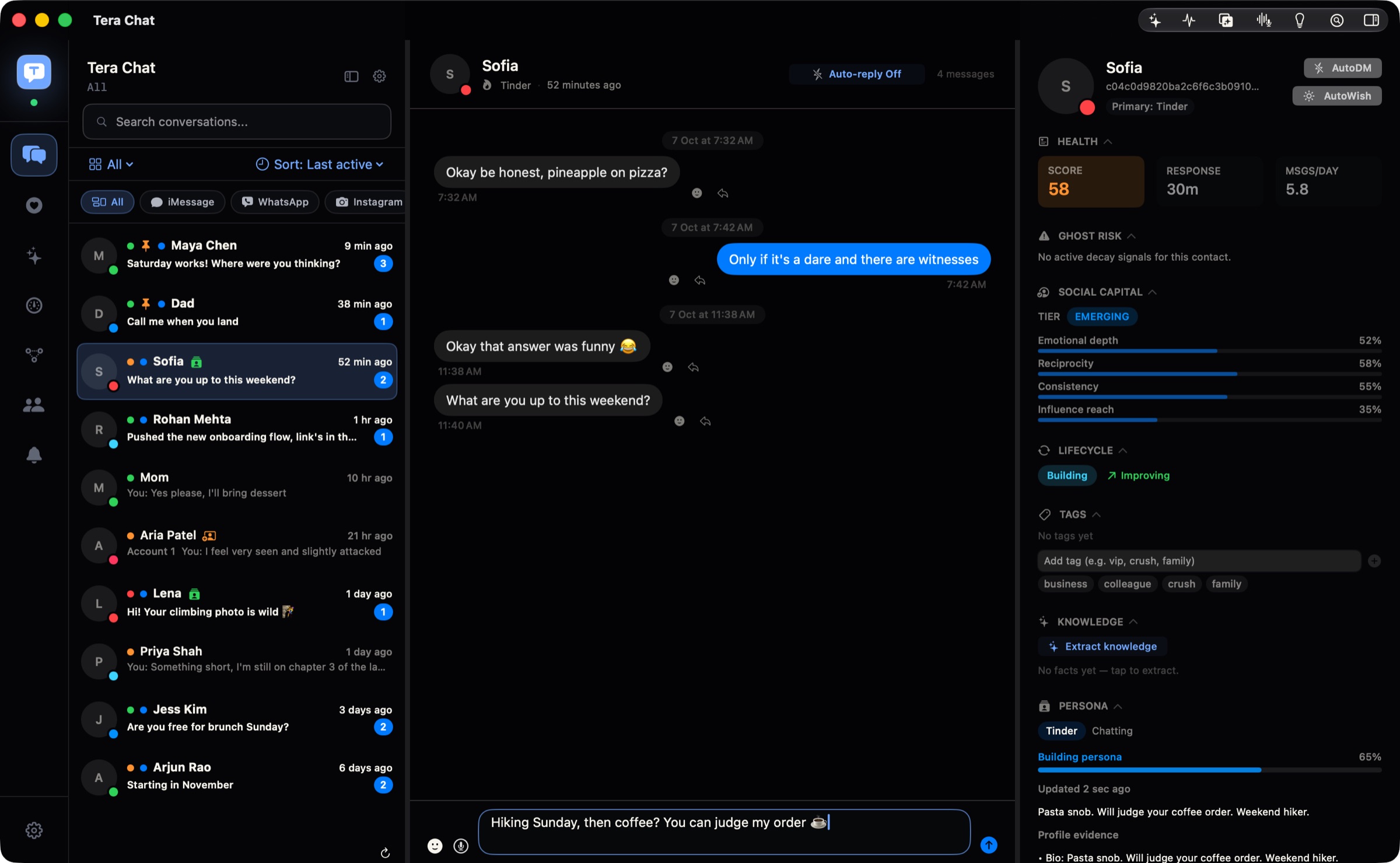
Tera Chat brings your Tinder matches and messages into the same list as the rest of your chats, then adds a few tools on top. All of the AI parts produce drafts; you decide what gets sent.
| Feature | What it does | What you do |
|---|---|---|
| Tinder in your inbox | Tinder chats sit next to iMessage, WhatsApp, Telegram and Instagram; the Tinder chip filters to just them | Reply with text from your Mac |
| New matches rail | Shows matches who haven’t heard from you yet | Pick who to message |
| Openers | Drafts openers from each match’s own bio and prompts, so it reads like you paid attention. Preparing them doesn’t send anything | Review each one, rewrite it in your words, send it yourself |
| Replies in your voice | When a chat goes quiet, drafts a reply in your texting style | Read it, change it, send it |
| Missed questions and quiet chats | Flags questions you never answered and conversations going quiet | Decide whether to pick it back up |
| Plan a date | Suggests three date ideas that fit what you’ve talked about, with one click to Calendar | Choose one and ask them yourself |
| Instagram handoff | When a match shares their Instagram, Alert Center helps you continue on Instagram, next to the Tinder chat it came from (Confirm username, Open Instagram, Copy handle) | Follow them and keep talking |
Plan a date lives in the contact panel (⌥⌘I) under Date planning. It shows for contacts tagged crush, match, girlfriend, boyfriend or dating; add a tag under Tags in the contact’s details if you don’t see it.
How do you connect Tinder?
Click Dating in the rail, open the Tinder tab and click Protected Browser. After Touch ID or your Mac password, a private window opens tinder.com in an isolated browser profile that only Tera Chat uses. Sign in there as you normally would, then click Sync History back in Tera Chat. Google Chrome, Brave or Microsoft Edge must be installed for the window to open. The full steps and fixes are in how to connect WhatsApp, Telegram, Instagram and Tinder.
Hinge (beta, read-only) and Bumble (coming soon)
Hinge support is in beta and read-only: you can see your Hinge conversations in Tera Chat, but you send replies from the Hinge app on your phone. It needs a one-time setup that downloads about 2 GB. Bumble is coming soon, with no date yet.
What can’t Tera Chat do with dating apps?
Plainly, these are the limits as of version 1.1.2:
- No sending on Hinge. It’s read-only.
- No Bumble yet.
- Text only on Tinder. No photos, GIFs or files from Tera Chat.
- No reactions or quoted replies. Ones you add in Tera Chat stay in Tera Chat.
- No notification for every new message. Keep Tinder’s own notifications on if you rely on them.
- Mac only. No iPhone, iPad, Windows or Android version.
- Claude and Grok API keys aren’t used for Tinder drafts. Dating drafts need a Tera Chat AI plan or your own ChatGPT account through Codex.
- A browser is required. Chrome, Brave or Edge must be installed to sign in.
Which AI do you need for dating drafts?
Tinder openers and replies need either a Tera Chat AI plan (every plan includes them, from $9.99 a month or $99.99 a year, US dollars plus tax where applicable; cancel anytime) or your own ChatGPT account connected through OpenAI’s Codex. Claude and Grok API keys work for Tera Chat’s other AI features, but not for Tinder and Instagram drafts. Date ideas come with every Tera Chat AI plan on built-in AI, and also work with your own ChatGPT account or a Claude or Grok API key. Use your ChatGPT account or a Claude or Grok API key with Tera Chat covers the Codex setup.
How to use it as a wingman, not a ghostwriter
The best use of AI in a dating chat is the one Hinge itself recommends: “Think of AI as your wingman, not your ghostwriter” (Hinge, March 2026). Use a draft to get unstuck, then put it in your own words, because your match will meet you, not the AI.
Example chat, made up for this guide:
- Maya: just got back from my first pottery class, my “bowl” is definitely an ashtray
- An AI draft: Ha, ashtrays are just bowls with big dreams. What made you try pottery?
- What you send after editing: an ashtray on day one is honestly a win. are you going back or was that a one-time thing
The draft gave you the angle (be kind about the wonky bowl, ask a question). The edit made it sound like you: your lowercase, your kind of joke, your question. That’s the habit worth keeping, and with Hinge’s “written by you” rule it’s also the safer one. AI wingman, not ghostwriter goes deeper on where the line is.
What stays on your Mac?
Your Tinder conversations are stored on your Mac and never uploaded to a Tera Chat server. Your Tinder sign-in stays in an isolated browser profile on your Mac that only Tera Chat uses. Drafts sync between your Macs only through your own iCloud account.
AI sees the conversations it works on. With a Tera Chat AI plan, that text goes to Anthropic’s Claude through Tera Chat’s server, which passes it on and doesn’t keep it. With your own ChatGPT account, it goes to OpenAI through Codex. Is Tera Chat safe? has the full breakdown.
What about Autopilot on dating apps?
Autopilot, which writes replies for chats you choose, is off until you turn it on, and by default its replies wait in Pending drafts for you to edit, dismiss or send. There’s also a separate per-chat Auto-send switch marked Beta; turning it on shows the app’s own warning: “Tinder’s and Hinge’s terms don’t allow third-party AI tools. Auto-send could get your account banned.” Keep auto-send off in every dating chat. In a conversation with a match, a draft you ask for and rewrite in your own words is the better tool anyway. Tera Chat Autopilot explains how it works and the safety controls.
If something goes wrong
- The Protected Browser window doesn’t open: install Google Chrome, Brave or Microsoft Edge, then click Protected Browser again.
- Sync History imports nothing: finish signing in to Tinder in the private window first, then click Sync History again. Tera Chat only imports once it can see you’re signed in.
- Tinder signed you out: open Protected Browser, sign in again, and click Sync History.
- You want a clean start: the reset button in the Tinder tab clears only Tera Chat’s isolated Tinder profile, not your Tinder account.
- A draft says it needs a different AI: Tinder drafts need a Tera Chat AI plan or ChatGPT through Codex. Turn on Codex / ChatGPT in Settings → API Keys, or start a plan.
- No Plan a date option: tag the contact as a crush, match or dating in their details.
The bottom line
If you date on Tinder and live on your Mac, Tera Chat puts Tinder next to iMessage, WhatsApp, Telegram and Instagram in one inbox (we don’t know of another unified inbox that does), with drafts you control. It isn’t a full dating app for Mac: Hinge is read-only, Bumble isn’t there yet, and Tinder sending is text only. And it connects to your account, which Tinder’s and Hinge’s terms restrict. If you use it, keep auto-send off, stay the author of every message, and see Tera Chat’s dating page once you’ve weighed the risk.
Frequently asked questions
Is there a Tinder app for Mac?
No. Tinder has no Mac app, but tinder.com works in a web browser. Tera Chat signs in to tinder.com in a private browser window and brings your Tinder chats into its inbox.
Can Tera Chat send messages on Hinge?
No. Hinge support is in beta and read-only: you can read your Hinge conversations in Tera Chat, but you reply in the Hinge app on your phone.
Can I get banned from Tinder for using Tera Chat?
It's possible. Tinder's terms ban third-party apps that directly interact with the service without written consent, AI included, and Tera Chat connects to your account. We can't promise any account is safe from enforcement.
Does Tera Chat send messages to my matches on its own?
Not unless you set it up to. Openers and replies are drafts you review and send yourself, and Autopilot is off until you turn it on. Its replies wait for you by default; keep the separate auto-send switch off on dating apps.
Does Tera Chat support Bumble?
Not yet. Bumble is listed as coming soon, with no date. Bumble also closed its own web app in October 2025, so it's phone-only for now.
Published . How we write and check our guides. Spotted something out of date? Email hello@terachat.co.