The best messaging apps for Mac in 2026, network by network
The best messaging apps for Mac in October 2026: which chat apps have a real Mac app, which are web-only, which have nothing, and the best all-in-one inboxes.
The short answer
- Messages, WhatsApp, Telegram and Signal all have proper Mac apps in October 2026, and they're the best way to use each network on its own.
- Instagram, Messenger and Tinder have no Mac app, so on a computer their official option is the browser. Hinge and Bumble have no Mac or web version at all; the simplest way to use them from a Mac is mirroring your iPhone.
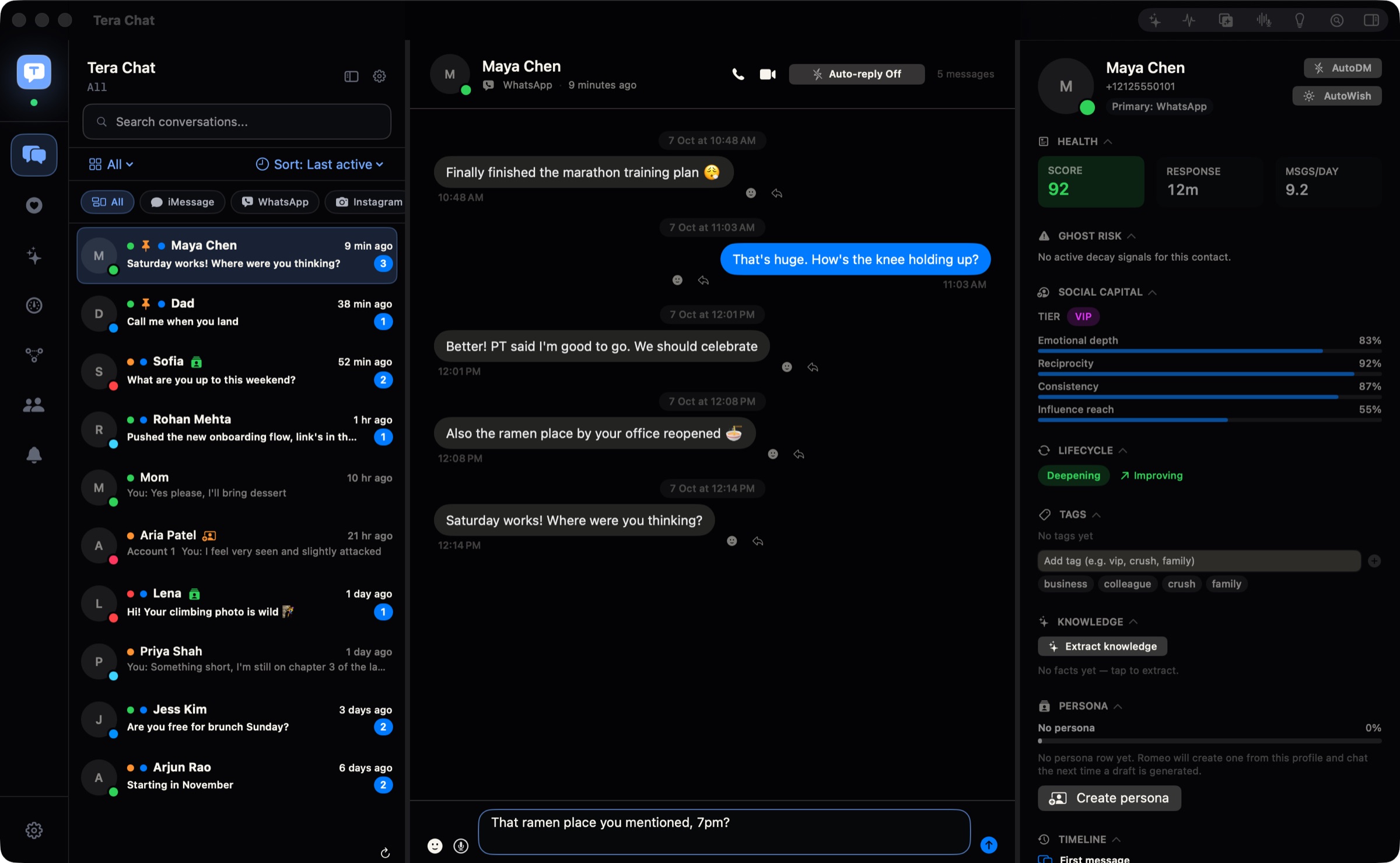
- If you use several networks, an all-in-one inbox saves the app-switching: Beeper for the most networks and other devices, Tera Chat for iMessage, WhatsApp, Telegram, Instagram and Tinder in one Mac app with AI replies.
- Texting Android phones from a Mac (SMS or RCS) still needs an iPhone relaying the messages through Text Message Forwarding.
The best messaging apps for Mac in 2026 are the official ones where they exist: Messages for iMessage, WhatsApp for Mac, Telegram for macOS and Signal Desktop. Instagram, Messenger and Tinder have no Mac app, so on a computer their official option is the browser, and Hinge and Bumble have no Mac or web version at all. If you juggle several of these, an all-in-one inbox such as Beeper (most networks, every device) or Tera Chat (iMessage, WhatsApp, Telegram, Instagram and Tinder in one Mac app, with AI replies) saves the app-switching.
Below: a network-by-network table of what works on a Mac as of October 2026, the best app for each, the best all-in-one inboxes, and a verdict for different kinds of users. Tera Chat is our app; we’ve tried to be fair, and we say where others are the better pick. We checked each app’s App Store listing, website and help pages on 20 October 2026.
Which messaging apps work on a Mac? (October 2026)
Most big chat apps have a real Mac app, a few are browser-only, and the dating apps are the weak spot. Here is where each one stands.
| Network | Best way on a Mac | Type | What to know |
|---|---|---|---|
| iMessage and SMS | Messages (built in) | Native | SMS and RCS go out through your iPhone (Text Message Forwarding) |
| WhatsApp for Mac | Native | Needs macOS 12.1 or later; your Mac is a linked device of your phone | |
| Telegram | Telegram for macOS | Native | Version 13.0 (9 Oct 2026); a separate Telegram Desktop app and a web version also exist |
| Signal | Signal Desktop | Desktop app | Signal must be installed on your phone first |
| Instagram DMs | instagram.com in a browser | Web only | The App Store lists the app for iPhone and iPad, not Mac |
| Messenger | facebook.com/messages in a browser | Web only | The desktop app closed on 15 December 2025 and messenger.com in April 2026 |
| Tinder | tinder.com in a browser | Web only | No Mac app |
| Hinge | iPhone Mirroring, if you have an iPhone | Phone only | iPhone and Apple Vision only; no web version |
| Bumble | iPhone Mirroring, if you have an iPhone | Phone only | Web version closed in October 2025; app-only |
Work chat is the easy part: Slack and Discord both have desktop apps for Mac.
The best messaging app for each network
For a single network, the official app nearly always beats a third-party one. Here’s what each is good at and where it falls short.
Messages: best for iMessage (and texting Android phones)
Messages is built into every Mac and is the only official way to use iMessage on one. With an iPhone signed in to the same Apple Account and Text Message Forwarding turned on (iPhone Settings → Apps → Messages → Text Message Forwarding), your Mac can also send SMS, MMS and RCS to Android phones. Apple notes that availability depends on your carrier and region.
Falls short on: it only does iMessage and texts; every other network needs its own app.
WhatsApp for Mac: best for WhatsApp
WhatsApp’s Mac app is native, free and needs macOS 12.1 or later (version 26.40.77 on the App Store as of October 2026). You link it by scanning a QR code with your phone, and it keeps working when your phone is offline. There’s also WhatsApp Web at web.whatsapp.com if you’d rather use a browser.
Falls short on: it’s tied to your phone. WhatsApp logs linked devices out if the phone goes unused for a long stretch.
Telegram for macOS: best for Telegram
Telegram is the most Mac-friendly of the big networks. It offers a native app, Telegram for macOS (version 13.0, released 9 October 2026), plus the cross-platform Telegram Desktop and two web versions, all listed on telegram.org/apps. Your chats live in Telegram’s cloud, so your phone doesn’t need to be on.
Falls short on: having two Mac apps confuses people; if in doubt, start with the native “Telegram for macOS”.
Signal Desktop: best for privacy-first chats
Signal’s desktop app is downloaded from signal.org, not the Mac App Store, and you need Signal on your phone before you can link it. It’s the pick if your friends are on Signal.
Falls short on: few all-in-one inboxes support it. Beeper, Franz and RPLY do; Tera Chat doesn’t.
Instagram, Messenger and Tinder: a browser, or a Safari web app
None of these three has a Mac app in October 2026. The neatest workaround costs nothing: open the site in Safari and choose File → Add to Dock, which turns it into a separate app with its own Dock icon (needs macOS Sonoma or later). Instagram’s App Store listing names iPhone and iPad only, which our guide to whether there’s an Instagram app for Mac explains. Messenger now lives at facebook.com/messages after Meta closed the desktop apps on 15 December 2025.
Hinge and Bumble: through your iPhone
Hinge’s App Store listing covers iPhone (iOS 17 or later) and Apple Vision only, and Hinge has no official web version. Bumble is now app-only after closing its web version in October 2025. Be wary of sites offering a “Hinge web” login: they aren’t run by Hinge.
The simplest way to use them from a Mac is iPhone Mirroring, which shows your iPhone’s screen in a window you control with your keyboard and trackpad. It needs macOS Sequoia or later, an iPhone on iOS 18 or later signed in to the same Apple Account and nearby, and it isn’t available in the European Union. It’s your phone on a bigger screen, not a Mac app, but it works for any iPhone app.
The best all-in-one messaging apps for Mac
If you use three or more of the networks above, an all-in-one inbox puts them in one list so you stop switching apps. These are the strongest options in October 2026; our guide to choosing an all-in-one messaging app compares 11 of them on eight criteria.
| App | Networks | iMessage | Dating apps | AI | Price | Runs on |
|---|---|---|---|---|---|---|
| Beeper | About 16 incl. WhatsApp, Signal, Messenger, Telegram, Instagram, Slack, Discord | Yes, Mac only | None | Tag @ChatGPT or @Apple Intelligence in chats (paid) | Free for 5 accounts; Plus $9.99/month | Mac, Windows, Linux, ChromeOS, iPhone, iPad, Android |
| Tera Chat | iMessage, WhatsApp, Telegram, Instagram, Tinder; Hinge beta (read-only) | Yes | Tinder; Hinge read-only | Drafts in your style, summaries, relationship insights | Free; AI plans from $9.99/month | Apple silicon Mac, macOS 15+ |
| Franz 6 | 75+ web services, Signal built in | No | No | Summaries, smart replies | Free for 3 services; Pro $60/year | Mac, Windows |
| Ferdium | Web services as tabs | No | Tinder as a tab | None | Free, open source | Mac, Windows, Linux |
| RPLY | 10 incl. iMessage, WhatsApp, Slack, email | Yes | No | Drafts in your voice | Free for 10 drafts; Pro $25/month (the same company’s NOX: $50/month billed yearly) | Apple silicon Mac, macOS 14+ |
Prices in US dollars, checked 20 October 2026 on each company’s pricing page.
Beeper: best for the most networks and every device
Beeper, owned by Automattic, connects about 16 networks and runs on Mac, Windows, Linux, ChromeOS, iPhone, iPad and Android. Most connections run on your device, so chat history doesn’t pass through Beeper’s servers. iMessage works only in the Mac app, which automates the Messages app in the background.
Best for: anyone who uses Signal, Messenger, Slack or Discord, or wants the same inbox on a phone or PC. Not for: dating apps (none are supported) or AI that drafts replies for you. The free plan stops at five accounts, one per network.
Tera Chat: best for iMessage, WhatsApp, Telegram, Instagram and Tinder in one Mac app
Tera Chat is a free Mac app that brings iMessage, WhatsApp, Telegram, Instagram and Tinder into one inbox and drafts replies in your own texting style. It reads your Messages history on your Mac (which needs Full Disk Access; here’s what that permission allows), links to WhatsApp as a linked device, signs in to Instagram inside the app, and opens Telegram and Tinder in a private browser window. Your messages stay on your Mac. Beyond the inbox, it flags questions you never answered and chats that are fading.
Best for: iPhone-and-Mac people whose friends, family and matches are spread across those five apps. Not for: Signal, Messenger, Slack or Discord users, Intel Macs, or anyone who needs a Windows or phone version, since Tera Chat runs only on Apple silicon Macs. Tinder’s and Hinge’s terms restrict third-party apps that connect to your account, and Tera Chat is one; see what Tinder’s rules say about AI.
Franz, Rambox and Ferdium: best for work apps in tabs
These “web wrappers” load each service’s website in its own tab inside one window. They’re good for Slack, Teams, Gmail and WhatsApp Web side by side, but they don’t merge your chats into one list and can’t show iMessage. Franz 6 adds AI summaries and drafts; Ferdium is free and open source.
Every all-in-one app here is unofficial for at least some networks, so read up on whether all-in-one messaging apps are safe before connecting accounts you depend on.
Can a Mac messaging app write replies for you?
Yes, in a few ways, and they differ mostly in which networks they cover. As of October 2026:
| Option | Networks | What it does | Cost |
|---|---|---|---|
| ChatGPT’s Apple Messages plugin | iMessage, SMS, RCS | Reads, searches, drafts and sends from the ChatGPT Mac app, asking your approval by default; Work or Codex modes only, Apple silicon only (9to5Mac) | Included in ChatGPT plans |
| Beeper | Its supported networks | Tag @ChatGPT or @Apple Intelligence inside a chat on the desktop app | Beeper Plus, $9.99/month |
| Tera Chat | iMessage, WhatsApp, Telegram, Instagram, Tinder | Drafts replies in your own style, summarizes threads, answers questions about a chat; you edit and send | Free with your own ChatGPT account, or a Claude or Grok API key billed by your provider (Instagram and Tinder drafts need ChatGPT or a Tera Chat plan); AI Plus $9.99/month |
Whichever you use, AI sees the conversations it works on, so check where that text goes before you switch it on.
Which messaging setup should you use?
Pick the line that sounds most like you:
- You mostly use iMessage and WhatsApp. Use Messages and WhatsApp for Mac. Add an all-in-one app only if switching between the two annoys you.
- You have an iPhone, a Mac and friends on four or five apps. Try Tera Chat for iMessage, WhatsApp, Telegram, Instagram and Tinder in one list, or Beeper if Signal or Messenger is on your list. Our walkthrough on combining WhatsApp, iMessage, Telegram and Instagram covers the setup for each.
- You also use a Windows PC or an Android phone. Beeper, because it runs everywhere.
- Your day is Slack, Teams and email, with WhatsApp on the side. A web wrapper like Rambox or Franz, or the official apps.
- You date on Hinge or Bumble. Use them on your phone, or through iPhone Mirroring on your Mac; neither has a Mac or web version in October 2026.
The short version
Use the official Mac apps for Messages, WhatsApp, Telegram and Signal, use Safari web apps for Instagram, Messenger and Tinder, and reach Hinge and Bumble through your iPhone (or iPhone Mirroring). If that’s too many windows, an all-in-one inbox is the fix: Beeper for breadth and other devices, Tera Chat for a Mac-only inbox that includes Tinder and drafts replies that sound like you.
Frequently asked questions
What is the best free messaging app for Mac?
For a single network, the official apps are free and best: Messages for iMessage, WhatsApp for Mac and Telegram for macOS. For several networks in one window, Beeper (free for up to five accounts) and Tera Chat (free inbox, Apple silicon Macs only) are the two free unified inboxes worth trying.
Is there an Instagram app for Mac?
No. As of October 2026 Instagram's App Store listing covers iPhone and iPad only, so on a Mac you use instagram.com in a browser, a Safari web app in your Dock, or an inbox app that connects Instagram DMs.
Can I text Android users from my Mac?
Yes, if you have an iPhone. Turn on Text Message Forwarding on the iPhone and your Mac can send SMS, MMS and RCS through it; Apple says availability depends on your carrier and region.
Do I need my phone on to use WhatsApp on a Mac?
Not all the time. The Mac works as a linked device, so it keeps working while the phone is offline, but WhatsApp logs linked devices out if the phone itself goes unused for too long, so open WhatsApp on your phone now and then.
Which messaging apps don't work on a Mac at all?
Hinge and Bumble have no Mac or web version: Hinge is offered for iPhone and Apple Vision only, and Bumble closed its web version in October 2025. If you have an iPhone, iPhone Mirroring (macOS Sequoia or later, not available in the EU) lets you use their iPhone apps from your Mac.
Published . How we write and check our guides. Spotted something out of date? Email hello@terachat.co.