How to choose an all-in-one messaging app for Mac (2026)
How to choose an all-in-one messaging app for Mac: eight things to check, from iMessage and dating apps to AI and price, with 11 apps compared in October 2026.
The short answer
- Start with iMessage: only an app running on your Mac can show it, so tab apps like Franz, Rambox and Ferdium can't, while Beeper and Tera Chat can.
- Then check how the app connects: web wrappers give each service its own tab, while bridge apps like Beeper and Tera Chat merge every chat into one list.
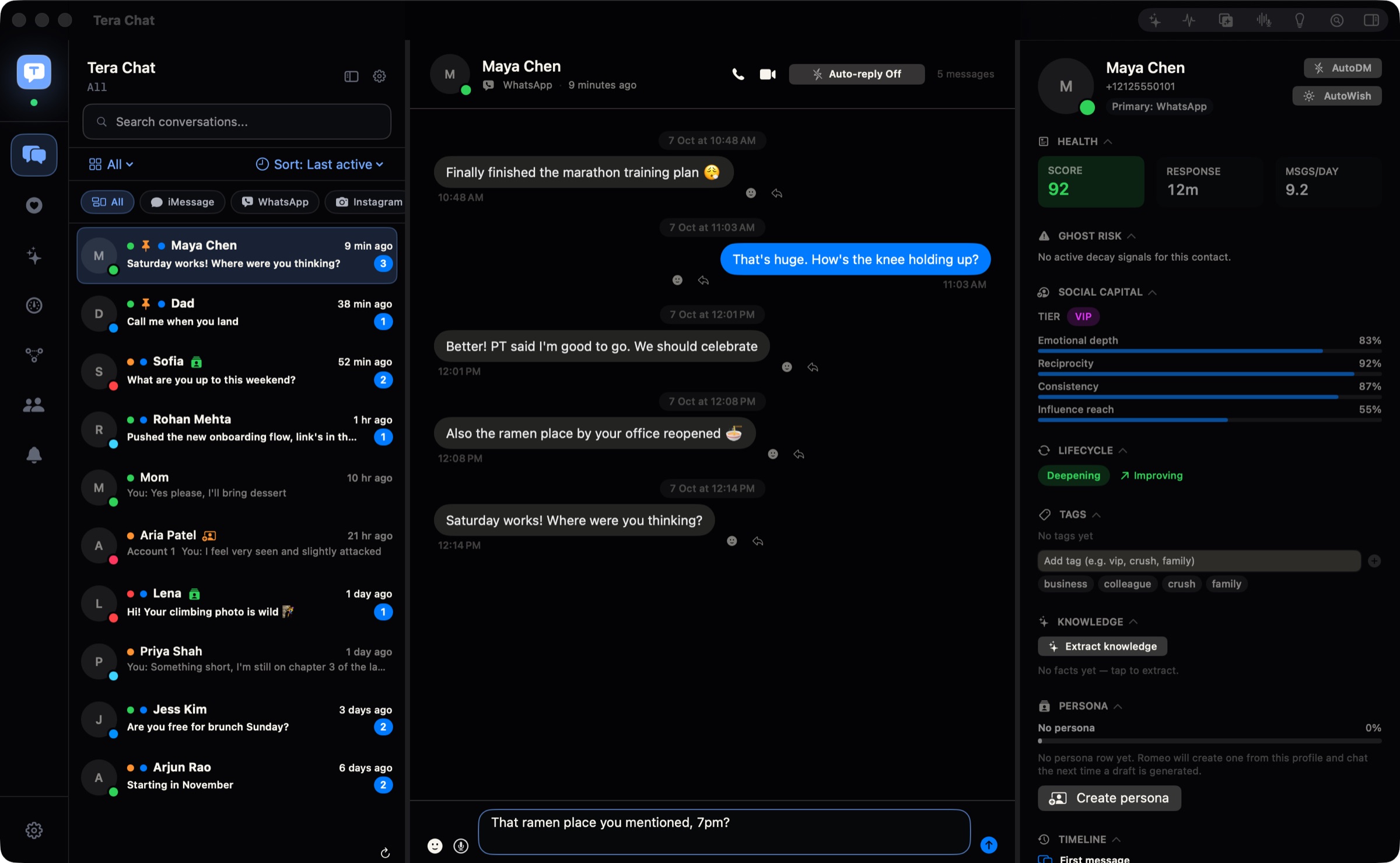
- Beeper covers the most networks (about 16) and runs on Mac, Windows, Linux, iPhone and Android. Tera Chat is Mac-only, but it's the only inbox we found that merges Tinder into the same list as iMessage, WhatsApp, Telegram and Instagram, with AI drafts in your style.
- Skip Station (its old domain now redirects to a gambling site) and Texts.com (closed to new users and folded into Beeper).
The right all-in-one messaging app for your Mac is the one that covers the networks you actually use, starting with iMessage. As of October 2026, Beeper is the pick if you want the most networks and also use Windows, an iPhone or Android; Tera Chat is the pick for a Mac-only inbox that adds Tinder and AI replies in your own style; and Franz, Rambox or Ferdium suit people who mostly want work web apps in tabs.
This guide gives you the eight things to check, in the order that rules apps out fastest, then compares 11 apps side by side and ends with a “best for” verdict for each kind of person. Tera Chat is our app; we’ve tried to be fair, and we say where others are the better pick. We checked every app’s own website, help center, pricing page and release notes on 20 October 2026. We didn’t benchmark memory or battery use, so you won’t find made-up speed numbers here.
The 8 things to check, in order
Work through these in order: the first three usually cut a list of ten apps down to two or three.
| # | Check | The question to ask | Why it matters |
|---|---|---|---|
| 1 | Connection model | Does it merge chats into one list, or give each service a tab? | Tabs are just your apps in one window; a merged list is a real inbox |
| 2 | Networks | Does it cover every app you use daily? | One missing network means you still open a second app |
| 3 | iMessage | Can it show and send iMessages? | Most Mac users’ biggest chat app, and the hardest to connect |
| 4 | Dating apps | Does it include Tinder or Hinge? | Almost no inbox does |
| 5 | AI | What does the AI actually do, and does it send anything on its own? | Ranges from nothing to drafting full replies |
| 6 | Privacy | Where do your messages live? | On your Mac, on the company’s servers, or both |
| 7 | Price | What does the free plan cap? | Account limits matter more than the headline price |
| 8 | Platforms | Do you need it on Windows, iPhone or Android too? | Some apps are Mac-only |
1. How it connects: tabs, bridges or your Mac itself
There are three ways an all-in-one app can reach your chats, and the model decides almost everything else.
- Web wrappers (Franz, Rambox, Ferdium, Wavebox, Shift) load each service’s website in its own tab inside one window. Anything with a web version works, but you still read WhatsApp in the WhatsApp tab and Telegram in the Telegram tab. It’s a tidier desktop, not one inbox.
- Bridges and protocol clients (Beeper, Chesly, and Tera Chat for WhatsApp) talk to each network directly, either from your computer or through a server, and merge every conversation into one list.
- Your Mac itself is the only route to iMessage: the app works with the Messages app or reads its history on your Mac. Beeper, Tera Chat and iMessage-focused AI tools all do some version of this.
Our plain guide to unified inboxes explains each model in more depth. If you want one list where the newest message rises to the top, whichever app sent it, you want the second or third model.
2. Which networks it covers
Write down every chat app you opened this week, then check each candidate against that list. As of October 2026:
- Beeper lists 16 networks in its help center, including WhatsApp, Signal, Telegram, Instagram, Slack, Discord, LinkedIn, X, Google Messages and iMessage (Mac only), and its home page also shows Messenger.
- Tera Chat covers five: iMessage, WhatsApp, Telegram, Instagram DMs and Tinder, plus Hinge in beta (read-only). It doesn’t support Signal, Messenger, Slack, Discord, LinkedIn or email.
- Web wrappers cover anything with a website: Franz says 75+ services, Rambox “unlimited apps”. They can’t cover apps with no web version.
Two traps catch people. Hinge and Bumble have no web or Mac version at all, so no wrapper can add them. And Messenger now lives only at facebook.com/messages on a computer, after Meta retired messenger.com in April 2026.
3. Whether it can show iMessage
Only apps that run on your Mac can show iMessage, because Apple offers no web version or public API for it. Two approaches exist:
- Beeper connects iMessage “by securely automating the Messages app on your Mac”, according to its setup guide. It asks for Accessibility, Contacts, Messages data and Automation permissions, warns that Messages “may still become briefly visible or flash occasionally”, and only works in the Mac app. Since version 4.3.144 (22 September 2026) it also requires Full Disk Access to show iMessage photos and videos on the newest macOS, per its release notes.
- Tera Chat reads your Messages history directly on your Mac, which needs Full Disk Access, and sends through the Messages app, so macOS asks once for permission to control Messages.
Either way you’re granting a powerful permission, so read what Full Disk Access allows before you switch it on. One more thing to weigh: on 2 October 2026 Apple said it will add stricter Full Disk Access controls, with no date set. Every app that shows iMessage depends on Apple’s rules here.
4. Whether dating apps are included
Almost no all-in-one app handles dating apps. Beeper’s network list has none. Ferdium has a Tinder “recipe”, but it’s just tinder.com in a tab. On the dating side, Tinder works in a browser, while Hinge and Bumble are phone-only.
Tera Chat is the only inbox we found that puts Tinder matches in the same list as iMessage, WhatsApp, Telegram and Instagram, with Hinge in beta (read-only) and Bumble listed as coming soon. Be aware that Tinder’s and Hinge’s terms restrict third-party apps that connect to your account, AI included; Tera Chat connects to your account, so it’s the kind of tool those terms cover. Our guide to what Tinder’s rules say about AI quotes the clauses.
5. What the AI actually does
“AI” on a feature list can mean anything from a chatbot in a sidebar to drafts written in your voice. Ask three questions: does it read the conversation you’re in, does it write like you or like a chatbot, and can it send anything without you?
| Level | What you get | Examples (October 2026) |
|---|---|---|
| None | No AI | Ferdium |
| Side panel | A general chatbot next to your apps, signed in with your own account | Rambox 3, Wavebox |
| Ask a bot in the chat | Tag @ChatGPT or @Apple Intelligence inside a conversation | Beeper (Plus, desktop only) |
| Drafts and summaries | Suggested replies, chat summaries, triage | Franz 6, NOX / RPLY, Amber (suggested replies), Tera Chat |
| Relationship insights | Fading chats, missed questions, life events, a weekly digest | Tera Chat |
On sending: RPLY’s site says it never auto-sends. Tera Chat drafts by default and you send; its Autopilot is off until you turn it on for a service or a single chat, and even then replies wait for you in Pending drafts unless you switch on a separate per-chat auto-send setting.
6. Where your messages live
There are two answers to look for: where the app stores your chat history, and where your text goes when the AI works on it.
- On your device. Beeper’s on-device connections mean messages “never touch our servers”, per Beeper’s FAQ. Tera Chat keeps your inbox on your Mac and never uploads it to a Tera Chat server. RPLY says messages are stored locally on your Mac, and Amber’s site says messages are “stored on device”. So local storage isn’t unique to any one app.
- In the cloud. Beeper’s older Cloud connections keep an encrypted copy of history on its servers. Chesly routes chat apps through Matrix bridges, one per app, so check its privacy policy for where messages are held.
- AI. Any cloud AI sees the conversations it works on. With Tera Chat that’s either the AI account you connected (ChatGPT, Claude or Grok) or, on a Tera Chat AI plan, Anthropic’s Claude through Tera Chat’s server, which passes the text on and doesn’t keep it.
Separately, every unofficial client carries some risk of a network challenging or restricting your account. Our guide to whether all-in-one messaging apps are safe covers WhatsApp’s and Instagram’s behaviour and the dating apps’ terms.
7. What it really costs
Headline prices hide the real limit, which is usually how many accounts the free plan allows. Prices below are in US dollars, as of October 2026.
| App | Free plan | Paid plans |
|---|---|---|
| Beeper | Up to 5 accounts, 1 per network | Plus $9.99/month or $99.99/year (10 accounts); Plus Plus $49.99/month (unlimited) |
| Tera Chat | The whole inbox, no time limit; AI at no charge from Tera Chat if you connect your own ChatGPT account or a Claude or Grok API key (you pay your provider; Instagram and Tinder drafts need ChatGPT or a Tera Chat plan) | AI Plus $9.99/month, AI Pro $19.99/month, AI Max $49.99/month |
| Franz 6 | 3 services, 1 workspace | Pro $60/year; Max $120/year; lifetime $199 (launch price) |
| Rambox 3 | Basic, after a 30-day Pro trial | Pro $7/month or $70/year |
| Ferdium | Everything, free and open source | None |
| Wavebox | 2 groups of 2 apps | Pro $8.33/month billed yearly |
| Amber | Free download | None published |
| NOX / RPLY | NOX: a free tier, limits not listed; RPLY: 10 AI-drafted replies | NOX Pro $50/month billed yearly; RPLY Pro $25/month or $300/year (its FAQ also says $30/month) |
Sources: Beeper’s pricing FAQ, Franz pricing, NOX pricing, RPLY, Amber and each app’s own pricing page, checked 20 October 2026.
8. Which devices it runs on
If you also want your inbox on a Windows PC, an iPhone or an Android phone, the choice is simple: Beeper runs on Mac, Windows, Linux, ChromeOS, iPhone, iPad and Android. Tera Chat runs only on Macs with Apple silicon (M1 or newer) and macOS 15 Sequoia or later; there’s no Windows, iPhone or Android version. Rambox, Ferdium and Wavebox are desktop apps for Mac, Windows and Linux; Franz lists Mac and Windows in its FAQ. Amber and NOX are Mac apps (Amber has announced Windows and Linux versions).
All-in-one messaging apps for Mac compared (October 2026)
Here are 11 apps you’ll see recommended, checked on 20 October 2026. The first table covers what each app connects; the second covers AI, privacy and platforms.
What each app connects
| App | Connection model | Networks | iMessage | Dating apps | Status |
|---|---|---|---|---|---|
| Beeper | Bridges, mostly on-device | About 16 incl. WhatsApp, Signal, Messenger, Telegram, Instagram, Slack, Discord | Yes, Mac app only (automates Messages) | None | Active, owned by Automattic |
| Tera Chat | Native Mac app: reads Messages history locally, WhatsApp as a linked device, Instagram sign-in inside the app, Telegram and Tinder in a private browser window | 5: iMessage, WhatsApp, Telegram, Instagram, Tinder | Yes (Full Disk Access) | Tinder; Hinge beta (read-only) | Active, launched October 2026 |
| Franz 6 | Web wrapper (Signal built in) | 75+ services | No | No | Active |
| Rambox 3 | Web wrapper | Any web app | No | Only as a web tab | Active (3.1.1, 14 Oct 2026) |
| Ferdium | Open-source web wrapper | Recipe catalog plus custom sites | No | Tinder as a tab | Active (7.2.3, 7 Sep 2026) |
| Wavebox | Chromium browser for web apps | Any web app | No | Only as a web tab | Active |
| Amber | Mac all-in-one messenger (connection method not disclosed) | 3: iMessage, WhatsApp, Telegram | Yes | No | Active (free macOS download) |
| NOX / RPLY | Mac AI inbox (connection method not disclosed) | 10 incl. iMessage, WhatsApp, Telegram, Signal, Slack, email | Yes | No | Pricing page live, but heynox.com’s home page redirected to a bare Caspian page with a sign-in link on 20 Oct 2026 |
| Chesly | Matrix bridges, one per app | 13 incl. WhatsApp, Telegram, Instagram, Messenger, Signal, email | No | No | Active |
| Texts.com | Was a desktop unified inbox | n/a | n/a | n/a | Closed to new users; now Beeper |
| Station | Was a web-app browser | n/a | n/a | n/a | Discontinued; domain redirects to a gambling site |
AI, privacy, price and platforms
| App | AI | Where messages live | Price | Runs on |
|---|---|---|---|---|
| Beeper | @ChatGPT or @Apple Intelligence in chats (Plus, desktop); voice transcription | On your device for on-device connections; encrypted copy on Beeper’s servers for Cloud ones | Free (5 accounts); from $9.99/month | Mac, Windows, Linux, ChromeOS, iPhone, iPad, Android |
| Tera Chat | Drafts in your style, summaries, questions about a chat, relationship insights | On your Mac; never uploaded to a Tera Chat server | Free; AI from $9.99/month or your own AI account | Apple silicon Mac, macOS 15+ |
| Franz 6 | Summaries, smart replies, transcription, an assistant; on-device, your own key or EU cloud | Service sessions on your computer | Free (3 services); from $60/year | Mac, Windows |
| Rambox 3 | Side panel for Claude, ChatGPT, Copilot or Gemini with your own sign-in; can be turned off | Service sessions on your computer | Free basic; Pro $7/month | Mac, Windows, Linux |
| Ferdium | None | On your computer; optional sync | Free | Mac, Windows, Linux |
| Wavebox | Brainbox assistant using your chosen AI; can be turned off | Service sessions on your computer | Free basic; Pro $8.33/month billed yearly | Mac, Windows, Linux |
| Amber | Optional suggested replies and search | On your device, per its site | Free download; no prices published | Mac (Windows and Linux announced) |
| NOX / RPLY | Drafts in your voice, triage, search; RPLY says it never auto-sends | Stored locally; cloud AI by default, optional on-device mode | NOX Pro $50/month billed yearly; RPLY Pro $25/month | Mac (RPLY: Apple silicon, macOS 14+) |
| Chesly | Triage, translation, voice to text | Routed through its Matrix bridges | Not published | iPhone, iPad, Mac, Android |
Which all-in-one messaging app is best for you?
Match yourself to one line below; each pick names who it isn’t for, too.
- Best for the most networks and every device: Beeper. Pick it if you use Signal, Messenger, Slack or Discord, or need your inbox on Windows, an iPhone or Android. It’s free for up to five accounts. Not for you if you want dating apps or AI that drafts replies.
- Best for a Mac-only inbox with dating apps and AI replies: Tera Chat. Pick it if your life runs on iMessage, WhatsApp, Telegram, Instagram and Tinder and you want drafts that sound like you, summaries and reminders about fading chats. The inbox is free. Not for you if you need Signal, Messenger or Slack, or a Windows or phone app. Our Tera Chat vs Beeper comparison goes deeper.
- Best free tab app: Ferdium. Open source, no account needed, and fine for web services. Not for iMessage or a merged list.
- Best tab app with AI built in: Franz 6. Summaries and drafts with on-device or your-own-key AI. The free plan stops at three services. Our Franz vs Rambox vs Ferdium comparison covers the tab apps in detail.
- Best for work web apps: Rambox 3 or Wavebox. Workspaces, multiple logins and an optional AI side panel. Not a chat inbox.
- Best free, lighter inbox for iMessage, WhatsApp and Telegram: Amber. Split inboxes, send-later, reminders and light CRM notes in a free Mac app. Not for Instagram, Signal, Slack or dating apps, and its site publishes no prices, system requirements or privacy policy.
- Best for AI drafts across work networks: NOX (or RPLY, from the same company). Covers Slack, email and LinkedIn as well as iMessage and WhatsApp. NOX Pro is $50 a month billed yearly and RPLY Pro $25 a month (as of 20 October 2026). Not for dating apps or a tight budget.
- Best if you only want AI for iMessage: ChatGPT’s Apple Messages plugin. It reads, drafts and sends iMessage, SMS and RCS from the ChatGPT Mac app, included in ChatGPT plans, but only in its Work or Codex modes on Apple silicon (9to5Mac).
- Best if you want nothing new: the official apps. Messages, WhatsApp and Telegram have native Mac apps, and Safari can turn Instagram or Tinder into a Dock app (File → Add to Dock, macOS Sonoma or later).
Which all-in-one apps to avoid in 2026?
Four names still show up in older lists but shouldn’t make your shortlist:
- Station. Its old website, getstation.com, now redirects to a Thai-language gambling site (we checked on 20 October 2026). Don’t download “Station” from look-alike sites.
- Texts.com. Automattic bought it in 2023 and merged it into Beeper; it no longer accepts new users.
- IM+. Its site still links to a Mac App Store listing that returned “not found” when we checked.
- HeyRobyn. It’s pitched as a native Mac inbox, but its site still showed a waitlist when we checked.
What to do next
Write down your must-have networks, then apply the first three checks: connection model, networks and iMessage. If you need many networks or other devices, start with Beeper. If you’re on an Apple silicon Mac and want iMessage, WhatsApp, Telegram, Instagram and Tinder together with AI drafts, try Tera Chat; it sends nothing on its own, and Autopilot stays off until you turn it on. Either way, connect one account at a time and keep the official apps installed until you trust the new inbox.
Frequently asked questions
Is there one app for iMessage, WhatsApp and Instagram on a Mac?
Yes. Beeper and Tera Chat both show iMessage, WhatsApp and Instagram DMs in one list on a Mac. Beeper adds many more networks and other devices; Tera Chat adds Telegram, Tinder and AI drafts but runs only on Apple silicon Macs.
What is the best free all-in-one messaging app for Mac?
It depends on what free has to cover. Tera Chat's inbox is free with no time limit, Beeper is free for up to five accounts (one per network), and Ferdium is free and open source but shows each service as a separate tab and can't show iMessage.
Why can't Franz or Rambox show my iMessages?
They wrap websites, and iMessage has no website. Showing iMessage takes an app that runs on your Mac and works with the Messages app or its history, which is what Beeper and Tera Chat do.
Are all-in-one messaging apps approved by WhatsApp or Instagram?
No. None of the apps here is made or endorsed by Meta, and networks can challenge or restrict accounts that sign in from unofficial clients. Read up on the risks before you connect an account you can't afford to lose.
Is Texts.com still an option?
Not for new users. Texts.com stopped taking registrations after Automattic merged it into Beeper, and its paid plans moved to Beeper's.
Published . How we write and check our guides. Spotted something out of date? Email hello@terachat.co.