How to combine WhatsApp, iMessage, Telegram and Instagram in one Mac app
How to combine WhatsApp and iMessage, plus Telegram and Instagram, in one Mac app: the three ways to do it and exactly what each network asks you to allow.
The short answer
- Yes, you can combine WhatsApp, iMessage, Telegram and Instagram in one Mac app, but only apps that run on your Mac can include iMessage, because they work through the Messages history stored on that Mac.
- There are three ways to do it: a tabbed wrapper (Franz, Ferdium), which shows each network's website in its own tab and can't include iMessage; Beeper, which merges 16 networks into one list; or a native Mac app like Tera Chat, which merges iMessage, WhatsApp, Telegram, Instagram and Tinder.
- Each network asks for something different: iMessage needs your permission to read the Messages data on your Mac (Full Disk Access, for apps that read it directly) plus Automation to send, WhatsApp uses one of your four linked-device slots, and Telegram and Instagram need a normal sign-in.
- Every app except the networks' own is unofficial, so whichever combined inbox you choose, you accept some risk from platform changes or enforcement.
You can combine WhatsApp, iMessage, Telegram and Instagram in one Mac app, but only an app that runs on your Mac can include iMessage, because it has to work through the Messages history stored on that Mac. As of October 2026 there are three ways to do it: a tabbed wrapper such as Franz or Ferdium (one tab per network, no iMessage), Beeper (16 networks merged into one list, iMessage on Mac only), or a native Mac app such as Tera Chat (iMessage, WhatsApp, Telegram, Instagram and Tinder in one list).
This guide compares the three, then walks through what each network needs you to allow, permission by permission, with links to the official pages. Tera Chat is our app; we’ve tried to be fair, and we say where others are the better pick.
What are the ways to combine your messaging apps on a Mac?
There are three kinds of app, and the difference that matters is whether you get one merged list or one window with several tabs. Only the merged-list apps can include iMessage.
| Approach | Examples | One merged list? | iMessage? | Price (October 2026) | Main trade-off |
|---|---|---|---|---|---|
| Tabbed wrapper | Franz, Ferdium, Rambox | No, one tab per service | No | Franz Starter is free for up to 3 services; Pro is $60 a year. Ferdium is free and open source | Still one app per network, just in one window |
| Bridge-style unified inbox | Beeper | Yes | Yes, on a Mac only | Free for up to 5 accounts; Plus starts at $9.99 a month | No dating apps; iMessage works by controlling the Messages app |
| Native Mac inbox | Tera Chat | Yes | Yes | The app and inbox are free; optional AI plans | Mac only (Apple silicon, macOS 15 or later), 5 networks plus Hinge in beta |
| No combining | Messages, WhatsApp for Mac, Telegram for macOS, Instagram in Safari | No | Yes, in Messages | Free | Four apps to check, but everything is official |
Tabbed wrappers load each network’s website (WhatsApp Web, Telegram’s web app, instagram.com) in its own tab. You sign in to each tab as you would in a browser, so no special permissions are needed. The catch is that you still switch between tabs, and since iMessage has no website, it can’t be one of them.
Beeper connects to each network and merges every chat into one list. Its help center lists 16 networks, including WhatsApp, Telegram, Instagram, Signal, Slack and Discord, with iMessage available on macOS only. It runs on Mac, Windows, Linux, iPhone, iPad, Android and ChromeOS, which no Mac-only app can match.
Tera Chat is a native Mac app that brings iMessage, WhatsApp, Telegram, Instagram and Tinder into one inbox and drafts replies in your own texting style. Hinge is in beta and read-only. It doesn’t support Signal, Messenger, Slack, Discord, LinkedIn, email or SMS from an Android phone.
For a fuller comparison of every option, see how to choose an all-in-one messaging app for Mac. If you’re new to the terms, what a unified inbox is explains wrappers, bridges and native apps in plain language.
What does each network need you to allow?
Whichever app you choose, each network decides how outside apps can reach it. iMessage is reached through files on your Mac, and the other three through a sign-in, so the permissions differ a lot.
| Network | What you grant | Where you do it | What to know |
|---|---|---|---|
| iMessage | Permission to read your Messages data (Full Disk Access, for apps that read it directly); Automation to send | System Settings → Privacy & Security | Only possible in an app running on your Mac |
| A linked device, by scanning a QR code with your phone | WhatsApp on your phone → Settings → Linked Devices | Uses one of your four linked-device slots | |
| Telegram | A normal Telegram sign-in | A Telegram login screen (Telegram’s website, in a wrapper or in Tera Chat) | Telegram has official web apps and two official Mac apps |
| A normal Instagram sign-in | Instagram’s own login page | Instagram has no Mac app at all |
iMessage: Full Disk Access to read, Automation to send
Your iMessage history lives in a protected database on your Mac, and macOS only lets another app read it with your explicit permission. Apps that read it directly need Full Disk Access, which Apple describes as access to “all files on your computer, including data from other apps” (Apple). That’s a broad permission, so only grant it to an app you trust, and know that you can turn it off again at any time. Our guide to Full Disk Access on Mac covers what it allows and how to revoke it.
Sending is a separate permission. An app that sends iMessages through the Messages app needs Automation access, which Apple describes as letting apps “access and control other apps on your Mac.”
How the two merged-list apps handle iMessage:
- Beeper connects by “automating the Messages app on your Mac.” Its setup asks for Accessibility, Contacts, Messages data and Automation, and it suggests Full Disk Access only if Beeper reports that it can’t read your data (Beeper help).
- Tera Chat reads your Messages history on your Mac, which needs Full Disk Access. Sending goes through the Messages app, so macOS asks once for permission to control Messages. To show names instead of phone numbers and email addresses, Tera Chat also needs access to your Contacts.
Either way, iMessage has to be signed in to the Messages app on that Mac first.
One thing to watch: on 2 October 2026 Apple said it will add “additional controls” to Full Disk Access, so that granting it takes very explicit user action. Apple didn’t give a date or a macOS version (MacRumors). Any app that reads iMessage this way may need you to approve it again when that change ships.
WhatsApp: a linked device
WhatsApp lets you link up to four devices to your phone. They keep working while your phone is offline, but they’re signed out if you don’t use WhatsApp on your phone for 14 days (WhatsApp Help Center). Every way of combining WhatsApp with other apps uses this system:
- A tabbed wrapper loads WhatsApp Web, so you scan its QR code like you would in a browser.
- Beeper and Tera Chat link themselves as a device, again by scanning a QR code with your phone.
Each one takes a slot. If you already use WhatsApp for Mac and WhatsApp Web on a work computer, a combined inbox would be your third linked device.
Telegram: a sign-in on Telegram’s web app
Telegram publishes official web apps (WebA and WebK) and two official Mac apps, the native Telegram for macOS and the cross-platform Telegram Desktop (telegram.org). A wrapper simply loads the web app. Tera Chat opens Telegram’s website in a private browser window, where you sign in as you normally would, then you click Sync History to import your chats. That window uses a browser you already have: Google Chrome, Brave or Microsoft Edge must be installed.
Instagram: a sign-in on Instagram’s own page
There’s no Instagram app for Mac. The App Store lists Instagram for iPhone and iPad only (App Store), so DMs on a computer mean instagram.com or an app that signs in for you. In Tera Chat you sign in on Instagram’s own login page, shown inside the app, and you can connect up to three Instagram accounts to one inbox.
How do you put all four in Tera Chat, step by step?
The setup takes a few minutes per network. You need a Mac with Apple silicon (M1 or newer) running macOS 15 Sequoia or later.
- Install it. Download Tera Chat from terachat.co/download, drag it to Applications and open it. Signing in is optional: Continue with Apple, Continue with Google, Continue with email or Continue without an account.
- Know what it will and won’t do. Each network syncs as soon as you connect it, and nothing is sent unless you send it: Autopilot, which can reply for you, stays off until you turn it on.
- Add iMessage. Open System Settings → Privacy & Security → Full Disk Access and turn on Tera Chat, then quit and reopen Tera Chat. The first time you send an iMessage, macOS asks for permission to control Messages. You can skip this step if you don’t need iMessage.
- Add WhatsApp. In Tera Chat, go to Settings → Messaging → WhatsApp → Pair device. On your phone, open WhatsApp → Settings → Linked Devices → Link a Device and scan the QR code.
- Add Telegram. Go to Settings → Messaging → Telegram → Sign in. Sign in in the window that opens, then click Sync History.
- Add Instagram. Go to Settings → Messaging → Instagram accounts → Connect and sign in on Instagram’s login page. Repeat for up to three accounts.
- Sort the inbox your way. Use the filter chips to show one network at a time, or the Needs Reply view to see only threads waiting on you.
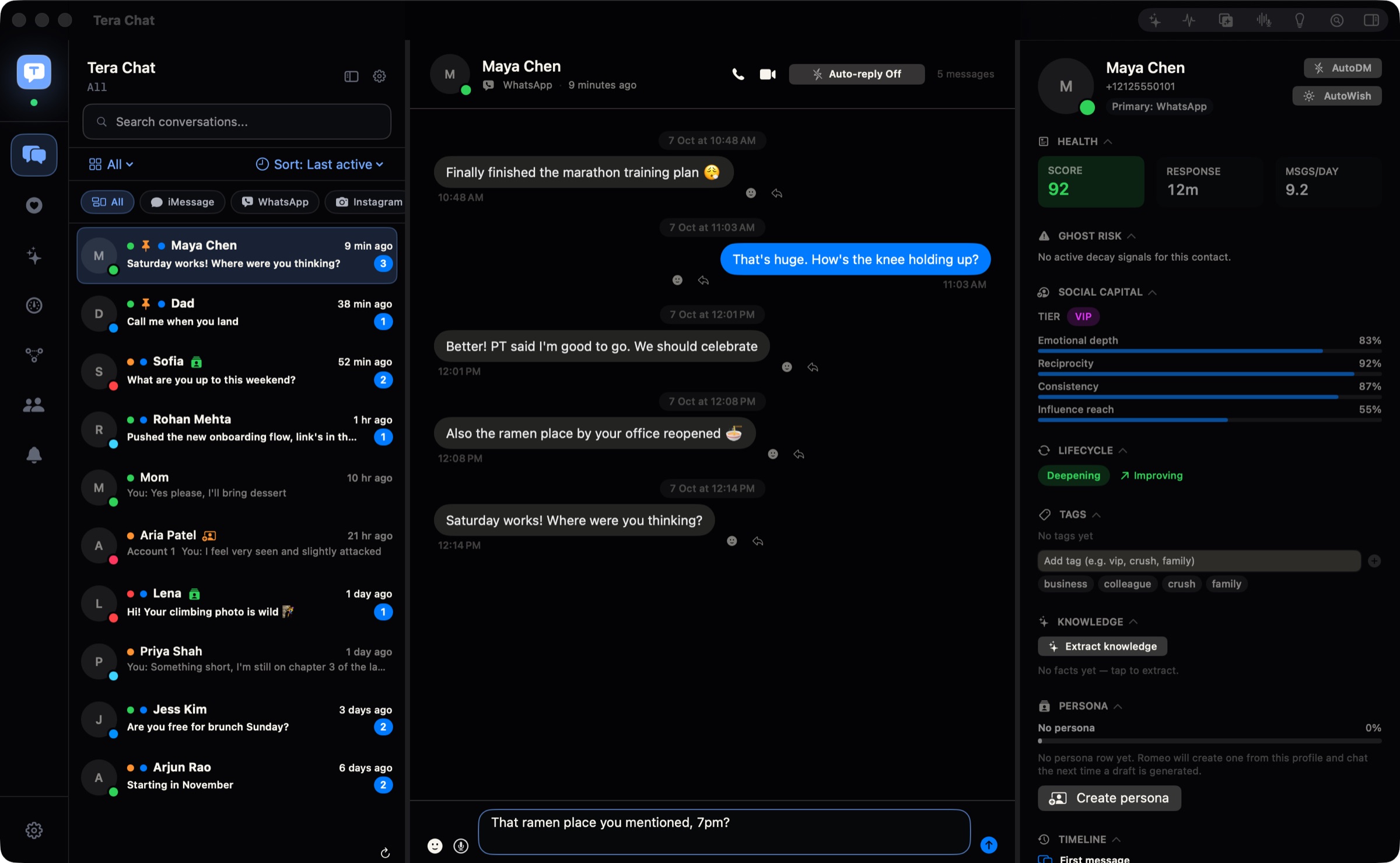
Your messages, contacts and relationship stats stay on your Mac and are never uploaded to a Tera Chat server. Sign-ins to WhatsApp, Instagram and Telegram stay in Tera Chat’s own storage on your Mac. For each network’s details and known limits, see how to connect WhatsApp, Telegram, Instagram and Tinder to Tera Chat.
What do you give up with a combined inbox?
Every combined inbox trades some of each network’s features for having one place to look. Here’s what you lose with each option, stated plainly.
With Tera Chat:
- It doesn’t show a notification for every new message. Its notifications are for things like fading chats, life events, the weekly digest and reminders, so keep your phone’s notifications on for anything urgent.
- Emoji reactions and quoted replies you add in Tera Chat aren’t sent to the other app.
- You can send photos and files on iMessage. WhatsApp sending from Tera Chat is text only.
- WhatsApp and Instagram calls open their own web apps.
- It’s Mac only, with no iPhone, Windows or web version, and no Signal, Messenger, Slack or Discord.
With Beeper: no dating apps among its listed networks, iMessage only on a Mac, and five accounts on the free plan (Beeper FAQ).
With a wrapper: no merged list, no iMessage, and you still check each tab.
With any unofficial app: WhatsApp, Telegram and Instagram don’t make or endorse these apps, and a network can change how it works or act against accounts it thinks are automated. We cover what that means in practice in are all-in-one messaging apps safe?
Which option should you choose?
The right answer depends on your devices and which networks you use.
- You want only official apps and don’t mind four of them: keep Messages, WhatsApp for Mac and Telegram for macOS, and add Instagram to your Dock as a Safari web app (Safari → Share → Add to Dock). Check them at set times instead of whenever a badge appears.
- You also use Signal, Slack or Discord, or you need Windows or a phone app: Beeper covers more networks and more devices than anything else here.
- You mostly want work tools and web apps in tabs: Franz or Ferdium does that well, as long as you don’t need iMessage.
- You’re on an Apple silicon Mac and want iMessage, WhatsApp, Telegram and Instagram in one list, plus Tinder or AI drafts that sound like you: that’s what Tera Chat is built for. The inbox is free; AI drafts work with your ChatGPT account (through Codex) or a Claude or Grok API key, or a built-in AI plan from $9.99 a month. If you add Tinder, know that Tinder’s terms restrict third-party tools that connect to your account, and Tera Chat is one; here’s what Tinder’s rules say.
For network-by-network advice on the best Mac app for each service, start with the best messaging apps for Mac in 2026.
What to do next
Decide whether you want one list or tabs. If you want one list that includes iMessage, pick an app that runs on your Mac, and before you connect anything, check how many WhatsApp linked devices you already use and whether you’re comfortable granting Full Disk Access. Connect one network at a time, so if something doesn’t work you know which one it was.
Frequently asked questions
Can you merge WhatsApp and iMessage into one conversation?
No. A combined inbox puts WhatsApp and iMessage threads in one list, but each conversation still runs on its own network. If a friend uses both, you'll see two threads with them, one per network.
Does a unified inbox use up one of my WhatsApp linked devices?
Yes. Any app that connects to WhatsApp the way WhatsApp Web does takes one of the four linked-device slots WhatsApp allows, alongside WhatsApp for Mac or WhatsApp Web if you use them.
Why does iMessage need Full Disk Access when WhatsApp doesn't?
Your iMessage history is kept in a protected database on your Mac, and macOS only lets another app read it with your explicit permission, usually Full Disk Access. WhatsApp, Telegram and Instagram are reached over the network after you sign in, so they don't need that permission.
Is there a free way to get WhatsApp, iMessage, Telegram and Instagram in one app?
Yes. Beeper's free plan covers up to five accounts, and Tera Chat's inbox is free with no time limit on Apple silicon Macs. Franz's free Starter plan and Ferdium also work, but they can't include iMessage.
Can I add Signal or Messenger too?
Beeper supports Signal, and wrappers such as Franz can load web versions of many services. Tera Chat doesn't support Signal, Messenger, Slack or Discord.
Published . How we write and check our guides. Spotted something out of date? Email hello@terachat.co.