Know what to say. Now on Windows.
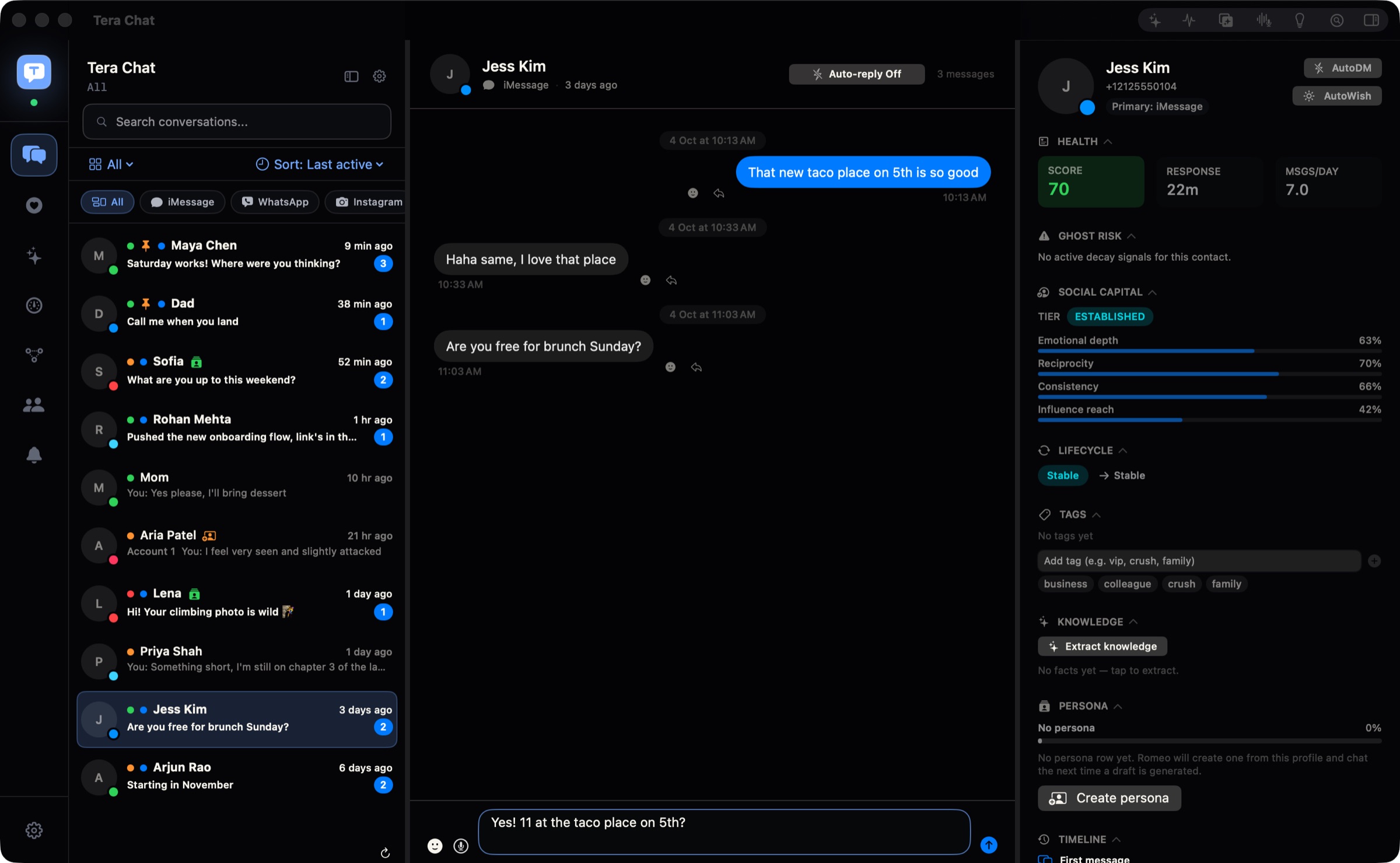
Tera Chat writes openers for your matches and replies in your texting style, inside your Tinder, Instagram, WhatsApp and Telegram chats. Start with one chat, read the draft, and make it yours before you send.
Free · Mac: macOS 15 or later, Apple silicon · Windows 10 or 11, 64-bit
Sign in for 10 free AI replies a day and openers for 10 matches in total. No paid plan or separate AI account needed for that allowance.
On a Mac? Get Tera Chat for Mac.
Install it in 3 steps
Open this on your Mac or Windows PC.
Tera Chat is an app for Mac and Windows, so it can't install on a phone or tablet. Send this link to your Mac or Windows PC and download it there.
Got our email? Open it on your computer and click Get Tera Chat for Mac.
No email handy? On your computer, type terachat.co into the browser.
Your download has started. When TeraChat-Setup.exe finishes, follow the 3 steps below.
- Open TeraChat-Setup.exe. You'll find it in your browser's downloads. If your browser asks whether to keep the file, keep it.
- If you see “Windows protected your PC”, click More info, then Run anyway. Windows says this about new apps whose installer isn't code-signed yet, and Tera Chat's isn't yet. The app is safe, and signing is on the way.
- Tera Chat opens. Sign in with Continue with Apple or Continue with Google, or with your email and the 6-digit code we send you. Then connect one chat and try your first reply.
From then on, Tera Chat updates itself: new versions download in the background and install when you're not in the middle of something.
What Tera Chat does for you
It says hi to every match. You don't.
Tera Chat reads each new match's profile and writes an opener about what they actually wrote. Switch on Autopilot and it keeps the chat going, every reply ready to send, and carries on when the chat moves to Instagram.
Empty box? One click.
Someone asked a question and you've been staring at the box. Click the sparkle and Tera Chat writes the reply in your own words: your slang, your emoji, your length. Change a word if you like, then send.
Know who's worth your evening.
Every person gets a summary from their profile and your chat: green flags, red flags and what they're into. Read it, then decide who to really talk to. You end up with real options without saying hi to everyone.
It remembers what people tell you.
A birthday, a trip, an exam on the 26th, big news nobody answered. Tera Chat catches them in your chats, keeps them on the person's profile and reminds you before the day. Before a date, you know their places, their food and their things.
Good morning, every morning. Even when you sleep in.
Turn on AutoWish for someone and Tera Chat sends a good morning, a good night or a midday hello at a natural time each day, in words you've used with them before. It stays quiet while you're already talking and skips chats that have gone cold. For the one who wakes up late, has ADHD, or just can't keep up.
Every chat, one app. That part's free.
WhatsApp, Telegram, Instagram, Tinder and Bumble in one list on your PC. A chat that starts on Tinder and moves to Instagram stays one chat.
What is free, and what happens next?
Tera Chat for Windows and its inbox are free. Signing in adds 10 built-in AI replies a day and openers for 10 matches in total. Try a real conversation before deciding whether you need more.
Your conversations and your control
Your inbox and your chat sign-ins are stored on your PC. AI features send the conversation text they work on to the AI service; built-in Tera Chat AI passes it through our server to Anthropic without keeping that text. Read the privacy details.
Questions before you download
Which PCs can run Tera Chat?
Any PC with Windows 10 or Windows 11, 64-bit. It installs for your own Windows account, so you don't need admin rights.
Why does Windows warn me about the installer?
Windows warns about new apps whose installer isn't code-signed yet. Tera Chat's isn't yet, and signing is on the way. Download it only from terachat.co, then choose More info and Run anyway on the blue Windows screen.
Is it the same as the Mac app?
Yes. The same reply button, openers and Autopilot, red and green flags, memory and reminders, AutoWish and all your chats in one place, with the same account and plans. The one thing it can't do is iMessage, which only works on a Mac.