WhatsApp Wrapped tools compared: year filters and image exports
Compare Tera Chat, 10015, TryMyPost, Talk & Tool and WhatsAnalyze for a group recap: year selection, one image versus multiple cards, and local processing.
The short answer
- Choose Tera Chat for one 1080×1920 recap image from a selected calendar year. Choose a multi-card tool if you want a sequence of separate stories.
- 10015 documents a year selector and nine-card downloads. Talk & Tool documents year selection plus story and square output. Tera is not the only year-filtered option.
- In our fictional-file check, TryMyPost displayed all 14 messages spanning 2025 and 2026. We did not find a year selector in the controls we inspected.
- Check the export's dates before calling any result a full-year Wrapped. A tool can filter existing messages, but cannot restore months missing from the file.
For a private group-chat recap, the important choice is which dates are counted and what you can download. A year label on a card does not necessarily mean the tool filtered a multi-year export.
Tera Chat Wrapped fits when you want to choose a calendar year and save one 1080×1920 PNG on your phone. For a sequence of cards, square output or other presentation options, another tool may fit better. Tera does not offer a multi-card ZIP or an arbitrary date-range picker.
This comparison was checked on 2 November 2026. Tera Chat publishes it, so the authors have an interest in one of the options. We distinguish direct checks from vendors’ documentation. This is not a security audit or a speed benchmark.
Compare the output before choosing
| Tool | Year selection | Image output | Evidence |
|---|---|---|---|
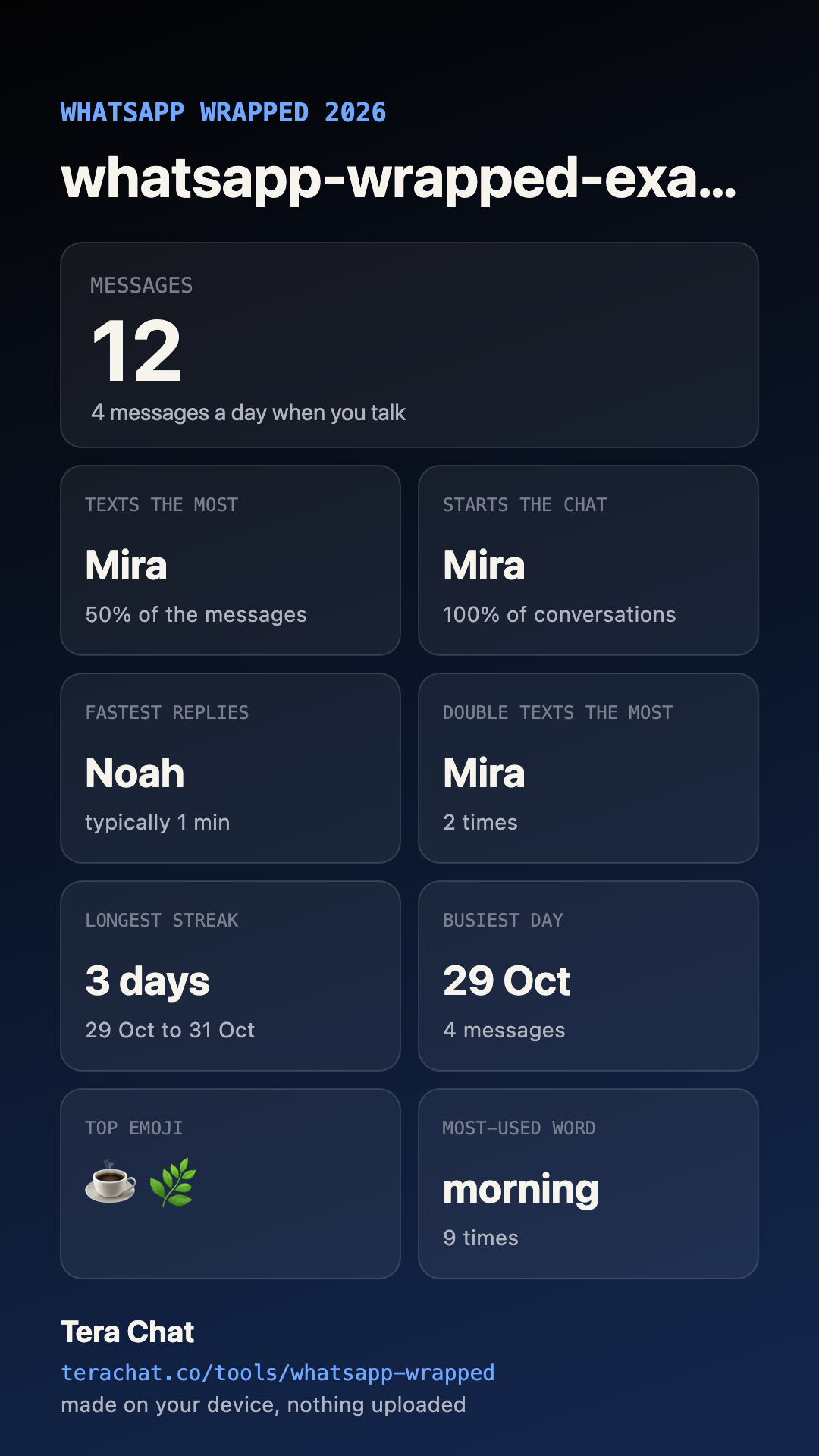
| Tera Chat | Years present in the file, or All years | One 1080×1920 PNG | Fictional two-year file checked; actual saved image below |
| 10015 | Year menu, including All time | Individual PNG or nine-card ZIP | Live controls inspected; export workflow documented, not completed in our check |
| TryMyPost | No selector found in the chat/look controls inspected | Nine cards; individual PNG/all-card ZIP controls, free branding | Fictional file parsed; downloads not tested |
| Talk & Tool | Year selection documented | Story and square cards; optional names | Vendor documentation only |
| WhatsAnalyze | Behavior not verified | Story recap; HD and PDF described as Pro | Vendor documentation; headline still referred to 2025 |
All five describe browser-side processing for their core recap. For the external tools, that is a vendor claim, not independent network verification. Optional sharing can behave differently: WhatsAnalyze describes encrypted share links. Saving an image to your phone is separate from creating a hosted link.
A two-year export makes the distinction visible
Use our fictional group export before choosing a private conversation. It contains 14 messages: two on 31 December 2025 and 12 on 29–31 October 2026. Every name and message is invented.
In Tera Chat, select the file and compare the choices:
| Selection | Messages | Sender counts |
|---|---|---|
| 2026 | 12 | Mira 6, Noah 3, Zoe 3 |
| 2025 | 2 | Noah 1, Zoe 1 |
| All years | 14 | Mira 6, Noah 4, Zoe 4 |
The selection changes the statistics and saved card. This is the actual PNG generated by Tera, not a design mockup:
In our TryMyPost check, the same file produced 14 messages, three people and four active days, covering 31 December 2025 to 31 October 2026. We inspected its chat and appearance controls without finding a year selector. This is a dated observation of the controls available in this session, not a claim that the product can never add or expose another filtering path. Do not label that all-history result a 2026-only recap.
We inspected 10015’s year menu and download choices but did not complete its file-selection flow. Its filtering is documented and visible in the interface, rather than verified against our sample. We did not run the sample through Talk & Tool or WhatsAnalyze.
Make a year-specific recap without editing the transcript
For Tera, export the group from the WhatsApp phone app, save the TXT or ZIP, open Wrapped and choose the file. Select 2026, then Save as image. This filters the file locally; it does not depend on a WhatsApp Web custom-date export or manually deleting old lines.
On a supported phone, saving can open the share sheet; otherwise the browser downloads the PNG. Review it before sending it. The image can contain participant names, a top word and activity statistics even without the message transcript.
If 2026 is missing from the menu, inspect the file’s dates. A label cannot manufacture absent messages. Our sample covers only three October days in 2026. Similarly, a recap made on 2 November can only be year-to-date, and a truncated phone export may cover less. Keep your original export when experimenting.
The same chat can produce different awards
Counting rules may differ between tools. Tera’s daily summary divides by active days. Reply gaps count consecutive messages from different senders less than 24 hours apart; the fastest-replier tile needs at least three qualifying gaps. Conversation starts use a separate six-hour threshold, plus the first message in the selected period.
These rules describe timestamps, not a group’s meaning. An apparent answer could address an earlier message. Check the worked reply-time calculation before interpreting an award as a personal judgment.
For a participant table, emoji ranking and activity grid, use the group-statistics example. Choose the destination that produces the result you need.
Frequently asked questions
Which WhatsApp Wrapped tool lets me choose a year without editing the file?
Tera Chat has a year selector, verified with the fictional two-year export linked here. 10015 and Talk & Tool also document built-in year selection. Select based on the output you want: one Tera image, a 10015 card sequence, or Talk & Tool's story/square formats.
Does Tera Chat download nine separate Wrapped cards?
No. Tera saves one 1080×1920 PNG containing the available recap tiles. It does not provide a nine-card ZIP, a square layout or a custom start/end date picker.
Can a 2026 Wrapped include the whole year before December ends?
No. A 2026 result made before the year ends is year-to-date at most, and the export may cover an even shorter period. Check its first and last messages rather than assuming the year label proves completeness.
Published . How we write and check our guides. Spotted something out of date? Email teralabsx@gmail.com.