Apple Intelligence vs Tera Chat for your messages: which fits you?
Apple Intelligence in Messages vs Tera Chat: smart replies, summaries, privacy, price and which apps each covers. Where Apple wins and where it stops (Oct 2026).
The short answer
- Apple Intelligence is the better pick if you text mostly on iMessage, in English, and want something free, private and built into both your iPhone and Mac.
- Tera Chat is the better pick if your conversations are spread across WhatsApp, Telegram, Instagram and Tinder as well as iMessage and you want drafts in your style, summaries and relationship reminders in one Mac inbox.
- Apple's Smart Reply and in-thread summaries cover Messages and Mail only, and its personalized replies are English only and, per Macworld, still waiting on iOS 27.2.
- Apple's privacy model (on-device or Private Cloud Compute) is stronger than any app that sends text to a cloud AI provider, Tera Chat included.
- You don't have to choose: Apple's features keep working on your iPhone and Mac while Tera Chat handles the other apps on your Mac.
Apple Intelligence is the better choice if you text mostly on iMessage, in English, and want something free, private and built into your iPhone and Mac. Tera Chat is the better choice if your conversations are spread across WhatsApp, Telegram, Instagram and Tinder as well as iMessage, and you want replies in your own style, summaries and nudges about people you’re losing touch with, all in one Mac inbox. They don’t conflict, so many people will use both.
Tera Chat is our app; we’ve tried to be fair, and we say where Apple is the better pick. Apple’s features below were checked against Apple’s own pages on 20 October 2026, when the newest public versions were iOS 27.0.1 and macOS Golden Gate 27.0.1.
The short answer
| Choose Apple Intelligence if… | Choose Tera Chat if… |
|---|---|
| Most of your texting is iMessage | Your chats are split across iMessage, WhatsApp, Telegram, Instagram or Tinder |
| You want help on your iPhone, not just your Mac | You do your catching up on a Mac |
| You want zero setup and zero cost | You’ll connect your accounts once to get one inbox |
| Privacy of the AI processing matters most | You want drafts in your style in every app, with a tone per group of contacts |
| You don’t need relationship reminders | You want to know whose question you never answered and which friendships are fading |
Feature by feature
As of 20 October 2026.
| Apple Intelligence | Tera Chat | |
|---|---|---|
| Apps it works with for replies and summaries | Messages (iMessage, SMS, RCS) and Mail | iMessage, WhatsApp, Telegram, Instagram, Tinder (Hinge beta, read-only) |
| Suggested replies | Smart Reply in Messages | Drafts in the thread you’re reading |
| Replies in your style | Personalized Smart Reply: listed for 27, English only, expected in iOS 27.2 per Macworld; Siri AI (beta) can match your style in Messages and Mail | Learns your slang, emoji and message length from how you text |
| Different tone for different people | Not described by Apple | Tag contacts (family, colleague, crush, VIP) and set a tone per tag |
| Summaries | Summaries in Messages and Mail; notification summaries | Summarize any thread on demand (⇧⌘S), including WhatsApp and Telegram groups |
| Questions about a chat | Not a listed Messages feature | “Ask about this chat”, e.g. “what restaurant did she mention?” |
| Plans and dates from chats | Suggestions in Messages (one tap to Calendar or Reminders) coming in a future update | Life events such as birthdays, new jobs and moves, one click to Calendar |
| Relationship reminders | No equivalent | Missed questions, fading chats, a weekly digest |
| Devices | iPhone, iPad, Mac (M1 or later), Apple Vision Pro | Mac only: Apple silicon, macOS 15 or later |
| Where the AI runs | On your device or Apple’s Private Cloud Compute | Your chosen provider (OpenAI via Codex, Anthropic, xAI) or Claude through Tera Chat’s server |
| Price | Free | Free app; AI via your ChatGPT account (through Codex) or a Claude or Grok API key, or plans from $9.99 a month |
| Sends for you | No | No by default; Autopilot is opt-in and not available for iMessage |
Sources for Apple’s column: Apple’s feature and requirements page, Apple Intelligence overview, Siri AI requirements and Macworld’s iOS 27 tracker.
Where Apple Intelligence wins
- It’s free and already there. No download, no accounts to connect, no permissions to grant.
- It’s on your iPhone, where most people do their texting. Tera Chat has no iPhone app.
- Its privacy model is stronger. Apple runs AI on your device or on Private Cloud Compute, where it says your data “is never stored” and is “used only for your requests”. Any app that sends your conversations to a cloud AI provider, Tera Chat included, asks you to trust that provider’s policy instead.
- Write with Siri (Siri AI, beta, English to start) can compose and rewrite “virtually anywhere you type”.
- No platform-terms risk. Apple’s features don’t connect to third-party accounts. Tera Chat’s connections to WhatsApp, Instagram and Tinder aren’t official integrations from those companies, and Tinder’s terms ban third-party apps that interact with the service, AI included; Tera Chat connects to your Tinder account, so it is the kind of tool those terms cover (what Tinder’s rules say).
- Extras Tera Chat doesn’t list, such as Live Translation in Messages and Genmoji.
Where Apple Intelligence stops
- Messages and Mail only for Smart Reply and in-thread summaries. Apple doesn’t describe it drafting a WhatsApp reply from the WhatsApp conversation or summarizing a Telegram group.
- English only for personalized replies in Messages, and Siri AI is English only for now.
- Not shipped yet, per Macworld: the style-matching replies were pulled before iOS 27’s public release and are expected in 27.2. See our Personalized Smart Reply tracker.
- No per-person tone that Apple has described.
- No relationship layer: nothing tells you that a friend asked you a question three weeks ago, or that a chat with someone you care about has gone one-sided.
- Device limits: Mac with M1 or later, iPhone 15 Pro or newer, and not on devices bought in mainland China. Siri AI also has a waitlist and isn’t available on iPhone in the EU.
Where Tera Chat wins
- One inbox for five apps. iMessage, WhatsApp, Telegram, Instagram and Tinder in one list, tinted by network.
- Drafts in your style everywhere, with a different tone for each tag of contacts, so your boss and your best friend don’t get the same reply. You pick a suggestion, edit it and send it.
- Summaries and questions about any chat, including a WhatsApp group you muted for a week.
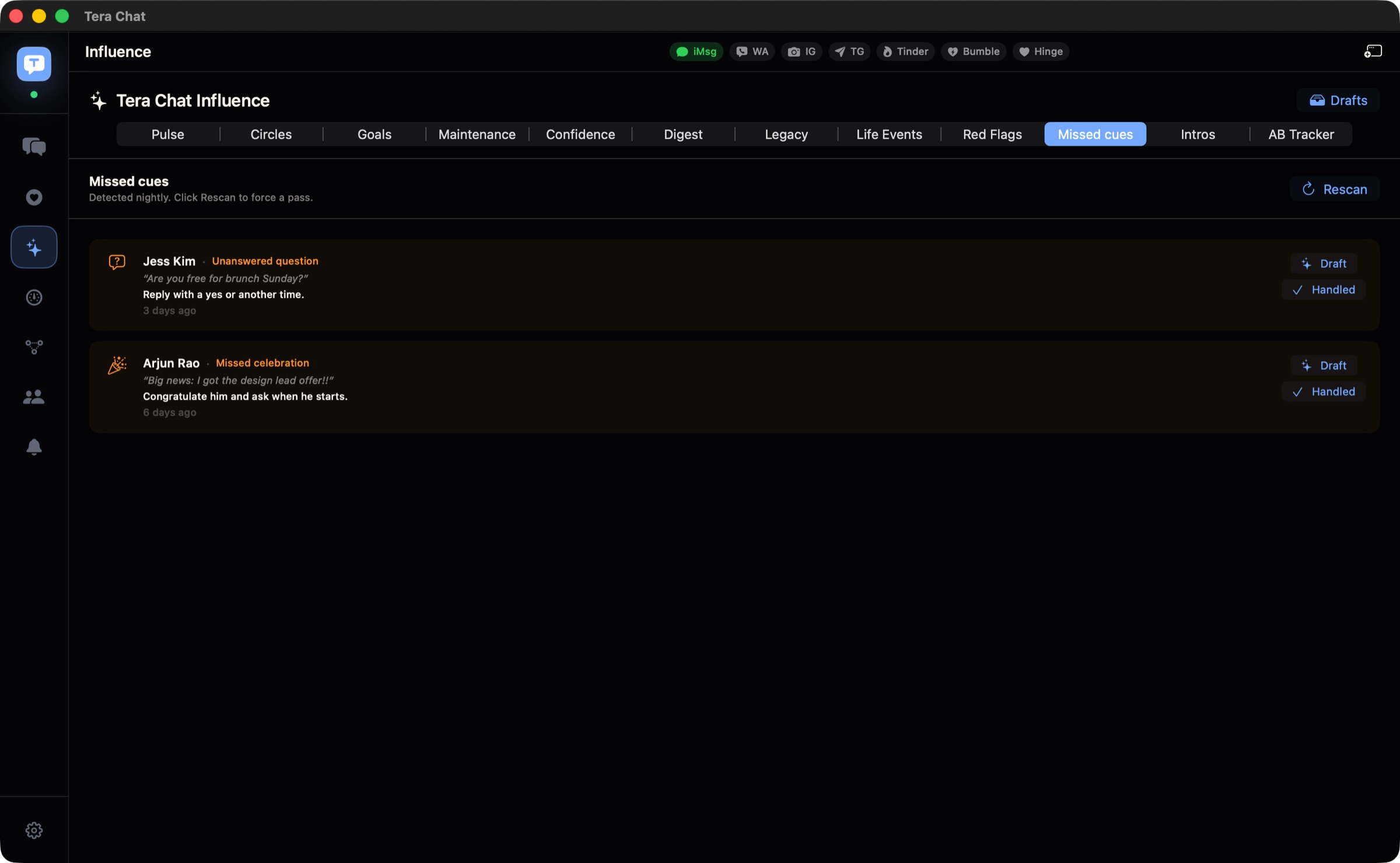
- Relationship intelligence: a nightly scan on your Mac flags questions you never answered and celebrations you missed, with a Draft button for each; fading chats are surfaced before they go cold; birthdays and new jobs mentioned in chats go to Calendar in one click; and a short weekly digest arrives on Sunday morning.
- Dating apps in the same inbox, with openers built from a match’s profile (with a Tera Chat AI plan or your own ChatGPT account through Codex), and every message reviewed and sent by you.
Where Tera Chat stops
- Mac only. It needs Apple silicon (M1 or newer) and macOS 15 or later. No iPhone, iPad, Windows or web version.
- Setup and permissions. iMessage needs Full Disk Access so Tera Chat can read your Messages history on your Mac (what that permission covers); WhatsApp pairs by QR code; Telegram and Tinder need Chrome, Brave or Edge installed for sign-in.
- AI goes to a cloud provider. Your inbox stays on your Mac and no Tera Chat server holds a copy, but AI features send the conversations they work on to the provider you chose. Some features run in the background once AI is set up (for example a summary after every 10 new messages and the Sunday digest), which you can pause in Settings.
- Fewer apps than some inboxes, and no Signal, Messenger, Slack, Discord or email.
- Limits: WhatsApp and dating-app sending is text only, reactions you add aren’t sent to the other app, and it doesn’t notify you of every new message.
Can you use both?
Yes, and for many people that’s the best setup. Keep Apple Intelligence on: Smart Reply and message summaries keep working in Messages on your iPhone and Mac. Use Tera Chat on your Mac for the conversations Apple can’t reach, and for summaries, reminders and drafts across all of them. Tera Chat reads your Mac’s Messages history and sends iMessages through the Messages app, so nothing about Apple’s setup changes.
How the privacy models compare
| Question | Apple Intelligence | Tera Chat |
|---|---|---|
| Where are messages stored? | In Messages on your devices, and in iCloud if you use Messages in iCloud | On your Mac; settings, AI insights and drafts sync between your Macs only through your own iCloud account |
| Who processes them with AI? | Your device, or Apple’s Private Cloud Compute | The AI provider you chose, or Anthropic’s Claude via Tera Chat’s server, which passes text on and doesn’t keep it |
| Can you pause background AI? | Turn features off in Settings | Pause background processing in Settings → Pipelines |
For a broader look, see our checklist on whether it’s safe to let AI read your messages.
The verdict
If your phone’s Messages app is where your relationships live, Apple Intelligence is free, private and good enough, and Apple says more Messages features are coming in a future update. If your relationships are scattered across WhatsApp, Telegram, Instagram and Tinder, Apple’s AI can’t follow them there, and Tera Chat is built for exactly that: one Mac inbox, replies that sound like you, and reminders before a friendship goes quiet. For the wider field of options, read AI that replies to texts in your style. If most of your messages are work chats, see our Tera Chat vs NOX comparison too.
Frequently asked questions
Does Apple Intelligence work with WhatsApp?
Only partly. Write with Siri (Siri AI, beta, English) can compose and rewrite text virtually anywhere you type, but Smart Reply suggestions and conversation summaries are Messages and Mail features, and Apple doesn't describe drafting WhatsApp replies from the WhatsApp conversation.
Is Tera Chat better than Apple Intelligence?
Not across the board. Apple is free, private and on your iPhone; Tera Chat is Mac-only. Tera Chat is better when your chats live in several apps, because Apple's messaging AI stops at Messages.
Can I use Apple Intelligence and Tera Chat together?
Yes. They don't conflict: Apple's features stay on in Messages on your iPhone and Mac, and Tera Chat reads your Mac's Messages history (with Full Disk Access) alongside your other apps.
Does Tera Chat use Apple Intelligence?
No. Tera Chat's AI runs on the provider you choose: your own ChatGPT account through Codex, a Claude or Grok API key, or a Tera Chat AI plan that runs on Anthropic's Claude.
Which is more private?
Apple's processing model is the more private of the two: it runs on your device or on Private Cloud Compute, which Apple says never stores your data. Tera Chat keeps your inbox on your Mac, but its AI features send the conversations they work on to the AI provider you picked.
Published . How we write and check our guides. Spotted something out of date? Email hello@terachat.co.