AI that replies to texts in your style: how it works and the tools compared
How AI that replies to texts in your style works, the five ways to get it (chatbots, keyboards, Apple, ChatGPT on Mac, AI inboxes) and what to watch for.
The short answer
- AI that replies in your style combines three things: samples of messages you've already sent, the recent messages in the thread, and the tone you use with that particular person.
- As of 20 October 2026 there are five ways to get it: paste a chat into ChatGPT or Claude, use an AI keyboard on your phone, use Apple's suggested replies in Messages, let ChatGPT's Mac app read your iMessages, or use an AI inbox that reads all your chats.
- Apple lists Personalized Smart Reply in Messages as an iOS 27 and macOS 27 feature, English only, but Macworld reports the style-matching replies were pulled before launch and are expected in iOS 27.2.
- Pick a tool that drafts and lets you send, not one that sends for you: you catch mistakes, you stay the author, and dating apps like Tinder and Hinge restrict third-party AI tools that connect to your account.
- Every option sends the text it works on to some AI model, so check where it runs (on your device, Apple's Private Cloud Compute, or a cloud provider) before you connect your chats.
AI that replies to texts in your style reads the conversation, looks at examples of messages you’ve already sent, and drafts a reply that sounds like you, which you then edit and send. As of 20 October 2026 you can get it in five ways: paste a chat into ChatGPT or Claude along with a few of your own texts, use an AI keyboard on your phone, use Apple’s suggested replies in Messages, let ChatGPT’s Mac app read your iMessages, or use an AI inbox that drafts across all your messaging apps. They differ most in three things: whether they see the whole thread, whether they really learn how you write, and how many apps they cover.
This guide explains how “in your style” works, walks through each approach with its real limits, and compares them in one table. Then it covers what to watch out for: privacy, sounding fake, and the dating apps’ rules. Tera Chat is our app; we’ve tried to be fair, and we say where others are the better pick. We checked each tool’s website, help center and pricing on 20 October 2026.
How does AI write a reply “in your style”?
It combines three ingredients: samples of how you write, context from the thread, and the tone you use with that person. Leave any one out and the reply sounds like a stranger wrote it.
1. Style samples: how you actually text
A language model writes in whatever style its instructions and examples suggest. With no examples, it falls back on polite, complete, slightly formal sentences, which is why generic AI replies sound like customer service. Give it a handful of real messages you’ve sent and it picks up the patterns:
- Length: do you send one line or three paragraphs?
- Capitals and punctuation: all lowercase? No full stops? Lots of question marks?
- Emoji and slang: which ones, and how often (“lol”, “haha”, “tbh”)?
- Habits: do you split one thought across several messages? Sign off with “x”?
Some tools ask you to paste samples each time. Others read your sent messages and build a profile once, then reuse it.
2. Context from the thread
The model also needs the last few messages, or it can’t answer what was actually asked. The best tools read the recent conversation, and some keep notes about the person (their partner’s name, the trip they mentioned). A paste-in chatbot only knows what you paste.
3. A different tone for different people
You don’t text your manager the way you text your sister. Good tools let you set the tone per person or per group of people, so “sounds like me” means you, talking to them.
What it looks like in practice
Example chat, made up for this guide. Maya texts: “are we still on for saturday?? also did you ever hear back about the flat”
Three of your recent messages, used as style samples:
“omg yes. 7 works” “running 10 min late sorry, grab a table” “no idea tbh, will ask”
| Version | Reply |
|---|---|
| Generic AI, no samples | “Hi Maya, yes, we’re still on for Saturday. Unfortunately I haven’t heard back about the flat yet, but I’ll keep you posted. Looking forward to it.” |
| AI with your samples and the thread | “yes saturday’s on. 11 still ok? no word on the flat yet tbh” |
| What you send after editing | “yes saturday’s on, 11 still good? no word on the flat yet, chasing them tmrw” |
The style-matched draft gets the shape right. Your edit adds the one thing no AI could know: that you plan to chase the agent tomorrow. That’s the right division of labour, and it’s why the best tools draft rather than send.
What it still can’t know
An AI only knows what’s in the messages it sees. It doesn’t know your plans, how you feel about the person today, or what you said to them on a phone call. It can also misread sarcasm or invent a detail that sounds plausible. Treat every draft as a first draft.
The five ways to get AI replies in your style
Here’s each approach, what it does well, and where it stops.
1. Paste the chat into ChatGPT, Claude or Gemini
You copy the last few messages into a chatbot, add three to five of your own texts as samples, and ask for a reply. It works for any app, the free tiers are enough, and you’re fully in control of what you share. If Claude is your chatbot, our guide to Claude and iMessage covers what’s official and what’s not.
Where it stops: it’s manual, so it’s fine for one tricky message and tedious for twenty. The chatbot sees only what you paste, and you’re sending other people’s messages to a cloud service. “AI reply generator” apps and websites work the same way (paste or screenshot, pick a tone) but usually without your samples, which is why their output sounds generic. Our ChatGPT prompt kit for replying to texts has copy-paste prompts.
2. An AI keyboard on your phone
AI keyboards work inside any app where you type. Grammarly’s keyboard for iPhone and Android, for example, works in iMessage, WhatsApp, Instagram and others and offers AI rewrites of what you’ve typed. On iPhone, Apple’s Write with Siri (part of Siri AI, in beta) can compose and rewrite “virtually anywhere you type”, and Apple says that in Messages and Mail it can match your writing style, punctuation and tone (Apple).
Where it stops: a keyboard mostly works on the text field, not the conversation. Grammarly’s page doesn’t say its keyboard reads the thread, and Write with Siri’s style matching is described only for Messages and Mail. Siri AI is in beta, available in English to start, and not initially available on iPhone and iPad in the EU.
3. Apple’s Smart Reply in Messages
On an iPhone, iPad or Mac with Apple Intelligence, Messages suggests replies: on a Mac you select a conversation, click the text field and choose one (Apple). It’s free, built in, and runs on your device or on Apple’s Private Cloud Compute.
The version that matches your style is Personalized Smart Reply in Messages, which Apple lists as an iOS 27 and macOS 27 feature, “English only”, for iPhone, iPad, Mac with M1 or later and Vision Pro (Apple). Macworld’s iOS 27 tracker (updated 13 October 2026) reports that the style-matching suggestions were removed before iOS 27’s public release and are expected in iOS 27.2 (Macworld). Apple hadn’t released iOS 27.2 as of 20 October 2026 or given a date. Our Personalized Smart Reply tracker follows the dates.
Where it stops: only Messages (iMessage, SMS and RCS). Not WhatsApp, Telegram, Instagram or dating apps, and personalized replies are English only.
4. ChatGPT’s Messages plugin on a Mac
Since August 2026, ChatGPT’s Mac app has an Apple Messages plugin that can read and search your iMessage, SMS and RCS chats and send messages through the Messages app. By default it sends only after you approve the message and its recipients. It works only in the Codex and ChatGPT Work modes of the Apple silicon Mac app, not in regular chats, on the web or on your phone (OpenAI). See how to use ChatGPT with iMessage on a Mac for setup.
Where it stops: iMessage, SMS and RCS only, and there’s no “your style” setting. Because it can read your history, you can ask it to match how you usually write to someone, but you have to ask each time.
5. An AI inbox that reads your chats
AI inboxes connect to your messaging accounts, learn from your sent messages and draft replies in the thread you’re looking at. This is the only approach that combines all three ingredients across several apps at once.
- Tera Chat (Mac): brings iMessage, WhatsApp, Telegram, Instagram and Tinder into one inbox and drafts replies that match your slang, emoji and message length. You can tag contacts (family, colleague, crush, VIP) and set a tone for each tag. You pick a suggestion, edit it and send it yourself. The app is free. For AI, use your ChatGPT account (through OpenAI’s Codex) at no extra cost, a Claude or Grok API key (you pay that provider; these keys don’t draft Tinder or Instagram replies), or a built-in AI plan from $9.99 a month. Mac only: it needs Apple silicon and macOS 15 or later, and there’s no iPhone app.
- RPLY (Mac): drafts in your voice across ten networks, including Slack, Signal, email and LinkedIn, which Tera Chat doesn’t support, and never auto-sends. Its site lists a free tier of 10 drafts and both $25 and $30 a month for Pro, and now also promotes an invitation-only product called Caspian (RPLY). The same company sells a near-identical app, NOX, at $50 a month billed annually (NOX pricing), so check the current offer before paying.
- GhostReply (Mac): a different idea. It learns how you text from your iMessage history and sends replies automatically, for one person or all your one-to-one chats, with no approval step. It runs as a Terminal process with your own Groq key and costs $4.99 once after 10 free replies (Product Hunt).
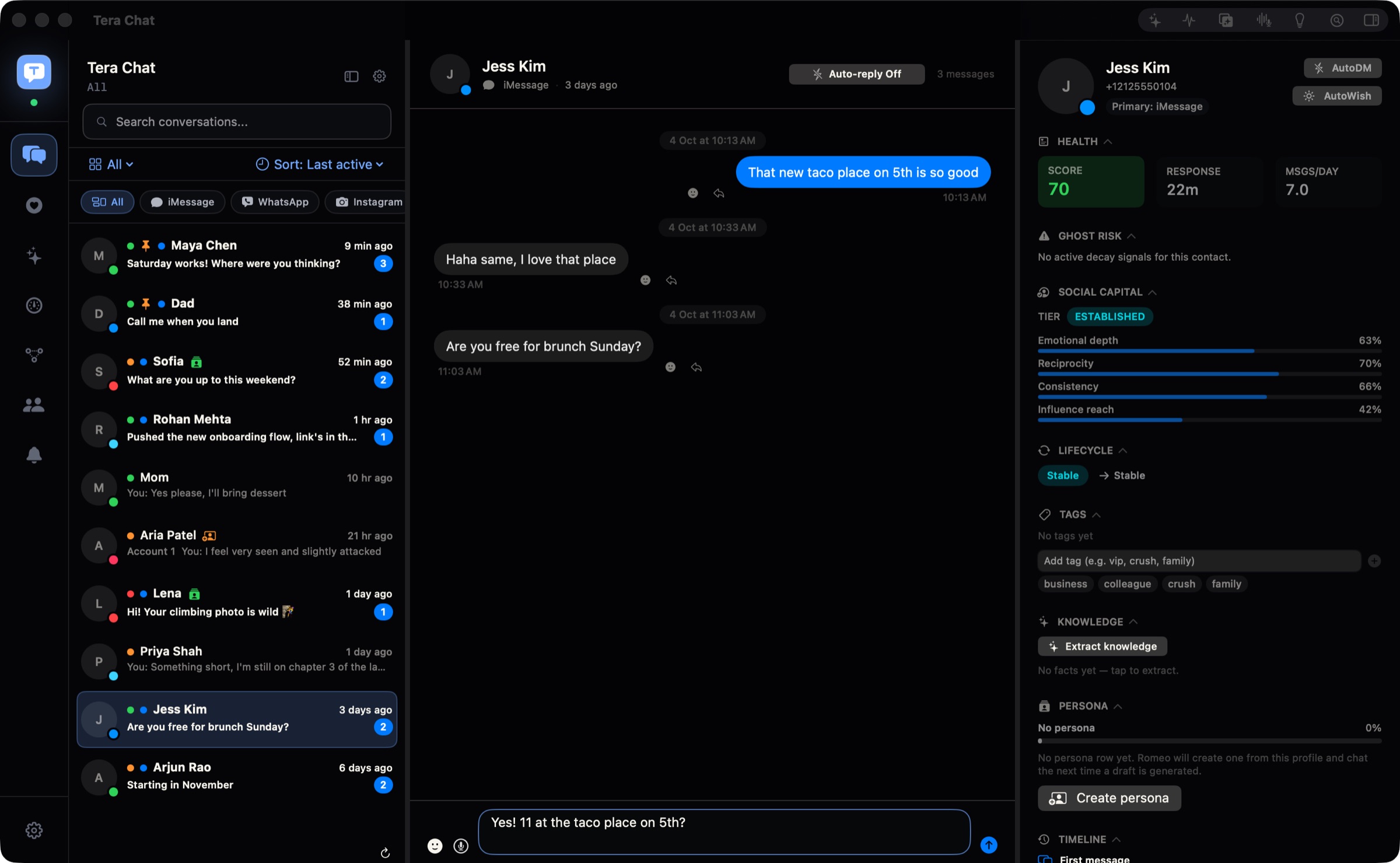
Where it stops: an inbox app needs access to your accounts, which is a bigger trust decision than pasting one message. Reading iMessage history on a Mac requires Full Disk Access (what that permission means). And connecting a dating account brings the terms issues covered below.
AI reply tools compared
Prices and features as of 20 October 2026.
| Approach | Examples | Sees the thread? | Learns your style? | Apps covered | Where the AI runs | Price | Sends for you? |
|---|---|---|---|---|---|---|---|
| Paste into a chatbot | ChatGPT, Claude, Gemini | Only what you paste | Only if you paste samples | Any (copy and paste) | Provider’s cloud | Free tiers; paid plans | No |
| Reply-generator apps | Many App Store apps and sites | Paste or screenshot | Rarely | Any (copy and paste) | Cloud | Varies | No |
| AI keyboard | Grammarly Keyboard, Write with Siri (beta) | Mostly the text field | Siri AI: in Messages and Mail | Most phone apps | Cloud; Apple: device or Private Cloud Compute | Free to start | No |
| Apple Smart Reply | Messages on iPhone, iPad, Mac | Yes | Personalized version: English only, expected in iOS 27.2 | Messages only | Device or Private Cloud Compute | Free | No, you tap and send |
| ChatGPT Messages plugin | ChatGPT Mac app (Codex, Work) | Yes, reads your history | If you ask it to | iMessage, SMS, RCS | OpenAI’s cloud | All ChatGPT plans | After you approve |
| Auto-replier | GhostReply | Yes | Yes | iMessage only | Groq (your key) | $4.99 once | Yes, automatically |
| AI inbox | Tera Chat | Yes | Yes, plus tone per tag | iMessage, WhatsApp, Telegram, Instagram, Tinder | Your chosen provider or Tera Chat AI (Claude) | Free app; AI via your ChatGPT account or an API key, or AI Plus $9.99/mo | No by default; Autopilot is opt-in |
| AI inbox | RPLY | Yes | Yes | 10 networks incl. Slack, Signal, email | Cloud by default; on-device option | Free tier; Pro $25–30/mo | No |
Drafts or autopilot? Why “you send it” matters
Choose a tool that drafts and lets you send. A reply you’ve read is a reply you can stand behind: you catch the invented detail, the wrong tone, the joke that lands badly with this particular person. You also stay the author of your relationships, which is the point of texting people you care about.
Some tools can send on their own. GhostReply does it by default. Tera Chat has Autopilot, which is off until you turn it on for a platform or a single chat; even then, its replies wait in Pending drafts for you to edit, dismiss or send with one click. Sending automatically is a separate per-chat switch marked Beta. Autopilot has quiet hours (10 pm to 8 am by default), rate limits and an emergency stop, and it isn’t available for iMessage. We don’t recommend turning automatic sending on, and never on a dating app.
What to watch out for
Privacy: where do your messages go?
Every tool sends the text it works on to an AI model somewhere. The question is where, and who keeps it:
- On your device or Apple’s Private Cloud Compute: Apple says its server-side processing is “used only for your requests” and your data “is never stored” (Apple).
- A cloud chatbot or API (OpenAI, Anthropic, Google, xAI): your provider’s data policy applies.
- An app’s own server: read its privacy policy. Tera Chat keeps your inbox on your Mac and has no server holding a copy of your messages; the AI provider you pick sees the conversations it works on, and with a Tera Chat AI plan the text passes through Tera Chat’s server to Anthropic’s Claude without being kept.
Remember that the other person’s messages are in there too. Our checklist on whether it’s safe to let AI read your messages goes through the questions to ask.
Sounding fake
People notice when a message doesn’t sound like you. If a draft feels off to you, it will feel off to them. Common tells:
- Greetings and sign-offs you never use (“Hi Maya”, “Best”).
- Perfect punctuation when you normally type in lowercase.
- Over-enthusiasm, filler (“I hope you’re doing well”) and three sentences where you’d send one.
- Answering every point in order, like a support ticket.
The fix is the same each time: better samples, a shorter draft, and your own edit before sending.
The dating apps’ rules
If you text matches, know the rules. Tinder’s Terms of Use (effective 5 March 2026, section 2c item 22) ban using third-party apps or services that directly interact with Tinder without written consent, “including but not limited to artificial intelligence or machine learning systems” (Tinder). Hinge’s terms use the same wording and also ban content you didn’t write yourself unless Hinge authorized it (Hinge). Bumble’s guidelines ban unauthorized automations that interact with profiles or messages (Bumble).
Tera Chat connects to your Tinder account, so it is the kind of tool those terms cover. Using AI for ideas and writing the final message yourself is the honest middle ground: see what Tinder, Hinge and Bumble’s terms actually say about AI.
Which approach fits you?
- You only text on iMessage, in English, and want zero setup: use Apple’s Smart Reply, and watch for Personalized Smart Reply in iOS 27.2. It’s free and the most private.
- You want help with one hard message: paste it into ChatGPT or Claude with three of your own texts as samples.
- You live on your phone and use many apps: an AI keyboard covers the most apps, at the cost of not seeing the whole conversation.
- You’re on a Mac and mostly need iMessage: ChatGPT’s Messages plugin, which OpenAI says is available on every ChatGPT plan.
- You’re on a Mac and your chats are spread across iMessage, WhatsApp, Telegram, Instagram and Tinder: Tera Chat drafts in your style in all of them from one inbox, and it’s free with your own ChatGPT account.
- You need Slack, Signal or email too: RPLY covers more networks.
- You want it fully automatic: think twice. A wrong auto-reply costs more than the minute it saves. If all you need is an away message, see how to auto-reply to texts and WhatsApp.
What to do next
Start with the cheapest test: copy one real conversation, add three messages you’ve sent, and see whether a chatbot’s draft sounds like you. If it does and you want that across every app without copying and pasting, move to a tool that reads the thread and learns your style. Whichever you choose, keep the last step for yourself: read the draft, make it yours, and send it.
Frequently asked questions
Is there an AI that texts like me?
Yes. Tools that learn from your past messages, such as AI inboxes like Tera Chat or RPLY, can draft replies in your usual length, punctuation and slang. You can also get close with ChatGPT or Claude by pasting a few of your own texts as examples before asking for a reply.
Is there an app that replies to texts for you automatically?
A few do, such as GhostReply for iMessage on a Mac, which sends replies without asking. Most tools draft and wait for you, which is safer: an AI can misread a message, invent a plan or reply to the wrong person.
Can AI reply to my WhatsApp messages?
Not from inside WhatsApp in your own style: Meta AI can rewrite a draft or summarize unread messages where it's available, but Meta doesn't describe it as learning how you text. On a Mac, an inbox app like Tera Chat can draft WhatsApp replies in your style for you to send.
Will people know I used AI to reply?
They might if the draft sounds unlike you: too formal, too long, too many exclamation marks, or oddly perfect punctuation. Use your own messages as style samples and always edit the draft before you send it.
Is it safe to let an AI read my texts?
It depends on where the AI runs and who keeps the data. On-device processing and Apple's Private Cloud Compute are the most private; cloud chatbots and apps vary. Read the privacy policy, and prefer tools that draft only when you ask or let you pause background processing.
Published . How we write and check our guides. Spotted something out of date? Email hello@terachat.co.