AI reply assistants for Mac compared: ChatGPT for Messages, Tera Chat, RPLY, Beeper and more
AI messaging assistants for Mac compared: Apple Intelligence, ChatGPT's Messages plugin, Tera Chat, RPLY, Beeper and GhostReply on apps, permissions and price.
The short answer
- If your chats are only on iMessage, you may not need a new app: Apple's Smart Reply is built in, and ChatGPT's Messages plugin can read and draft iMessages on any ChatGPT plan, according to OpenAI.
- Tera Chat is the assistant to pick if your conversations are spread across iMessage, WhatsApp, Telegram, Instagram and Tinder: it drafts in your style in all of them, free with your own ChatGPT account.
- RPLY covers more work networks (Slack, Signal, email, LinkedIn); Beeper connects the most networks (16) but its AI is a chatbot you mention in the chat, and its answers are visible to everyone in it.
- Every assistant that reads iMessage on a Mac needs deep macOS permissions, and every cloud AI sees the conversations it works on, so compare where your data goes before you install.
- Prefer assistants that draft and wait for you; GhostReply sends iMessage replies automatically, with no approval step.
The best AI reply assistant for a Mac depends on where your conversations live. If it’s only iMessage, you already have two free options: Apple’s Smart Reply in Messages, and ChatGPT’s Messages plugin, which can read your iMessages and draft replies you approve. If your chats are spread across WhatsApp, Telegram, Instagram and Tinder too, Tera Chat drafts replies in your own style across all of them from one inbox. RPLY covers more work networks like Slack, Signal and email, and Beeper connects the most networks, though its AI is a chatbot you mention in the chat rather than a private drafting assistant.
Below: a quick verdict, then each assistant’s networks, permissions, where your data goes and price, and who should use what. Tera Chat is our app; we’ve tried to be fair, and we say where others are the better pick. We checked each product’s website, help center and pricing on 20 October 2026; we did not run hands-on tests of other apps.
The quick verdict
| Assistant | Best for | Not for |
|---|---|---|
| Apple Intelligence (Smart Reply, Write with Siri) | Free, private help in Messages on Mac and iPhone | WhatsApp, Telegram, Instagram or dating chats; languages other than English for personalized replies |
| ChatGPT Messages plugin | Reading, searching and drafting iMessages with an AI you already use | Any other messaging app; Intel Macs |
| Tera Chat | One inbox with AI drafts in your style across iMessage, WhatsApp, Telegram, Instagram and Tinder | Slack, Signal, Messenger, email; iPhone; Intel Macs |
| RPLY | Drafts across ten networks, including Slack, Signal, email and LinkedIn | Dating apps; anyone who wants one clear price (its site lists several) |
| Beeper | The most networks (16), with apps on desktop and phone | Private drafts in your style; dating apps |
| GhostReply | Hands-off iMessage auto-replies | Anyone who wants to read replies before they go out |
What to compare before you install
Six things separate these tools:
- Which apps it covers. iMessage-only tools are useless for your WhatsApp group.
- Whether it sees the thread and learns your style. That’s the difference between a useful draft and a polite generic one. Our explainer on AI that replies to texts in your style covers how this works.
- Permissions. Reading iMessage on a Mac needs deep access to your system.
- Where the AI runs. On your Mac, on Apple’s servers, or in a cloud provider.
- Whether it sends on its own. Drafts you approve are safer.
- Price and requirements. Several of these need Apple silicon.
Apple Intelligence: built in, iMessage only
Messages offers Smart Reply suggestions when you click in the text field of a conversation (Apple), on any Mac with M1 or later that has Apple Intelligence turned on. Apple lists Personalized Smart Reply in Messages, which matches your writing style, as a macOS 27 feature, “English only” (Apple). Macworld reported on 13 October 2026 that the style-matching replies were pulled before the public release and are expected in iOS 27.2 (Macworld). Write with Siri, part of Siri AI (beta, English to start), can compose and rewrite text “virtually anywhere you type” (Apple).
- Covers: Messages (iMessage, SMS, RCS). Write with Siri works in text fields elsewhere, but Apple doesn’t say it reads your WhatsApp conversation.
- Permissions: none to grant; it’s part of macOS.
- Data: on your Mac or Apple’s Private Cloud Compute.
- Price: free.
ChatGPT’s Apple Messages plugin: included with any ChatGPT plan
OpenAI added an Apple Messages plugin to the ChatGPT Mac app in August 2026. In the Codex and ChatGPT Work modes, it can read and search your iMessage, SMS and RCS chats and send messages through the Messages app. It doesn’t work in regular ChatGPT chats, on the web, on your phone, in the Codex command-line tool or on Intel Macs. By default it sends only after you approve the message and its recipients; you can choose “Always allow sending to this chat”, which OpenAI warns removes your final review (OpenAI). OpenAI says it’s available on all plans in the ChatGPT Mac app.
- Covers: iMessage, SMS and RCS only. No WhatsApp, Telegram or Instagram plugin is listed.
- Permissions: whatever macOS asks for when you turn it on; OpenAI’s guide doesn’t list them.
- Data: files are read on your Mac, but ChatGPT’s models run on OpenAI’s servers, so the messages it works on go to OpenAI.
- Style: no “your style” setting, but it can read your past messages if you ask it to match how you usually write.
Setup steps are in how to use ChatGPT with iMessage on a Mac. If you use Claude instead, see what’s official for Claude and iMessage.
Tera Chat: one inbox, drafts in your style across five apps
Tera Chat is a native Mac app that brings iMessage, WhatsApp, Telegram, Instagram and Tinder into one inbox (Hinge is in beta and read-only). It learns your texting style, including slang, emoji and how long your messages run, and drafts replies that sound like you. You can tag contacts (family, colleague, crush, VIP and so on) and give each tag its own tone. You pick a suggestion, edit it and send it. It also summarizes a thread you’ve fallen behind on (⇧⌘S) and answers questions about a chat, such as “what restaurant did she mention?”.
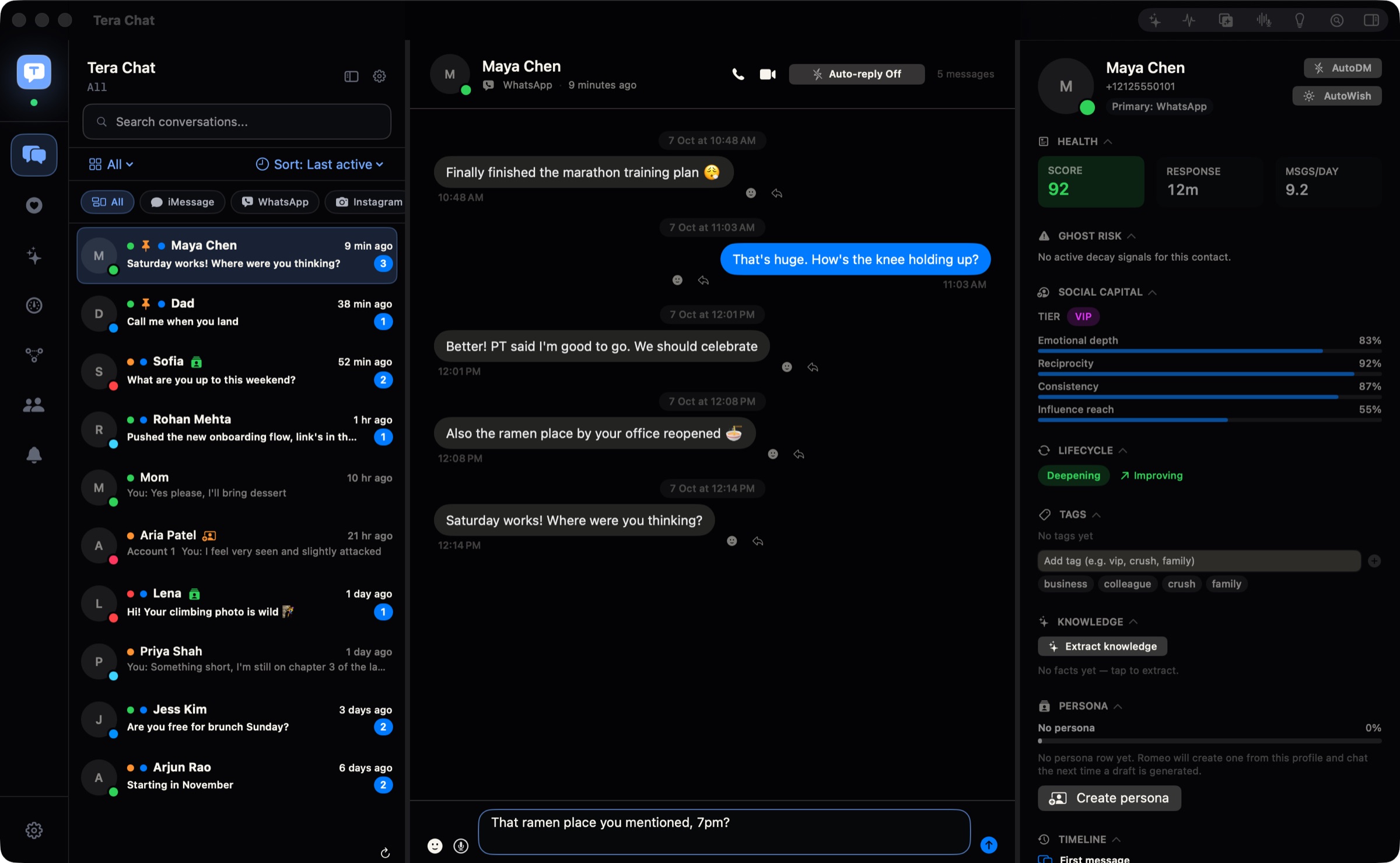
- Covers: iMessage, WhatsApp, Telegram, Instagram (up to three accounts) and Tinder. Not Signal, Messenger, Slack, Discord, LinkedIn or email.
- Permissions: iMessage needs Full Disk Access so Tera Chat can read your Messages history on your Mac (what that permission is), and macOS asks once to let it control Messages for sending. WhatsApp pairs by QR code like WhatsApp Web. Telegram and Tinder sign in through a private browser window, which needs Chrome, Brave or Edge installed.
- Data: your inbox stays on your Mac; no Tera Chat server holds a copy of your messages. The AI sees the conversations it works on: with your ChatGPT account or an API key the text goes to the provider you chose, and with a Tera Chat AI plan it goes to Anthropic’s Claude through Tera Chat’s server, which doesn’t keep it.
- Sends on its own? No by default. Autopilot is opt-in per platform or chat, and its replies wait in Pending drafts for you; it isn’t available for iMessage.
- Price: the app is free. AI costs nothing extra with your ChatGPT account (through OpenAI’s Codex); with a Claude or Grok API key you pay that provider for what you use; Tinder and Instagram drafts need ChatGPT through Codex or a plan. Built-in AI plans start at $9.99 a month, cancel anytime (plans).
- Requirements: Apple silicon (M1 or newer) and macOS 15 or later. No iPhone app.
RPLY: more work networks
RPLY is a Mac app that pulls ten networks into one AI inbox: iMessage, WhatsApp, Slack, email, Telegram, Signal, Instagram, X, LinkedIn and Discord. It drafts replies and leaves the decision to you; its FAQ says it doesn’t send on its own. Messages are indexed locally; drafting uses cloud models by default, with an on-device mode in settings (RPLY).
- Where it beats Tera Chat: Slack, Signal, email, LinkedIn, X and Discord, and an on-device AI option.
- Where it doesn’t: no dating apps, no relationship insights.
- Price: its own page lists a free tier of 10 drafted replies and both $25 and $30 a month for Pro (or $299–$300 a year). The page also now promotes an invitation-only product called Caspian, and the same company sells a near-identical Mac app, NOX, whose pricing page shows $50 a month billed annually. Confirm what you’re buying before you pay.
- Requirements: Apple silicon and macOS 14 or later.
Beeper: the most networks, a different kind of AI
Beeper connects 16 networks, including WhatsApp, Signal, Telegram, Instagram, Slack, Discord, LinkedIn and iMessage on macOS, and has no dating apps (Beeper). Its AI feature, AI in Chats, lets you mention @ChatGPT or @Apple Intelligence in any chat. It needs Beeper Plus or Plus Plus, works only in Beeper Desktop, can reference about the last 20 messages, and the AI’s reply is “visible to all participants” in the chat (Beeper Help). That’s useful for settling a question in a group, but it isn’t a private assistant drafting your replies.
- Where it beats Tera Chat: many more networks, and apps for Windows, Linux, iPhone and Android (Tera Chat is Mac-only).
- Permissions for iMessage: Accessibility, Contacts, Messages data and Automation; Beeper works by automating the Messages app (Beeper Help).
- Price: Plus, which AI in Chats needs, is $9.99 a month after a 7-day free trial (Beeper).
GhostReply: automatic iMessage replies
GhostReply learns how you text from your iMessage history and sends replies in your style automatically, from your Mac, for one person or all one-to-one chats. It skips group chats, runs as a Terminal process with your own Groq API key, and costs $4.99 once after 10 free replies (Product Hunt). There’s no approval step, which is the whole point of it and also the risk.
Side by side
As of 20 October 2026.
| Apple Intelligence | ChatGPT plugin | Tera Chat | RPLY | Beeper AI in Chats | GhostReply | |
|---|---|---|---|---|---|---|
| iMessage | Yes | Yes (plus SMS, RCS) | Yes | Yes | Yes | Yes |
| No | No | Yes | Yes | Yes (the inbox) | No | |
| Telegram, Instagram | No | No | Yes | Yes | Yes (the inbox) | No |
| Tinder | No | No | Yes (Hinge beta, read-only) | No | No | No |
| Slack, Signal, email | No | No | No | Yes | Slack, Signal | No |
| Drafts in your style | Personalized version pending | If you ask | Yes, with tone per tag | Yes | No | Yes |
| Sends on its own | No | After approval | Only if you turn on Autopilot | No | Posts AI replies to the chat | Yes |
| Where AI runs | Mac or Private Cloud Compute | OpenAI cloud | Your provider or Claude via Tera Chat | Cloud or on-device | OpenAI or Apple | Groq |
| Price | Free | Included in ChatGPT plans | Free app; AI via your ChatGPT account or an API key, or plans from $9.99/mo | Free tier; $25–30/mo | Plus $9.99/mo | $4.99 once |
| Needs | M1 or later | Apple silicon | M1 or later, macOS 15+ | Apple silicon, macOS 14+ | Beeper Desktop | Mac, Terminal |
Permissions and privacy: what you’re agreeing to
Any assistant that reads iMessage on a Mac is reading a protected part of your system, and any cloud AI sees the conversations it works on. Before installing, check three things:
- What it can read. Full Disk Access covers far more than Messages. Grant it only to apps you trust, and revoke it in System Settings → Privacy & Security when you stop using one.
- Where the AI runs, and what’s kept. Apple’s Private Cloud Compute says data is used only for your requests and never stored. Cloud providers and apps each have their own policies.
- Other people’s messages. The friends in your threads didn’t choose your AI tool.
Unofficial connections to WhatsApp, Instagram and dating apps also carry platform risks, which apply to Tera Chat as much as to any other inbox: see whether all-in-one messaging apps are safe and our privacy checklist for letting AI read your messages. If you use Tera Chat with Tinder, know that Tinder’s terms ban third-party apps that interact with the service, AI included, and Tera Chat connects to your account, so it is the kind of tool those terms cover: see what Tinder’s rules say about AI.
Who should use what
- iMessage only, and you want free and private: Apple’s Smart Reply.
- iMessage only, and you want an AI that can search and summarize your threads: ChatGPT’s Messages plugin.
- Personal chats spread across iMessage, WhatsApp, Telegram, Instagram and Tinder: Tera Chat.
- Work chats across Slack, Signal and email: RPLY.
- You need Windows or a phone app, or networks like Discord and LINE: Beeper.
- You really want replies sent without you: GhostReply does it, but read the risks above first.
What to do next
Write down where your last 20 conversations happened. If they’re all blue bubbles, try Apple’s and ChatGPT’s free options first. If they’re split across apps, an inbox that drafts in your style everywhere will save you more time than any single-app assistant. Either way, keep sending as the last step you do yourself.
Frequently asked questions
What is the best AI assistant for iMessage on Mac?
For iMessage only, start with what's free: Apple's Smart Reply in Messages, or ChatGPT's Messages plugin, which reads your chats and drafts replies you approve. If you also use WhatsApp, Telegram, Instagram or Tinder, an inbox app like Tera Chat covers them all in one place.
Can ChatGPT reply to WhatsApp messages on a Mac?
Not with OpenAI's own tools: as of 20 October 2026 its Messages plugin works with iMessage, SMS and RCS only. Tera Chat can use your ChatGPT account, through OpenAI's Codex, to draft WhatsApp, Telegram and Instagram replies on your Mac.
Do AI reply assistants send messages on their own?
Most don't by default. ChatGPT asks you to approve each message and recipient, RPLY only drafts, and Tera Chat's drafts wait for you unless you turn on Autopilot. GhostReply is the exception: it sends iMessage replies automatically.
Which AI messaging assistants work on Intel Macs?
Fewer than you'd hope. ChatGPT's Messages plugin is only in the Apple silicon build, Tera Chat needs an M1 or newer Mac, RPLY needs Apple silicon, and Apple Intelligence needs a Mac with M1 or later.
Is Beeper's AI the same as an AI reply assistant?
Not quite. Beeper Plus lets you mention @ChatGPT or @Apple Intelligence in a chat on Beeper Desktop, and the AI's reply is posted for everyone in that chat to see. It doesn't privately draft replies in your style.
Published . How we write and check our guides. Spotted something out of date? Email hello@terachat.co.