How to make AI replies sound like you, not like a robot
Why AI-written texts sound fake, and how to get AI replies in your style: the style-sample method, a reusable style card, a prompt and six before-and-after rewrites.
The short answer
- AI replies sound robotic because the model fills every gap with its default voice: longer, more polished and more enthusiastic than people actually text.
- The fix is evidence, not adjectives: give the AI 20 to 40 of your real sent messages, a short style card describing your habits, the conversation, and what you want to say.
- Always tell the AI your decision (yes, no, which day) and let it handle only the wording.
- Edit every draft against a quick checklist: cut the first sentence, match their length, delete any phrase you've never typed, and add one detail only you would know.
- Research on smart replies found people are judged more negatively when others suspect they used AI, so a draft that sounds like you matters as much as a fast one.
To make AI replies sound like you, give the AI evidence of how you actually text: 20 to 40 of your real sent messages, a short “style card” describing your habits (length, capitals, punctuation, emoji, how you laugh, how you say no), the conversation you’re replying to, and what you want to say. Then edit the draft against a quick checklist before you send it. Generic prompts produce generic texts because the AI fills every gap with its own default voice, which is longer, more polished and more enthusiastic than anyone texts.
This guide explains the tells that give AI replies away, walks through the style-sample method step by step with a template and a prompt, and shows six before-and-after rewrites. All examples are made up for this guide.
Why AI replies sound fake
AI models are trained to be helpful and clear, so their default register is closer to customer service than to a text from a friend. You can spot it in a few seconds:
| The tell | A typical AI draft | What a person usually sends |
|---|---|---|
| Too long | Three sentences to say yes | “yes!” |
| Too polished | Capitals, full stops, semicolons, dashes | lowercase, no full stop, maybe a typo |
| Over-enthusiastic | “That sounds amazing! I’d absolutely love to!” | “down” |
| Service-desk phrases | “Thanks for reaching out”, “I hope you’re doing well” | Nothing; they just answer |
| Vague warmth | “Let’s catch up soon!” | “free thursday?” |
| Wrong register | Texts your brother like your manager | Different voices for different people |
| No shared history | No nicknames, no inside jokes, no callbacks | “how did the interview go??” |
This matters more than it seems. In two experiments published in Scientific Reports in 2023, researchers found that AI-suggested replies made conversations faster and more positive, but people were judged more negatively when their partner suspected they were using them (Hohenstein et al., 2023). Trust in AI for relationships is low to begin with: in a 2025 Pew survey, 50% of US adults said AI will make people worse at forming meaningful relationships, and 5% said better (Pew Research Center). A reply that reads like AI costs you something even when it’s polite. If you’re wondering about someone else’s texts, see whether someone is using AI to text you.
The style-sample method in five steps
Describing your style in adjectives (“casual, friendly, short”) barely helps, because every AI thinks its default voice is casual and friendly. Showing it real examples does.
Step 1: Collect 20 to 40 messages you actually sent
Scroll back through three or four chats with different people, such as a close friend, a family member, a group chat and a colleague, and copy only your own messages. Aim for a mix: a quick yes, a no, a joke, something longer, a reply to bad news. Twenty to forty is a practical range: enough to show patterns, short enough to paste.
Before you paste them anywhere, delete names, phone numbers, addresses and anything private about other people.
Step 2: Turn them into a style card
Read your samples and write down what you notice. This is the part most people skip, and it’s what makes the AI consistent. A template to fill in:
MY TEXTING STYLE
Length: usually one short line; I split longer thoughts into 2-3 messages
Capitals: lowercase, except names
Punctuation: no full stop at the end; question marks yes; never semicolons or dashes
Laughing: "haha" with friends, "lol" in groups, nothing at work
Emoji: rarely, at most one per message
Phrases I use: "no stress", "down", "ngl", "you legend"
Phrases I never use: "absolutely", "reach out", "I hope you're well"
How I say yes: "yes!!" or "down"
How I say no: honest and short, and I suggest another time
With work contacts: full sentences, capitals, no emoji, still brief
Step 3: Prompt with samples, card, conversation and intent
Give the AI all four ingredients, and always state your decision yourself. The AI handles wording; you decide whether you’re going, what day, and how you feel.
You're helping me write a text message in my own voice.

Here is my style card:
[paste style card]

Here are real messages I've sent, for reference:
[paste 20-40 samples]

Here's the conversation I'm replying to (most recent last):
[paste the last 10-20 messages]

What I want to say: [e.g. "I can't come Saturday, but offer coffee next week"]

Write 3 options. Match my style card and the length of their last message.
No phrases from my "never use" list. No dashes. Don't add enthusiasm I didn't ask for.
Step 4: Edit against a 30-second checklist
Even a good draft needs a pass from you. Read it once against this list:
- Would I say this out loud to this person? If not, change it.
- Cut the first sentence. AI drafts often warm up before getting to the point.
- Match their length. A one-line message rarely deserves a paragraph.
- Delete any phrase you’ve never typed in your life.
- Remove extra exclamation marks and anything that sounds like a greeting card.
- Add one specific detail only you would know: a name, a callback, a plan.
Step 5: Save your style card so you don’t repeat this
In ChatGPT, go to Settings > Personalization, make sure Enable customization is on, and paste your style card into Custom Instructions (on iPhone and Android it’s Settings > Customize ChatGPT). Free and Go users can save up to 1,500 characters; paid plans get 5,000 (OpenAI Help Center). OpenAI notes that information from custom instructions is also used to improve its models unless you opt out. In Claude, click your initials, open Settings, and add it under Instructions for Claude, which applies to all your conversations (Claude Help Center). Keep the samples themselves out of permanent settings if they mention other people.
Before and after: six rewrites
Each pair shows a generic AI draft and the same reply after using the method above. The person in these examples texts in lowercase, keeps it short, and uses full sentences only at work. (Made-up examples.)
1. Declining a friend’s birthday dinner
- Generic AI: “Hi Maya! Thank you so much for the invitation to your birthday dinner. Unfortunately, I won’t be able to make it on Saturday due to a prior commitment. I hope you have a wonderful time, and let’s definitely catch up soon!”
- In your style: “maya noo I’m away that weekend. can I take you for birthday coffee next week instead? my treat”
- What changed: lowercase, no “unfortunately” or “prior commitment”, and a real offer with a time instead of “catch up soon”.
2. Confirming plans in a group chat
- Generic AI: “Sounds great! I’m definitely in for Friday at 7pm. Looking forward to seeing everyone there!”
- In your style: “in for fri 7. who’s booking?”
- What changed: one line, like everyone else in the group, plus the question that moves the plan forward.
3. Replying two weeks late
- Generic AI: “Hey! I’m so sorry for the delayed response. Things have been incredibly hectic lately, but that’s no excuse. How have you been? I’d love to catch up properly soon!”
- In your style: “sorry I vanished, work ate me alive. how did the interview go??”
- What changed: a short apology and a callback to what they told you last time. The AI can only do that if it sees the conversation.
4. A colleague asks for feedback on WhatsApp
- Generic AI: “Hi Tom, thanks for reaching out! I’d be more than happy to take a look at the document. I’ll review it carefully and get back to you with my feedback as soon as possible.”
- In your style: “Sure, I’ll read it tonight and send comments by 10 tomorrow.”
- What changed: still full sentences (it’s work), but half the length and with a real deadline instead of “as soon as possible”.
5. A friend shares bad news
- Generic AI: “I’m so sorry to hear that you’re going through such a difficult time. Please know that I’m always here for you, and don’t hesitate to reach out if you need anything at all.”
- In your style: “that’s awful, I’m so sorry. can I bring dinner round thursday? no need to reply properly”
- What changed: a specific offer instead of “anything at all”, and permission not to answer. For messages like this, use AI to get unstuck at most, and write the final version yourself.
6. Saying no without over-explaining
- Generic AI: “Thank you for thinking of me for this! Unfortunately, I have a lot on my plate at the moment, so I don’t think I’ll be able to commit to helping out with the event this time. I hope it goes really well!”
- In your style: “I’m going to pass on this one, I’m stretched thin this month. hope it goes well!”
- What changed: an honest reason in a few words. Keeping the exclamation mark is fine when it’s how you actually end texts.
Different people get a different you
Nobody texts their manager, their mum and their best friend the same way, so one style card isn’t enough for everyone. Keep two or three: close friends, family, work. Then name the right one in your prompt (“use my work style”). The same habit helps with any AI tool: the more specific the person, the less generic the reply.
Tools that learn your style for you
Copy-pasting samples works with any chatbot, but some tools try to learn your voice themselves. As of 20 October 2026:
| Tool | Learns your own style? | Which apps | Where your text goes | Cost |
|---|---|---|---|---|
| ChatGPT or Claude with this method | From the samples you give it | Any, via copy and paste | OpenAI or Anthropic | Free tiers or your plan |
| WhatsApp Writing Help | No: five fixed options (Rephrase, Professional, Funny, Supportive, Proofread) | WhatsApp, in some countries and 4 languages | Meta’s Private Processing | Free |
| Apple’s Personalized Smart Reply | Apple calls it personalized; English only; reported as not yet released (see below) | Messages on Macs with M1 or later, iPhone, iPad | On the device or Apple’s Private Cloud Compute | Free |
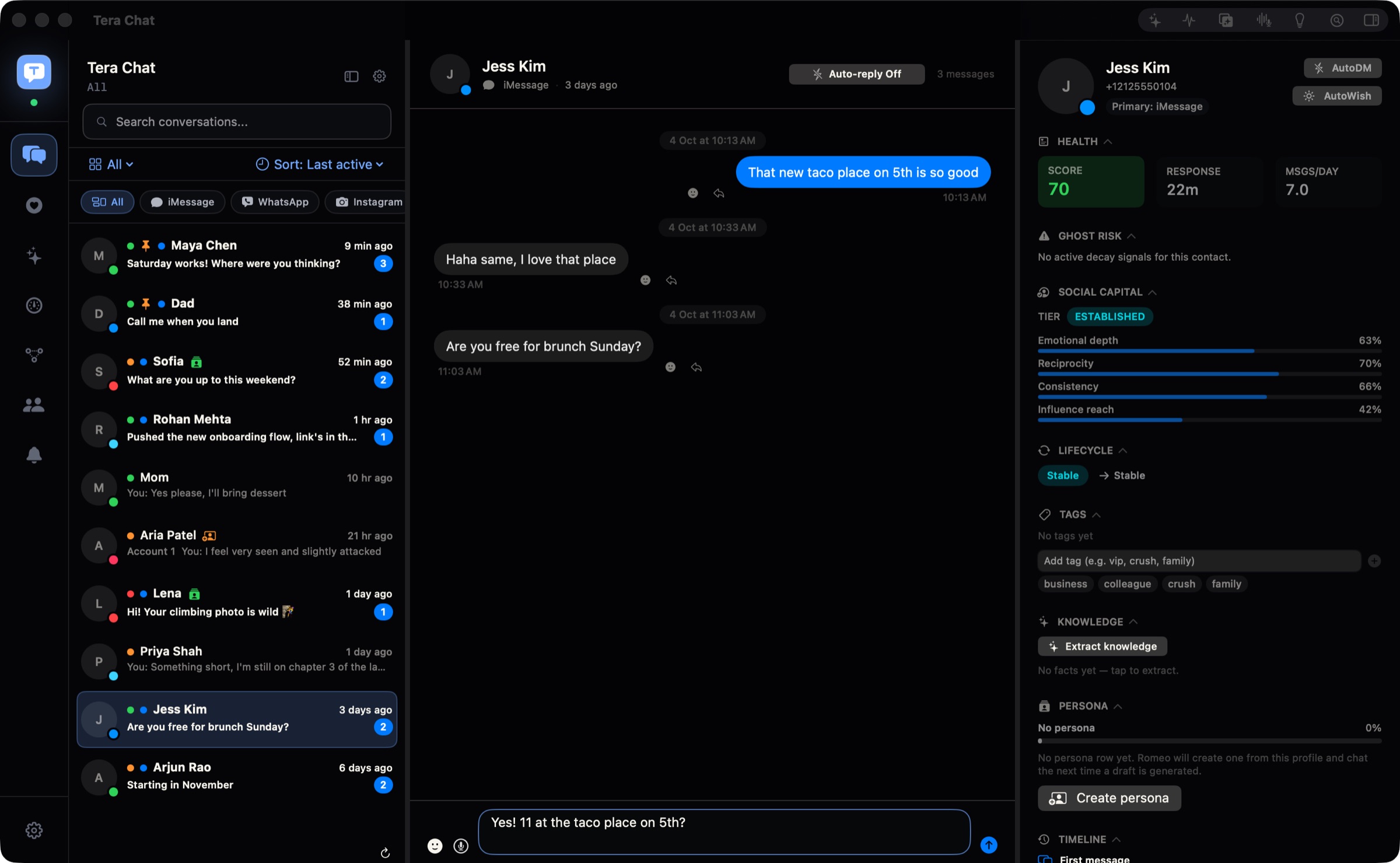
| Tera Chat | Yes, from your messages (slang, emoji, how long your messages run) | iMessage, WhatsApp, Telegram and Instagram on a Mac | Stays on your Mac; the text it drafts from goes to the AI you choose | Free with ChatGPT (through Codex) or a Claude or Grok API key; AI Plus $9.99/month |
A few notes on that table. WhatsApp’s Writing Help is useful for polishing a draft, but its tones are the same for everyone; our WhatsApp Writing Help guide covers who has it. Apple lists Personalized Smart Reply in Messages as an English-only feature for Apple Intelligence devices (Apple Support), but Macworld reports that the smarter suggested replies were removed before iOS 27’s public release and expects them in iOS 27.2 (Macworld, updated 13 October 2026); our Personalized Smart Reply tracker follows its arrival.
Tera Chat is our app, so weigh this accordingly. It drafts replies in your texting style across apps, and you can tag contacts (family, colleague and so on) and set a different tone for each tag, which is the “different people get a different you” idea built in. You review, edit and send each reply yourself; its optional Autopilot (on any Tera Chat AI plan, or with ChatGPT through Codex) stays off unless you turn it on. It works with your own ChatGPT account (through OpenAI’s Codex app) or your own Claude or Grok API key at no cost from Tera Chat; Instagram drafts need ChatGPT through Codex or a Tera Chat AI plan. It needs a Mac with Apple silicon and macOS 15 or later, and there’s no phone app.
Privacy: what you share when you paste texts into AI
Your samples are your words, but the conversation you paste usually contains someone else’s. Before you use any of the prompts above:
- Remove names, numbers and details that identify other people.
- In ChatGPT, turn off Improve the model for everyone in Settings > Data controls, or use a Temporary chat, which isn’t used for training but may be kept for up to 30 days (OpenAI Help Center).
- In Claude, check the model training setting in your privacy settings.
Is it safe to let AI read your messages? compares the privacy models of each kind of tool.
Stay the author
The goal isn’t to fool anyone. It’s to get past the blank-screen moment and still send something that’s yours. Decide what you want to say before you open the AI, keep the most personal messages for yourself, and if someone asks whether you had help, say so. If you’re thinking about using AI on dating apps, check the apps’ rules first: Tinder’s and Hinge’s terms restrict third-party AI tools.
For a ready-made prompt kit built on the same idea, see how to use ChatGPT to reply to texts without sounding like ChatGPT, and for a comparison of every approach, from paste-in generators to inbox apps, read AI that replies to texts in your style.
Frequently asked questions
Can ChatGPT learn my texting style?
Within a conversation, yes, if you paste examples of your real messages and a description of your habits. To reuse it, save a short style card in ChatGPT's custom instructions (Settings > Personalization on web and desktop). It won't learn from your messages on its own.
How many of my messages does the AI need?
Twenty to forty is a practical range: enough to show your patterns (length, punctuation, emoji, slang) and short enough to paste. Pick messages to different people so the AI sees how you change with each.
Is it dishonest to use AI to write texts?
Using AI for wording is like asking a friend to help phrase something; the decision and the feelings should still be yours. If someone asks whether you used AI, tell them, and write the most personal messages yourself.
Is it safe to paste my texts into ChatGPT or Claude?
Your samples and the conversation go to that company. Remove names and numbers, and turn off model training in ChatGPT's Data controls or check Claude's privacy settings before you paste anything personal.
Published . How we write and check our guides. Spotted something out of date? Email hello@terachat.co.