NOX alternative for Mac: Tera Chat vs NOX (formerly RPLY) compared
Looking for a NOX alternative? Tera Chat vs NOX (formerly RPLY) in October 2026: networks, AI drafts, privacy, price and where NOX is the better pick.
The short answer
- NOX suits work-heavy inboxes: it covers 10 networks, including Slack, Signal, email, LinkedIn, X and Discord, and its Pro plan is $50 a month billed annually as of 20 October 2026.
- Tera Chat for Mac suits personal chats: iMessage, WhatsApp, Telegram, Instagram and Tinder in one free inbox, with AI drafts in your style and alerts when a friendship goes quiet.
- Both are Mac apps for Apple silicon; NOX runs on macOS 14 Sonoma or later, Tera Chat needs macOS 15 Sequoia or later.
- NOX can draft with an on-device model and says it never sends on its own; Tera Chat drafts with ChatGPT, Claude or Grok, and its Autopilot is off until you turn it on.
- Tera Chat's AI is free with your own ChatGPT account (through Codex) or a Claude or Grok API key, and built-in plans start at $9.99 a month.
Pick NOX if your messages are mostly work: it covers 10 networks, including Slack, Signal, email, LinkedIn, X and Discord, prepares drafts before you open a thread, can run its AI on your Mac, and says it never sends on its own. Its Pro plan is $50 a month billed annually as of 20 October 2026. Pick Tera Chat for Mac if your chats are personal: it puts iMessage, WhatsApp, Telegram, Instagram and Tinder in one free inbox, drafts replies in your own style and notices which friendships are going quiet. Its AI is free with your own ChatGPT account (through Codex) or a Claude or Grok API key, or built in from $9.99 a month. Both need an Apple silicon Mac.
This page compares how each app connects to your messages, what the AI does and where your text goes, privacy, what you’d actually pay, and where each one wins. Tera Chat is our app; we’ve tried to be fair, and we say where others are the better pick. NOX facts come from its own website, pricing page, integration pages, privacy policy, terms and changelog, checked on 20 October 2026. We didn’t install or test NOX.
What is NOX, and is it the same as RPLY?
NOX is a Mac AI inbox made by NOX Devices, Inc., and by every public sign it is the app formerly called RPLY. Its older site, heynoxmail.com, still carries the RPLY name and the same pitch (“One Inbox for All Your Messages”), the address heynox.com/rply now shows the NOX page, and the command NOX gives for connecting AI tools still calls its built-in tool rply-mcp.
Two other things stand out on its site in October 2026:
- A second product. The bare address heynox.com now redirects to a sign-in page for Caspian, and NOX’s own pages carry a banner introducing Caspian as “a new standard for assistants”, by invitation. Caspian’s privacy policy names NOX Devices, Inc. as its operator and describes it as an assistant you text or call. The NOX pages (pricing, download, integrations, changelog) are still live.
- Release pace. The most recent entry on the NOX changelog is version 0.1.13, dated 17 September 2026. Earlier 2026 entries added Discord (April), Signal Desktop (May) and sending reactions (September).
NOX’s own pages also say it is “Backed by OpenAI” and has been featured in the New York Times and Business Insider.
Tera Chat vs NOX at a glance
The two overlap on iMessage, WhatsApp, Telegram and Instagram, then split: NOX toward work networks, Tera Chat toward dating apps and relationships.
| Tera Chat for Mac | NOX | |
|---|---|---|
| Made by | Tera Labs | NOX Devices, Inc. |
| Runs on | Apple silicon Mac, macOS 15 Sequoia or later | Apple silicon Mac (M1 or newer), macOS 14 Sonoma or later |
| Networks | iMessage, WhatsApp, Telegram, Instagram DMs, Tinder; Hinge (beta, read-only) | iMessage, WhatsApp, Telegram, Instagram, Signal, Slack, Discord, X, LinkedIn, email |
| Dating apps | Tinder; Hinge (beta, read-only); Bumble coming soon | None listed |
| Free plan | The whole inbox, no time limit; AI free with your own ChatGPT account or a Claude or Grok API key | Inbox, unlimited search and 10 AI-drafted replies |
| Paid plans | AI Plus $9.99/month, AI Pro $19.99/month, AI Max $49.99/month | Pro, $50/month billed annually |
| AI drafts | In your style, with a tone per tag; summaries; questions about a chat; voice drafts | In your voice, with a tone per contact; drafts prepared ahead; triage; search by meaning |
| Where drafting runs | Your chosen provider (ChatGPT, Claude or Grok), or Claude through Tera Chat’s server on a plan | Cloud models by default; optional on-device mode |
| Sends on its own? | Not by default; Autopilot is opt-in | Never, per NOX |
| Relationship insights | Health score, missed cues, fading chats, life events, weekly digest | A “closeness graph” of your inner circle is shown on its site |
| In-app analytics | Daily feature counts, never message text, can be turned off | Anonymised usage analytics (per its privacy policy) |
NOX sources: pricing, iMessage page, privacy policy. Prices in US dollars as of 20 October 2026.
How does each one connect to your messages?
Both read iMessage from the Messages history stored on your Mac. After that they take different routes: NOX reads the data of desktop apps you already have, while Tera Chat signs in to each network itself.
| Network | Tera Chat for Mac | NOX |
|---|---|---|
| iMessage | Reads your Messages history on your Mac (needs Full Disk Access); sends through the Messages app (macOS asks once for Automation permission) | Reads the Messages database on your Mac (needs Full Disk Access, plus Accessibility for shortcuts and overlays) |
| Pairs as a linked device (one account): scan a QR code with WhatsApp on your phone, like WhatsApp Web; sending is text only | “Link your WhatsApp desktop app”; NOX reads its local message data | |
| Telegram | Telegram’s web app opens in a private browser window; sign in, then click Sync History | “Link your Telegram desktop app”; NOX reads local data |
| Instagram DMs | Sign in on Instagram’s own login page inside Tera Chat; up to three accounts | “Link your Instagram account”; DMs sync to your Mac |
| Tinder | tinder.com opens in a private, isolated browser window; sign in, then click Sync History | Not supported |
| Signal, Slack, Discord, X, LinkedIn, email | Not supported | Supported |
Quotes are from NOX’s WhatsApp page and its Telegram and Instagram pages. For Telegram and Tinder, Tera Chat borrows a browser you already have, so Google Chrome, Brave or Microsoft Edge must be installed.
Both iMessage approaches rely on Full Disk Access, a powerful macOS permission that you can revoke at any time in System Settings. Before granting it to either app, read what Full Disk Access allows.
AI: what each one drafts, and where your text goes
Both draft replies that sound like you and leave the send button to you by default. NOX is built for speed in a busy work inbox; Tera Chat is built around personal relationships.
NOX, according to its pages:
- Drafts “in your voice”, with a tone that adapts by contact, and has drafts ready before you open a thread.
- Sorts your inbox into Needs Reply and Waiting, and searches “by meaning” rather than exact words.
- Uses cloud models by default; message content is processed “transiently” and not stored on NOX’s servers. An on-device mode in settings keeps drafting on your Mac.
- Never sends on its own: “NOX never sends an iMessage without your explicit action.”
- For developers, includes a read-only MCP server that runs on your Mac, so tools like Claude Code, Codex and Cursor can search your conversations.
Tera Chat for Mac:
- Replies in your style. It learns your slang, emoji and how long your messages run; you pick a draft, edit it and send it.
- A different tone for different people. Tag contacts (family, colleague, crush, VIP) and set the tone for each tag.
- Summarize (⇧⌘S) a thread you’ve fallen behind on, and Ask about this chat (“what restaurant did she mention?”).
- Voice drafts (⌥⌘V): pick the audio file of a voice message someone sent you; Tera Chat transcribes it on your Mac and drafts your reply.
- AI on your terms. Use your ChatGPT account through OpenAI’s Codex app, or a Claude or Grok API key (you pay your provider, with a daily spend cap that defaults to $5; Instagram and Tinder drafts need ChatGPT through Codex or a plan), or a Tera Chat AI plan that runs on Anthropic’s Claude. On a plan, text goes to Claude through Tera Chat’s server, which passes it on and doesn’t keep it. Some features run in the background once AI is set up (for example, a summary after every 10 new messages); you can pause that in Settings → Pipelines.
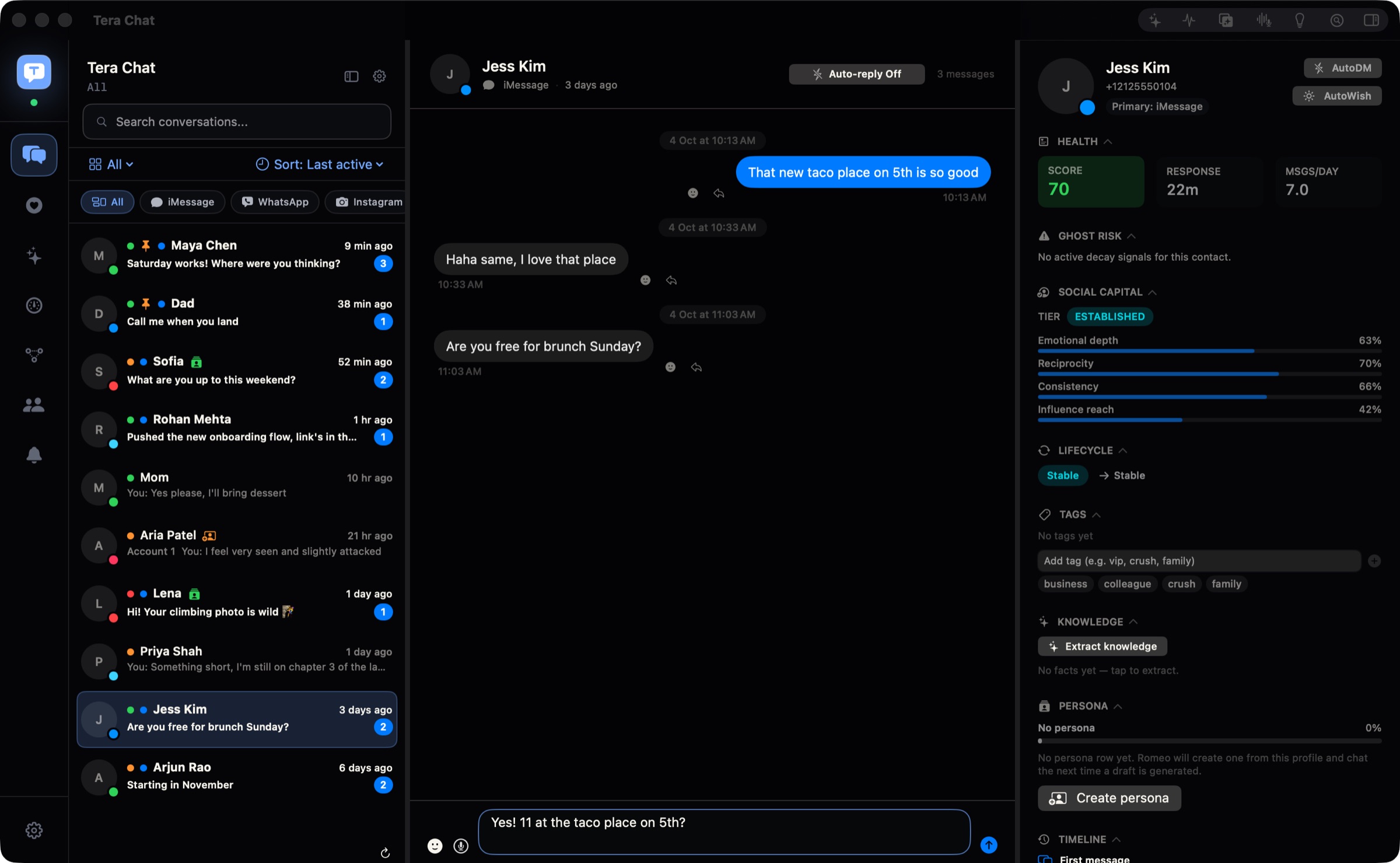
On automatic sending, the two differ in principle. Tera Chat’s Autopilot is off until you turn it on for a service or a single chat, and even then its replies wait in Pending drafts for you to edit, dismiss or send. Sending automatically is a separate per-chat switch marked Beta, with a warning that Tinder’s and Hinge’s terms don’t allow third-party AI tools; we don’t recommend turning it on. Quiet hours (10 pm to 8 am by default), rate limits and a Disable all autopilot switch are built in, and Autopilot isn’t available for iMessage. If you want the simplest possible promise that nothing ever goes out without a click, NOX’s “never” is it.
Privacy: both local-first, with different defaults
Neither company keeps your message history on its own servers, so the differences are in the details: where drafting happens and what the app reports back.
- NOX: messages are indexed and stored on your Mac. Drafting goes to cloud models by default, processed for “typically seconds” and not kept, and a local-only mode disables server-side AI entirely. Its privacy policy (updated 2 October 2026) says NOX collects anonymised usage analytics and doesn’t train AI models on your messages.
- Tera Chat: messages, contacts and relationship stats stay on your Mac and are never uploaded to a Tera Chat server. Settings, AI insights and drafts sync between your Macs only through your own iCloud account. AI keys and your Tera Chat account sit in the macOS Keychain; sign-ins to WhatsApp, Instagram, Telegram and Tinder stay in Tera Chat’s own storage on your Mac. The app sends usage counts, such as how often each feature is used, its version and which networks are connected, never message text; you can turn them off, and an account is optional.
- On AI in both: the AI sees the conversations it works on. NOX can keep that on your Mac; Tera Chat sends it to the provider you chose.
Both are unofficial clients for services like WhatsApp and Instagram, and NOX’s own policy notes that using WhatsApp through it “remains subject to Meta’s WhatsApp Terms”. Our guide to whether all-in-one messaging apps are safe explains what that means for your accounts. Tera Chat also connects to Tinder, whose terms (like Hinge’s) restrict third-party apps that connect to your account, AI included, so read what Tinder’s rules say about AI and stay the author of what you send.
What does each one cost?
For the inbox alone, both are free. For daily AI help, NOX Pro is $50 a month billed annually; Tera Chat’s AI is free with an account or key you already have, or $9.99 to $49.99 a month built in. Prices in US dollars as of 20 October 2026.
| Your setup | Tera Chat for Mac | NOX |
|---|---|---|
| Inbox and search, no AI | Free | Free |
| Trying AI drafts | Free with your own ChatGPT account or API key | Free tier: 10 AI-drafted replies |
| AI drafts every day | Free with your own ChatGPT account, or a Claude or Grok key (you pay your provider); or AI Plus at $9.99/month ($99.99/year) with a monthly AI allowance | Pro: $50/month billed annually ($600 a year), unlimited drafts |
| Tinder chats with AI openers | Any Tera Chat AI plan, from $9.99/month, or your own ChatGPT account through Codex | Not possible |
| Drafts prepared before you open a chat | Autopilot (opt-in, per service or chat, not iMessage): free with your ChatGPT account through Codex, or any Tera Chat AI plan from $9.99/month (5 chats on AI Plus, every chat on AI Pro and AI Max) | Built in; unlimited on Pro |
| Slack, Signal or email in the same inbox | Not possible | Free inbox; Pro for unlimited drafts |
Two caveats on NOX’s price. Its older RPLY-branded site still says “first month free, then $300/yr”, and NOX’s terms mention monthly or annual billing while its pricing page shows only the annual rate, so confirm the price in the app before you pay. Its pricing page has a “Start Free Trial” button without saying how long the trial is; its April 2026 release notes mention a 7-day free trial. On refunds, NOX’s terms say requests within 30 days of a payment are reviewed case by case; Tera Chat gives a full refund if you email within 14 days of any charge. Tera Chat’s plans are on its pricing page.
Where NOX wins
NOX is the better pick for a lot of people, and here’s specifically why:
- Work networks. Slack, Signal, Discord, X, LinkedIn and email (including Gmail) sit next to iMessage and WhatsApp. Tera Chat supports none of those six.
- One macOS version further back. NOX runs on macOS 14 Sonoma; Tera Chat needs macOS 15 Sequoia or later. (Both need Apple silicon.)
- Drafting that can stay on your Mac. NOX’s on-device mode keeps AI drafting local. Tera Chat’s drafts always come from a cloud AI provider; it transcribes voice messages on your Mac, but the reply draft itself isn’t written there.
- A firm “never sends” rule. Its pages say every draft needs your explicit action before anything goes out.
- Built for triage. Drafts are waiting before you open a thread, and search works “by meaning”. Unlimited drafts on Pro, where Tera Chat’s plans come with a monthly AI allowance.
- Fuller messaging. NOX’s release notes added macOS notifications for messages that need a reply (April 2026) and sending reactions (September 2026). Tera Chat doesn’t notify you of every new message, and reactions you add in it aren’t sent to the other app.
Where Tera Chat for Mac wins
- Price. The inbox is free with no time limit (plans only add built-in AI), and the AI is free with your own ChatGPT account or a Claude or Grok key. Built-in AI starts at $9.99 a month, against NOX’s $50.
- Dating apps in the same inbox. Tinder matches sit next to your other chats, with a New matches rail, openers drafted from the match’s own bio and prompts, and Plan a date ideas. Hinge is in beta (read-only) and Bumble is coming soon. NOX lists no dating apps.
- Relationship insights. Every contact gets a health score out of 100. Missed cues flag questions you never answered and celebrations you missed, fading chats are surfaced before they go cold, life events (birthdays, new jobs, trips) come with Add to Calendar, and a weekly digest lands every Sunday. Missed cues, fading chats and the health score work without any AI set up.
- Counts, never content. The app reports usage counts, such as how often each feature is used, its version and which networks are connected, never what’s in your chats (you can switch that off), and you can use it without an account.
What if you’re also weighing Beeper?
NOX’s own Beeper comparison describes Beeper as a “cloud bridge” that doesn’t draft replies. The second part matches Beeper’s documentation (its AI lets you tag @ChatGPT or @Apple Intelligence in a chat), but Beeper’s FAQ says that with its on-device connections, used for most networks, “messages never touch our servers.” Beeper is also the only one of the three with Windows, Linux and phone apps. Our Tera Chat vs Beeper comparison and Beeper review go into the detail, and our roundup of AI reply assistants for Mac covers ChatGPT’s Messages plugin and Apple Intelligence too.
Who should pick which
- Pick NOX if your day runs on Slack, email and iMessage, you want drafts waiting before you open a thread, and $600 a year is a fair price for the time it saves. Also pick it if you want drafting to stay on your Mac, or you’re on macOS 14.
- Pick Tera Chat for Mac if your important chats are friends, family and dates across iMessage, WhatsApp, Telegram, Instagram and Tinder, you’d like help noticing who you’ve drifted from, and you want to pay nothing or little for the AI.
- Pick neither if you need Windows, Linux or a phone app: both are Mac-only. Beeper covers those.
How we compared
On 20 October 2026 we read NOX’s pricing page, its iMessage, WhatsApp, Telegram and Instagram integration pages, its MCP page, its Beeper comparison, its privacy policy, terms and changelog, the RPLY-branded heynoxmail.com, and Caspian’s privacy policy. Tera Chat facts come from our own product documentation for version 1.1.2. We didn’t install or test NOX, so this page makes no claims about its speed or the quality of its drafts.
Frequently asked questions
Is NOX the same app as RPLY?
It appears so. NOX's site still serves the old /rply address, the MCP tool inside the NOX app is named rply-mcp, and the older heynoxmail.com site describes the same product under the RPLY name. NOX Devices, Inc. makes it.
How much does NOX cost?
As of 20 October 2026, NOX's pricing page lists a free tier with 10 AI-drafted replies and Pro at $50 a month billed annually. Its older RPLY-branded site still shows $300 a year, so check the price in the app before paying.
Does NOX support Tinder or other dating apps?
No dating apps appear on NOX's integration list. Tera Chat for Mac supports Tinder, with Hinge in beta (read-only).
Does NOX work on an Intel Mac?
No. NOX needs an Apple silicon Mac (M1 or newer) running macOS 14 Sonoma or later, and it is macOS only. Tera Chat also needs Apple silicon, plus macOS 15 Sequoia or later.
Do NOX or Tera Chat send messages automatically?
NOX says it never sends without your explicit action. Tera Chat sends nothing by default; its opt-in Autopilot writes drafts that wait for you, and sending automatically is a separate per-chat Beta switch we don't recommend.
Published . How we write and check our guides. Spotted something out of date? Email hello@terachat.co.