Relationship insights in Tera Chat: health score, missed cues, fading chats and life events
How Tera Chat's relationship health score is calculated, plus missed cues, fading chats, life events and the weekly digest, and what stays on your Mac.
The short answer
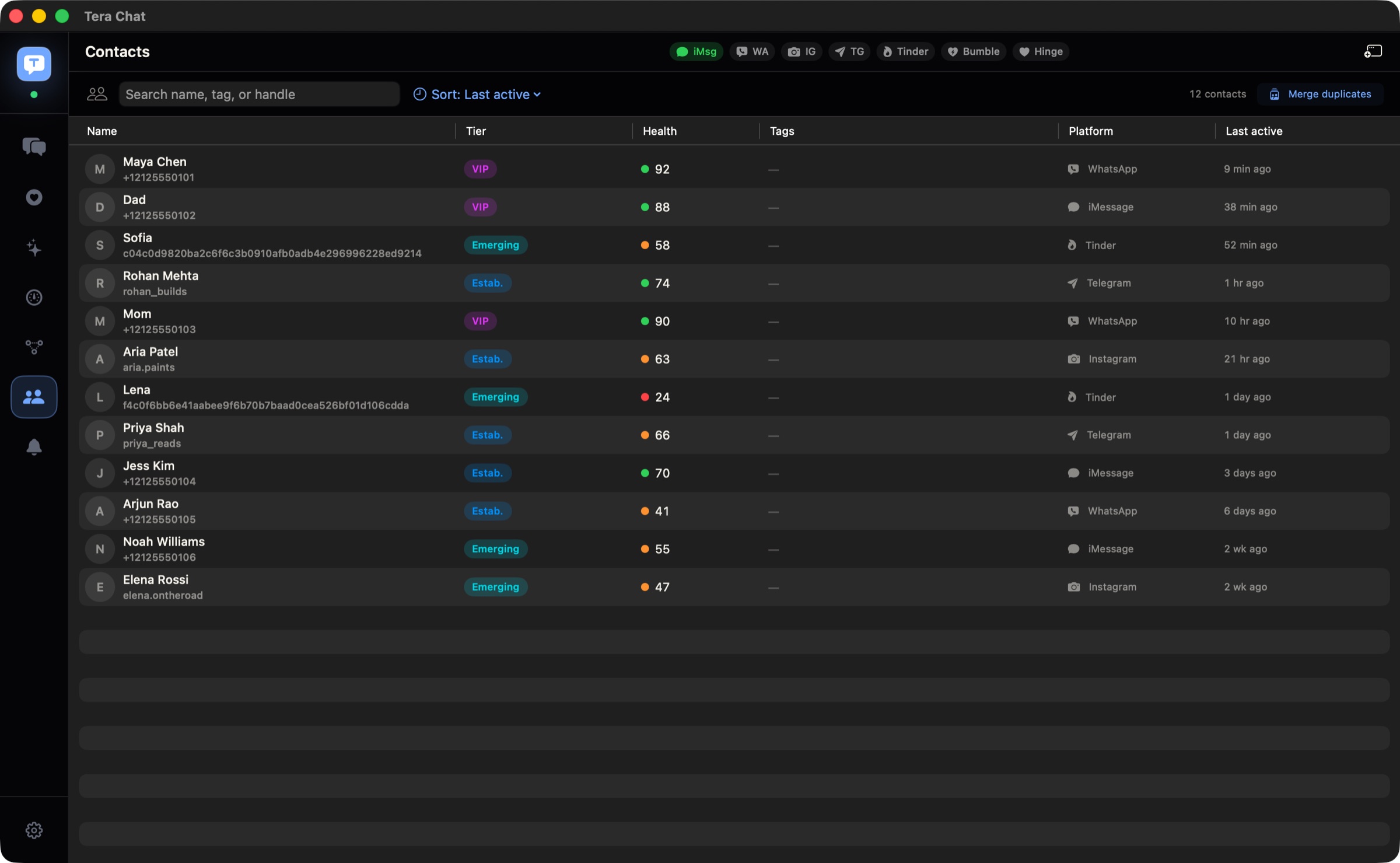
- Tera Chat's health score rates each relationship out of 100 from the last 30 days: how two-way the conversation is (40%), how recently you talked (30%), how often (20%) and the tone (10%).
- Scores of 70 and up show green (thriving), 40 to 69 orange (cooling) and below 40 red (struggling); a contact needs a conversation of at least five messages to be scored.
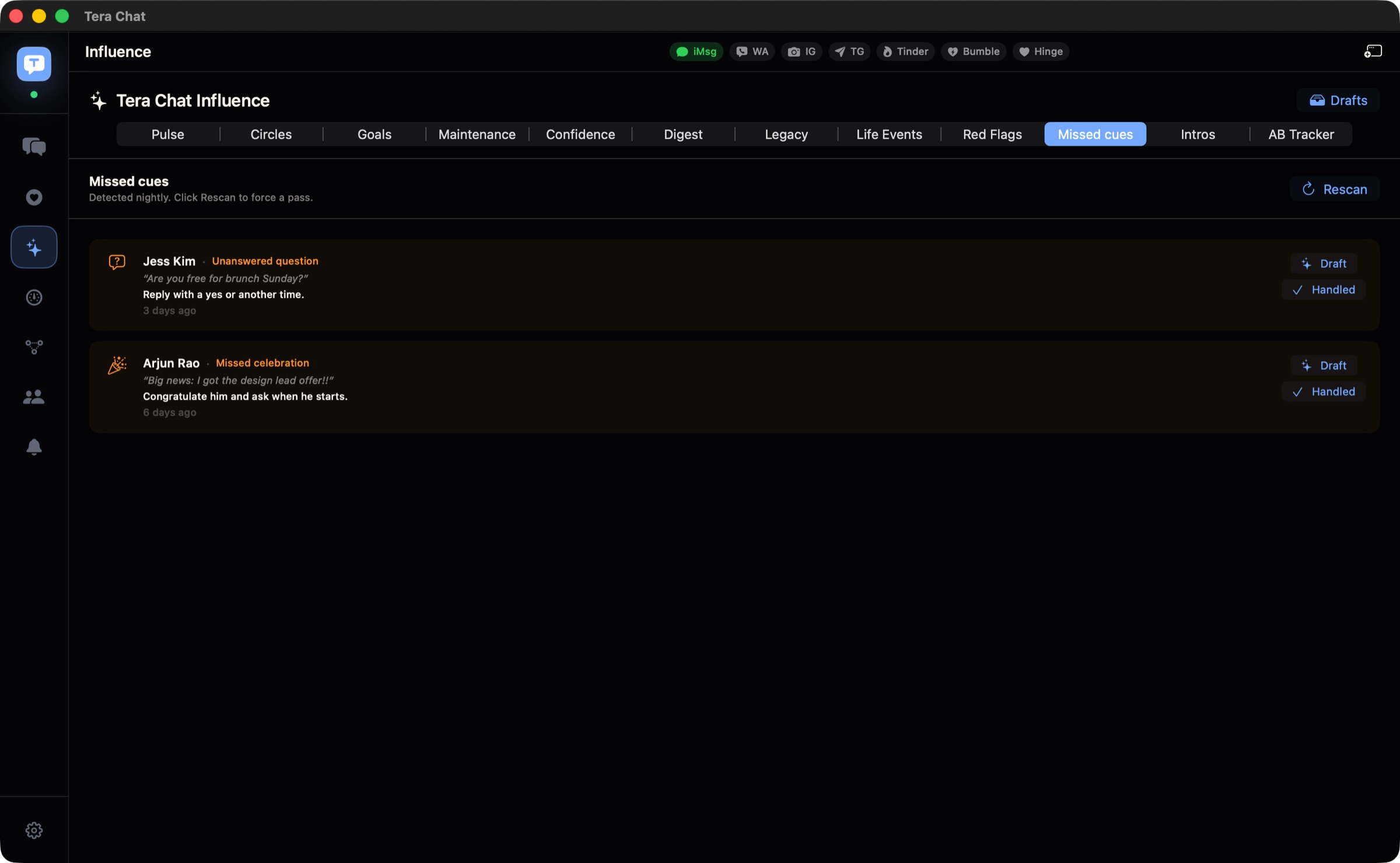
- Missed cues flag unanswered questions, missed celebrations, unheard support requests and unexplored interests, from a nightly scan on your Mac.
- The health score, missed cues, fading chats, circles and goals, introductions and red-flag radar work without AI; life events and the weekly digest need AI.
- Messages, contacts and relationship stats stay on your Mac; AI insights such as life events and digests sync between your Macs only through your own iCloud.
Tera Chat’s relationship health score rates each conversation out of 100 using the last 30 days: how two-way it is (40%), how recently you talked (30%), how often (20%) and its tone (10%), shown as green (thriving), orange (cooling) or red (struggling). Around it sit missed cues (questions and moments you never responded to), fading-chat alerts, life events like birthdays and new jobs, and a short digest every Sunday. The score, missed cues and fading-chat checks run on your Mac without AI; life events and the digest need AI.
This guide explains how each insight works, with a worked example of the score, where to find everything in the app, what stays on your Mac, and what to check when something looks off.
Tera Chat’s relationship insights at a glance
| Insight | What it shows | Where to find it | Needs AI? |
|---|---|---|---|
| Health score | A score out of 100 per contact, plus reply speed and messages per day | Contact details (⌥⌘I) → Health; sort the inbox by health score | No (the tone part uses AI if it’s set up) |
| Missed cues | Questions, celebrations, support requests and interests you didn’t respond to | Influence → Missed cues | No (the Draft button does) |
| Fading chats | Conversations going cold, before they do | Alert Center (⌥⌘A) → Decay, and notifications | No |
| Life events | Birthdays, anniversaries, job changes, trips, family events and other milestones from your chats | Notices above the chat, Alert Center → Life events, notifications | Yes |
| Weekly digest | Who’s warming up, who’s drifting, who to message | Influence → Digest, every Sunday morning | Yes |
| Circles and goals | Groups of people and how often you want to be in touch | Influence → Circles and Goals | No |
| Introductions | People in your network who should meet | Influence → Intros | No |
| Red-flag radar | Patterns like pressure or control in incoming messages | Influence → Red Flags, and each contact’s details | No |
The Influence window opens from the rail or with ⌘I.
How is the health score calculated?
The score adds up four parts, each measured over the last 30 days:
| Part | Weight | How it’s measured |
|---|---|---|
| Two-way balance | 40 points | The smaller of your sent and received message counts divided by the larger. Even back-and-forth scores full marks |
| Recency | 30 points | Full marks if you last talked within a day; then 80% within 3 days, 60% within 7, 40% within 14 and 20% within 30 |
| Frequency | 20 points | Messages per day divided by 5, so five or more a day scores full marks |
| Tone | 10 points | AI sentiment analysis of the conversation, if AI is set up. Until a chat has been analysed, tone counts as neutral (5 points) |
The total maps to a colour: 70 and above is green (thriving), 40 to 69 orange (cooling), below 40 red (struggling). Contacts need a conversation of at least five messages before they’re scored.
A worked example
Made-up numbers, to show how the parts add up. Over the last 30 days you sent Sam 60 messages and Sam sent you 45. You last talked two days ago.
- Balance: 45 ÷ 60 = 0.75, so 30 of 40 points.
- Recency: within 3 days, so 80% of 30 = 24 points.
- Frequency: 105 messages over 30 days is 3.5 a day; 3.5 ÷ 5 = 0.7, so 14 of 20 points.
- Tone: say it earns 7 of 10 points.
- Total: 75, green.
Now a friend who’s drifting: you sent 12 messages, they sent 3, and the last one was 10 days ago. Balance 3 ÷ 12 = 0.25 (10 points), recency 40% (12 points), frequency 0.5 a day ÷ 5 = 0.1 (2 points), tone say 6: a total of 30, red. Even with a friendly tone, a one-sided, quiet chat scores low, which is the point: it’s telling you you’ve been doing the reaching out, or that nobody has for a while.
What the score is not
It’s a nudge, not a judgement. A best friend who replies once a week can be as close as ever, and a busy group chat can score well without much warmth. Use it to spot who you haven’t been in touch with, then decide for yourself. The contact’s Health section shows the score alongside Response (how quickly you reply to them) and Msgs/day. To recalculate everyone at once, use Settings → Pipelines → Rescore all relationships.
What are missed cues?
Missed cues are moments in your chats that called for a response and didn’t get one. A scan runs on your Mac every night and looks for four kinds:
- Unanswered question: someone asked you something and the conversation moved on.
- Missed celebration: good news (a new job, an engagement, a finished exam) that you didn’t react to.
- Unheard support request: someone said they were having a hard time and you didn’t follow up.
- Unexplored interest: they mentioned something they care about and you never asked more.
Open Influence → Missed cues to see them. Each cue has Draft, which writes a reply for you to edit (this part needs AI), and Handled, which clears it. Rescan checks again now instead of waiting for the night. If you want to do the same thing by hand, the unanswered questions hiding in your chats shows how.
How do fading-chat alerts work?
Tera Chat checks every two hours, on your Mac, for conversations that are going cold, and grades them: Decaying, One-sided, Ghosting and Ghost protocol, from mildest to most serious. They appear in the Alert Center under Decay, and as notifications. The aim is to catch a chat while a quick “how did the move go?” still feels natural.
How does Tera Chat find life events?
Once AI is set up, Tera Chat checks each contact’s messages for life events once a day: birthdays, anniversaries, job changes, trips, family events, health news and other milestones mentioned in your chats. Reminders start three days ahead, as a notice above the chat, a row in the Alert Center under Life events, and a notification. Click Add to Calendar to put the event in your default calendar; macOS asks for Calendar access the first time. If a friend’s birthday was never saved in Contacts, a chat is often the only place it was ever mentioned; never forget a birthday compares the ways to catch it.
What’s in the weekly digest?
The digest is one short read every Sunday morning: who’s warming up, who’s drifting, and who to message this week. It builds itself on Sundays at 8:00 and sends a notification when it’s ready; Influence → Digest → Generate now builds one on demand. It needs AI to be set up.
Circles, goals and introductions
- Circles: group the people who matter (Influence → Circles). Use New circle and Add contact, or Generate circles to let Tera Chat suggest groups.
- Goals: set targets per circle, whether that’s to deepen, expand, revive or maintain those relationships, with a target count and an end date (Influence → Goals).
- Introductions: Influence → Intros suggests pairs of contacts who should meet, based on shared tags, platform, lifecycle and relationship health. Click Suggest for ideas and mark each one Sent, Connected or Declined as it goes.
For a system that uses these ideas with or without an app, see how to keep in touch with friends as an adult.
What is red-flag radar?
Red-flag radar looks at incoming messages from the last 30 days for patterns like pressure, control, threats, guilt, disrespect and pressure to reply. It runs on your Mac with no AI involved, it’s shown only to you, and it shows the messages it’s based on, so you can judge for yourself. In the app’s words: “Tera Chat shows evidence so you can decide, not panic.” Find it in Influence → Red Flags and in each contact’s details. It’s a prompt to look more closely, not a diagnosis.
What stays on your Mac?
- Your messages, contacts and relationship stats are stored on your Mac and never uploaded to a Tera Chat server.
- The health score’s maths, missed cues, fading chats and red-flag radar are worked out on your Mac.
- AI insights (facts Tera Chat learned about people, life events, digests) and drafts sync between your Macs only through your own iCloud account, using Apple’s CloudKit private database. Apple’s iCloud data security overview explains how that data is protected, including the optional Advanced Data Protection.
- AI sees the conversations it works on. Life events, the digest and the tone part of the score send text to your AI provider: the one you picked if you use your own account, or Anthropic’s Claude through Tera Chat’s server (which doesn’t keep it) on a Tera Chat AI plan. Pause background processing in Settings → Pipelines.
Is Tera Chat safe? covers storage, permissions and AI in more depth.
Notifications: what you’ll be told about
Tera Chat’s notifications are for these insights (fading chats, life events, the digest) and reminders, not for every new message. macOS asks whether Tera Chat may send notifications the first time it has one to show; change your choice any time in System Settings → Notifications (Apple).
If something looks wrong
| What you see | Why | What to do |
|---|---|---|
| A contact has no score | Fewer than five messages in the conversation | Wait until you’ve exchanged a few more |
| Scores look out of date | They haven’t been recalculated yet | Settings → Pipelines → Rescore all relationships |
| No life events or digest | They need AI | Turn on AI with your ChatGPT account or an API key or a Tera Chat AI plan |
| Draft on a missed cue asks you to enable Codex / ChatGPT or add a Grok key | For iMessage, WhatsApp and Telegram chats, that draft window only uses Codex / ChatGPT or a Grok key | Open the chat and click the sparkle button in the empty reply box, which works with any AI |
| The digest didn’t arrive on Sunday | Notifications are off, or AI isn’t set up | Check System Settings → Notifications, or click Generate now |
| Add to Calendar does nothing | Calendar access was denied | Allow Tera Chat under System Settings → Privacy & Security → Calendars (Apple) |
| iMessage contacts show as numbers | Tera Chat can’t see your Contacts | See how to add iMessage to Tera Chat for the fix |
| Nothing at all shows up | No apps are connected yet, or Tera Chat is paused (versions before 1.1.6 started that way) | Connect your apps first; if an orange banner says Tera Chat is paused (before 1.1.6: Safe preview), click Resume… |
What to do next
Open Influence → Missed cues first: it’s the quickest win, and it works without AI. Then sort your inbox by health score to see who’s slipped. If you haven’t connected all your apps yet, the getting started guide walks through it, because the insights are only as complete as the chats Tera Chat can see.
Frequently asked questions
What is a relationship health score?
In Tera Chat, it's a number out of 100 that sums up a conversation over the last 30 days: how balanced it is, how recent, how frequent and its tone. It's a prompt to check in, not a verdict on the friendship.
Does the health score need AI?
No. The score is calculated on your Mac. Only its tone part, worth 10 of the 100 points, uses AI sentiment analysis, and only if you've set up AI.
Can the other person see their score or know I'm tracking it?
No. Scores and insights are shown only to you inside Tera Chat. Nothing about them is sent to your contacts.
Why doesn't one of my contacts have a health score?
Tera Chat only scores contacts with a conversation of at least five messages. Once you've exchanged a few more, the score appears.
Do life events go into my calendar automatically?
No. Tera Chat shows the event with an Add to Calendar button, and nothing is added until you click it. macOS asks for Calendar access the first time.
Published . How we write and check our guides. Spotted something out of date? Email hello@terachat.co.