Birthday reminder apps vs birthdays pulled from your chats (2026)
The free way to never forget a birthday on iPhone and Mac, how birthday reminder apps and personal CRMs compare, and how to catch birthdays you never saved.
The short answer
- The best free birthday reminder is already on your iPhone and Mac: add birthdays to contact cards, turn on Calendar's Birthdays calendar and set a birthday alert.
- Every reminder app shares one weakness: it only knows the birthdays someone typed in. Many birthdays only ever appear in a chat.
- To catch unsaved birthdays, search your messages for words like 'birthday' and 'bday', ask the person, or use a tool that reads your chats.
- With AI set up, Tera Chat catches birthdays and other life events from iMessage, WhatsApp, Telegram, Instagram and Tinder chats on a Mac, with one click to Calendar; Apple has announced a similar one-tap Calendar suggestion for its own Messages app, in the iOS 27.2 beta as of October 2026.
The simplest reliable birthday reminder is free and already on your iPhone and Mac: add each birthday to the person’s contact card, turn on Calendar’s Birthdays calendar, and set a birthday alert. The weak spot of every reminder app, free or paid, is the birthdays you never saved, which often show up only in a chat (“it’s my birthday on Friday”). To catch those, search your messages, ask, or use a tool that reads your chats, such as Tera Chat on a Mac or the Messages Suggestions feature Apple is testing in the iOS 27.2 beta.
This guide covers each option with its cost and limits as of October 2026, a comparison table, how to find the birthdays you never saved, and a five-minute monthly routine. Tera Chat is our app; we’ve tried to be fair, and we say where others are the better pick.
Why birthday reminders fail
Most forgotten birthdays aren’t a memory problem. They’re a data problem or an alert problem.
- The birthday was never saved. A reminder app can only remind you of birthdays someone typed in. A friend mentions their birthday in a group chat, you reply with a party emoji, and it never reaches your contacts.
- The alert comes too late. A notification on the morning of the birthday is fine for a text, useless for a card, a gift or a plan.
- Too many reminders for people you don’t know well. When half your birthday notifications are for distant acquaintances, you learn to swipe them all away.
- The reminder lives in an app you no longer open. Social apps only help if you still use them and the friend shared their birthday there.
A good setup fixes all four: complete data for the people who matter, alerts with enough lead time, and nothing else.
Option 1: Contacts and Calendar on iPhone and Mac (free)
This is the right default for anyone with an iPhone or Mac. It’s free, keeps the data with Apple rather than a third party, and syncs through iCloud.
On a Mac:
- Add the birthday to the contact. Open Contacts, select the person, click Edit, click the Add button on the card and choose the birthday field (Apple’s guide to updating contacts).
- Turn on the Birthdays calendar. In Calendar, choose Calendar > Settings, click General and turn on Show Birthdays calendar (Apple Support). It updates automatically when you add or remove birthdays in Contacts.
- Set a birthday alert. In Calendar > Settings > Alerts, choose an alert time other than None for Birthdays (Apple Support).
On iPhone, add the birthday in the person’s contact card, then go to Settings > Apps > Calendar > Default Alert Times > Birthdays and choose an alert (Apple Support). If your contacts sync through iCloud, a birthday added on one device appears on the others.
Two things to know: the Birthdays calendar comes from Contacts, so you add or change birthdays there, and if you need more lead time for gifts, create your own yearly repeating event a week early for those few people.
Option 2: Google Calendar (free)
If your contacts live in Google, the equivalent works there. Birthdays saved in Google Contacts sync to a Birthdays calendar in Google Calendar, which you can show or hide under My calendars (Google Calendar Help). It’s the better choice if you use Android or Gmail as your main address book.
Option 3: Birthday reminder apps
Dedicated birthday apps add countdowns, gift ideas and notes, and usually import birthdays from your contacts. They help if you like planning gifts, but they don’t solve the missing-data problem: they import the same birthdays your contacts already have, plus whatever you type in by hand. Before you grant one access to your contacts, check the App Privacy section of its App Store listing to see what it collects.
Option 4: Personal CRMs (Dex, Mesh)
Personal CRMs combine birthdays with keep-in-touch reminders and notes, which suits people managing large professional networks. Prices as of October 2026:
- Dex says it notifies you of upcoming birthdays and reminds you to keep in touch. Premium costs $12 a month billed yearly or $20 month to month, with a 6-day trial that requires a card (Dex pricing).
- Mesh (formerly Clay) includes birthday notifications, reconnect reminders and “life updates” on its free plan for up to 1,000 contacts; it asks for a card even on the free plan, and Pro is $10 a month (Mesh pricing).
Both are strongest when your relationships live in email, calendars and LinkedIn; how much they can read from messaging apps varies, which we cover in personal CRMs with WhatsApp and iMessage. We compare more reminder tools in keep-in-touch reminder apps.
Option 5: Birthdays pulled from your chats
This is the only automatic way to catch birthdays you never saved, because it works from what people actually told you.
Apple Messages Suggestions (not released yet). Apple’s macOS 27 page says Messages and Mail will “offer suggestions to help you take quick actions based on context from your conversation”, such as adding a calendar event, in English, with suggestions in Messages “coming in a future software update”; its iOS 27 page says the same for iPhone. As of 20 October 2026 the feature is in the iOS 27.2 beta, where it offers one-tap Calendar and Reminders actions, according to Stuff (30 September 2026). Because it lives in Apple’s Messages app, it won’t see WhatsApp or Telegram chats.
Tera Chat (Mac). Our app reads the conversations you already have in iMessage, WhatsApp, Telegram, Instagram and Tinder on your Mac and, once AI is set up, catches life events from them: birthdays, anniversaries, new jobs and moves. Reminders start three days ahead, in the app and as notifications, and Add to Calendar puts the event in your default calendar with one click. The check runs once a day per contact. Your messages stay on your Mac; only the text the AI works on is sent to your AI provider (on a Tera Chat AI plan, to Anthropic’s Claude through Tera Chat’s server, which doesn’t keep it).
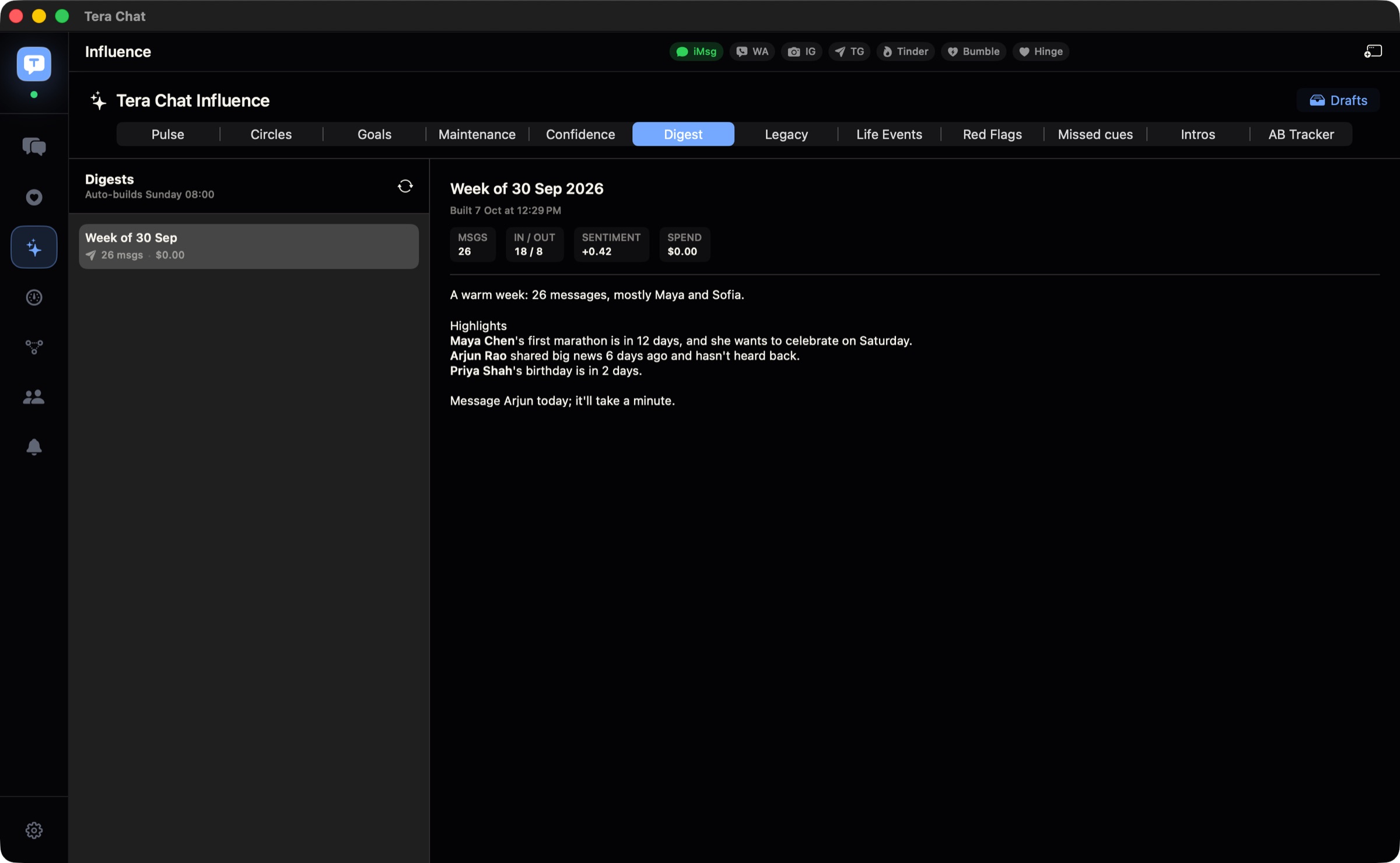
Its limits: it runs only on Macs with Apple silicon and macOS 15 or later, it only finds birthdays mentioned in the chats you connect (reading iMessage needs Full Disk Access, explained here), and it needs AI: your own ChatGPT account through OpenAI’s Codex, your own Claude or Grok API key, or a Tera Chat AI plan from $9.99 a month (as of October 2026). AI can misread a casual mention, so glance at an event before you add it.
Birthday reminder options compared
| Option | Where birthdays come from | Cost (October 2026) | Catches birthdays you never saved? | Best for |
|---|---|---|---|---|
| Contacts + Apple Calendar | Contact cards you fill in | Free | No | iPhone and Mac users |
| Google Calendar | Google Contacts | Free | No | Android and Gmail users |
| Social apps | Friends’ profiles | Free | Only if the friend shared it there | People who still use those apps daily |
| Birthday reminder apps | Contacts import or manual entry | Varies | No | Gift planners |
| Dex | Your contacts and connected accounts | From $12/month billed yearly | Only if a connected account has it | Professional networkers |
| Mesh | Your contacts and connected accounts | Free up to 1,000 contacts (card required) | Only if a connected account has it | Large networks on a budget |
| Apple Messages Suggestions | Dates mentioned in Messages | Free | Possibly, for dates mentioned in Messages | iPhone and Mac users who text in English, once it ships (in beta as of October 2026) |
| Tera Chat | Your chats in iMessage, WhatsApp, Telegram, Instagram and Tinder | App free; AI via your own account or from $9.99/month | Yes, when it was mentioned in a connected chat | Mac users whose friends are spread across apps |
How to find the birthdays you never saved
You can recover most missing birthdays in an evening with search and one honest question.
- List the people who matter. Your closest 15 or so people first; that’s where a missed birthday hurts. Our guide to keeping in touch with friends explains how to sort friends into circles.
- Check which ones have no birthday saved. On a Mac, scroll the Birthdays calendar for the year, or open each contact card.
- Search your chats. Try “birthday”, “bday”, “turning”, “years old” and the person’s name in Messages, WhatsApp, Telegram and Instagram. Group chats around past birthdays are a good source.
- Look at old photos. Photos from a party often carry the date.
- Just ask. “Random question: when’s your birthday? I’m finally putting the important ones in my calendar.” It’s a perfectly normal question.
- Save it straight away to the contact card, not to a note you’ll lose.
If you use Tera Chat with AI set up, you can also open a conversation and use Ask about this chat with a question like “Did they ever mention their birthday?”; answers draw on the recent messages and what the app has learned about the person.
What to send: birthday messages by closeness
Match the effort to the friendship. These are examples to rewrite in your own voice.
| Closeness | Good move | Example |
|---|---|---|
| Your closest people | Call, voice note or a plan | “Happy birthday. Dinner on me this week, you pick the place.” |
| Close friends | A message with a specific memory | “Happy birthday to the only person who’d drive four hours for a taco. Have the best day.” |
| Good friends | Warm and easy to answer | “Happy birthday. Anything fun planned?” |
| Wider circle | Short and genuine | “Happy birthday, hope it’s a great year.” |
| You missed it | No long apology, still specific | “I’m a day late and annoyed at myself. Happy birthday, how was it?” |
For more belated-message scripts, see what to say when you forgot to text someone back, and for remembering the details that make these messages personal, see how to remember details about people.
A five-minute monthly birthday routine
- On the first of each month, look at the coming month in your calendar.
- Decide per person: text, call, card, gift or plan.
- For cards and gifts, set a reminder a week before, unless your birthday alert already gives you that much notice.
- Add any birthday you discovered during the month to the contact card.
That routine, plus complete contact data for the people you care about, is enough for most people. Add a chat-reading tool only if your friendships mostly happen in messages and you keep discovering birthdays after the fact.
Frequently asked questions
What's the best free birthday reminder for iPhone and Mac?
The built-in Contacts and Calendar apps. Add a birthday to each contact card, turn on the Birthdays calendar in Calendar's settings and choose a birthday alert time other than None. It's free, private and syncs through iCloud.
Why am I not getting birthday notifications?
On a Mac, Apple's troubleshooting steps include checking that the Birthdays alert in Calendar's settings isn't set to None, that notifications are allowed for Calendar in System Settings, and that a Focus isn't silencing them.
How do I get a birthday reminder a week before?
If the built-in birthday alert doesn't give you enough notice, create your own yearly repeating event a week before the birthday for the people you buy gifts or cards for, and give that event its own alert.
Can an app find birthdays in my text messages?
Yes. Tera Chat on a Mac picks up birthdays mentioned in your connected chats once AI is set up, and Apple's Messages Suggestions, in the iOS 27.2 beta as of October 2026, offers to add dates from messages to Calendar. You can also search your chats by hand.
Published . How we write and check our guides. Spotted something out of date? Email hello@terachat.co.