Keep-in-touch reminder apps for iPhone and Mac (2026)
Keep-in-touch apps compared: fixed reminders (Apple Reminders, CatchUp, Hey!) vs apps that know when you last talked (Mesh, Dex, Tera Chat). Checked October 2026.
The short answer
- Keep-in-touch apps either remind you on a fixed schedule whatever happened (Apple Reminders, CatchUp, Hey!) or count from when you last actually talked (Mesh, Dex, Tera Chat).
- For most iPhone users, CatchUp is enough: it's free, sets daily to yearly or custom reminders per person, adds birthdays from Contacts and carries a 'Data Not Collected' label (checked 20 October 2026).
- Apple Reminders can do it with no new app: a repeating reminder per person, plus 'When Messaging' on iPhone to surface a note the next time you open that person's chat.
- Behaviour-based apps avoid pointless nudges. Mesh resets its reminders when you talk through a connected account; Tera Chat (Mac only) flags fading chats from iMessage, WhatsApp, Telegram and Instagram.
Keep-in-touch reminder apps come in two kinds. Fixed-interval apps such as Apple Reminders, CatchUp and Hey! nudge you every week or month whatever happened; behaviour-based apps count from when you actually last talked: Mesh and Dex use the email, calendar and messaging accounts you connect, and Tera Chat (Mac only) flags chats that are fading by reading iMessage, WhatsApp, Telegram and Instagram. For most iPhone users a free fixed-interval app like CatchUp is enough; if you text far more than you meet, behaviour-based tracking cuts out the reminders you don’t need.
Below: the difference in practice, a comparison table, each app’s strengths and limits, and how to set this up in Apple Reminders for free. Tera Chat is our app; we’ve tried to be fair, and we say where others are the better pick. We checked every app’s App Store listing, website or help pages on 20 October 2026.
Fixed-interval or behaviour-based: what’s the difference?
A fixed-interval app reminds you on the date you set; a behaviour-based app moves the reminder when you’ve already been in touch. An example, made up for this guide: you set “call Dad every two weeks” and you talk on Sunday. A fixed-interval app still nudges you on Wednesday. A behaviour-based app moves the next reminder to two weeks after Sunday, but only if that call or chat went through an account it can see.
| Fixed-interval | Behaviour-based | |
|---|---|---|
| How it decides | A schedule you set per person | Your last call, email or message through connected accounts, or the chat itself |
| What it needs from you | A list of people and an interval | Access to accounts or chats |
| Where it fails | Nudges you about people you saw yesterday | Can’t see in-person time or apps it isn’t connected to |
| Privacy cost | Usually low; often nothing leaves your phone | Higher; it has to read some of your activity |
| Examples | Apple Reminders, CatchUp, Hey! | Mesh, Dex, Tera Chat |
Keep-in-touch apps compared
| App | Price (checked 20 Oct 2026) | Platforms | Messaging sources | Privacy model | Best for |
|---|---|---|---|---|---|
| Apple Reminders | Free, built in | iPhone, iPad, Mac | Messages, through a “When Messaging” reminder on iPhone | Apple’s iCloud | No new app |
| CatchUp | Free (optional tips) | iPhone, iPad; Apple silicon Macs run the iPhone app | None; reads Contacts for birthdays | “Data Not Collected” label; syncs across your Apple devices | Simple, private reminders |
| Hey! | Free; optional reminder styles $2.99 each or $7.99 for all | iPhone; Apple silicon Macs run the iPhone app | None documented; imports friends from Contacts | Label lists email, content, identifiers and usage data linked to you | Playful nudges with streaks |
| Mesh (formerly Clay) | Free up to 1,000 contacts (card required); Pro $10/mo billed yearly or $20 monthly | Web, Mac, Windows, iPhone, Android | iMessage contacts (no message text), WhatsApp, Instagram, email, calendar, X, Facebook | Cloud; adds public updates to contacts | Free reminders that reset when you talk |
| Dex | Premium $12/mo billed yearly, $16 quarterly, $20 monthly; 6-day trial, card required | iPhone, Android, Mac, Windows, web, Chrome extension | WhatsApp (daily), iMessage (hourly via Mac app, beta), Instagram DMs, LinkedIn, email, calendar | Cloud, US-hosted; says it sells no data | Reminders across a professional network |
| Tera Chat | App and inbox free; AI with your ChatGPT account or a Claude or Grok API key, or AI Plus at $9.99/mo | Mac only (Apple silicon, macOS 15+) | iMessage, WhatsApp, Telegram, Instagram, Tinder; Hinge read-only (beta). No email or LinkedIn | Messages and relationship stats stay on your Mac; AI text goes to the AI provider you choose | Spotting fading chats on a Mac |
The apps in detail
Apple Reminders: free and already on your devices
Reminders can repeat on any schedule, and it syncs between iPhone, iPad and Mac through iCloud. On iPhone it also has a feature most people miss: When Messaging. Attach a reminder to a person and it appears the next time you chat with them in Messages (Apple Support). That’s ideal for “ask how the move went” rather than “text her every two weeks”.
- Best for: anyone who wants this without installing anything.
- Limits: it doesn’t know whether you’ve already talked, and When Messaging only works in Apple’s Messages app, not WhatsApp or Instagram.
CatchUp: the simple free option
CatchUp: Keep in Touch by Ryan Token lets you add people from Contacts and choose daily, weekly, monthly, quarterly, annual or custom reminders, at the time of day you pick. It adds birthday and anniversary reminders automatically if they’re saved in Contacts, works offline, has no ads and is supported by optional tips. Its App Store privacy label says “Data Not Collected”, and the developer says your contacts and preferences stay on your device. It needs iOS 26 or later.
- Best for: a private, no-cost reminder list on iPhone.
- Limits: purely schedule-based; it doesn’t see your messages or calls.
Hey!: reminders with personality
Hey! (listed on the App Store as “Hey! – Stay in Touch”) lets you add friends and pick a reminder every 3, 7, 14 or 30 days, with birthday reminders, streaks, notes per friend and reminder “styles” (from playful to therapist), several of them sold as optional packs. It says it keeps track of when you last reached out but doesn’t say how. Unlike CatchUp, its privacy label lists data linked to you, including your email address, content you create, identifiers and usage data.
- Best for: people who respond better to a joke than a to-do.
- Limits: fixed intervals only; more data collection than CatchUp.
Mesh: reminders that reset when you talk
Mesh, the personal CRM formerly called Clay, has Reconnect reminders: weekly, monthly, quarterly, yearly or Automatic, per person or per group. Crucially, Mesh counts from your most recent interaction (a call, calendar event, email or message from a connected account), so if you text someone early, the next reminder moves later. It’s free for up to 1,000 contacts, though it asks for a card at sign-up.
- Best for: behaviour-based reminders for free, on any device.
- Limits: it only sees contact through accounts you connect, its iMessage import needs the Mac app, and it adds public “life updates” (job changes, news) to people’s profiles, which not everyone wants for friends.
Dex: reminders inside a full networking CRM
Dex sets each reminder as your last interaction plus the frequency you choose, so a three-month keep-in-touch moves whenever a new interaction is logged (Dex docs). Its integrations keep that last-interaction date current, including WhatsApp (synced daily) and iMessage (synced hourly from its Mac app, in beta). It’s the most capable option here, and the most expensive: no free plan, and Premium is $12 a month billed yearly or $20 month to month (Dex pricing).
- Best for: people keeping up with a professional network as well as friends.
- Limits: price, and it’s built around networking rather than friendship.
Tera Chat: fading chats instead of timers (Mac)
Tera Chat is a free Mac app that brings iMessage, WhatsApp, Telegram, Instagram and Tinder into one inbox and drafts replies in your own texting style. Instead of a timer, it watches the conversations themselves:
- Fading chats are flagged before they go cold, from decaying to one-sided to ghosting, in the Alert Center and as notifications.
- Missed cues lists questions you never answered, celebrations you missed and requests for support you didn’t respond to, each with a Draft button.
- Circles and goals let you group people and set how often you want to stay in touch.
- Life events such as birthdays, new jobs and moves are caught from your chats, with one click to Calendar; this and the Sunday weekly digest need AI set up (your ChatGPT account, a Claude or Grok API key, or a Tera Chat AI plan).
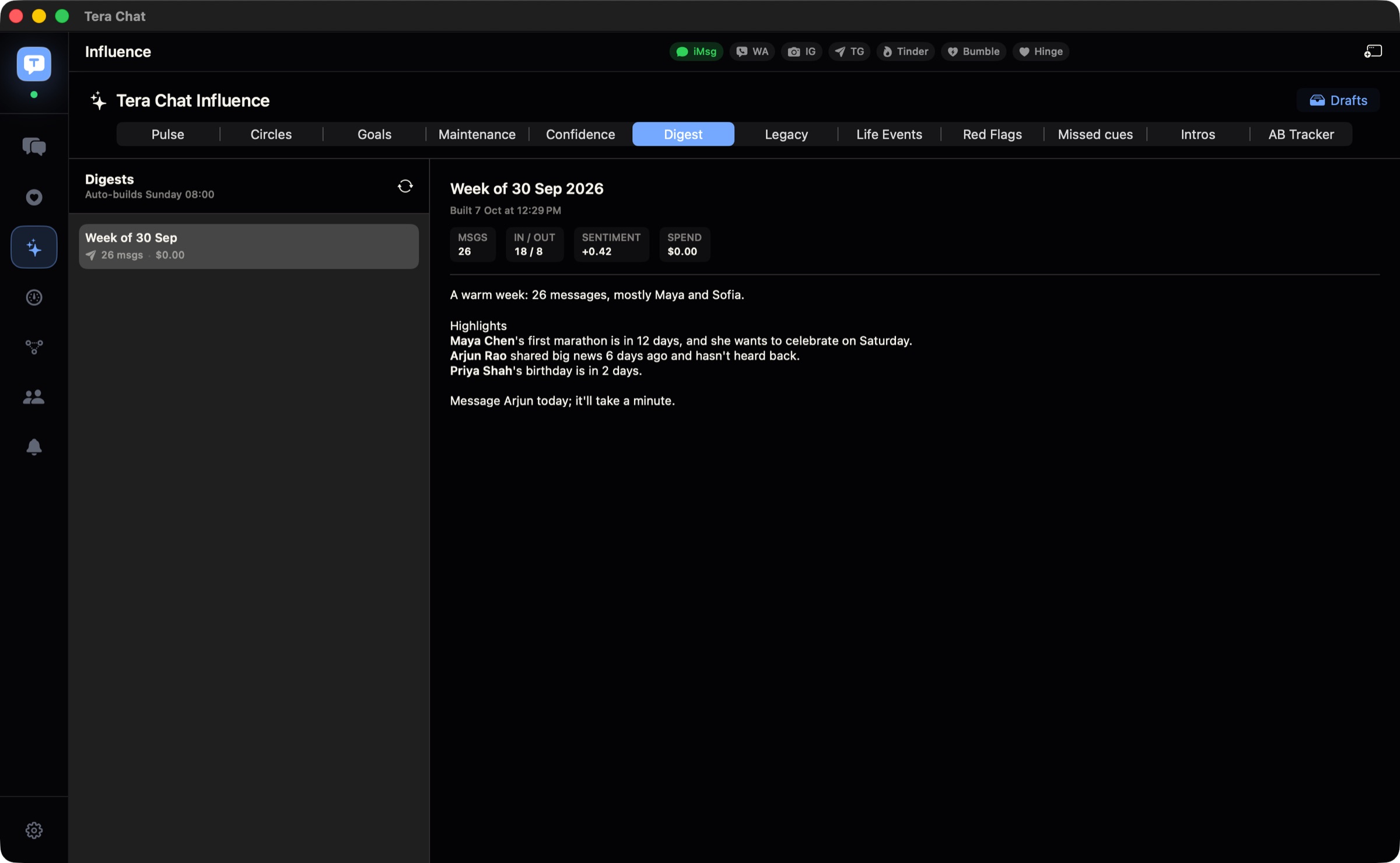
Missed cues and fading-chat alerts are worked out on your Mac without AI, and your messages and relationship stats stay on the Mac. Reading iMessage needs Full Disk Access, which our Full Disk Access guide explains; how each signal is calculated is in relationship insights explained.
- Best for: Mac users who mostly keep in touch by text and want reminders only when a chat is actually drifting.
- Limits: Mac only (Apple silicon, macOS 15 or later), with no iPhone app. It judges from your chats, so a friend you see every week but rarely text can still look like they’re fading. It doesn’t show a notification for every new message; its notifications are for things like fading chats, life events and the digest.
Also checked, and why they’re not above
- Catchup: Friendship Tracker (Chris Lee): free for two contacts, then a $9.99 in-app purchase (Catchup Plus) for unlimited contacts, notifications and a widget; “Data Not Collected” label. You log a check-in with a tap each time you connect, or turn on Auto Check In to log one when you call or message from the app. Its last update was in December 2024.
- Garden: Stay in Touch: still listed as free, but its App Store page shows no update since June 2020.
- UpHabit: its website returned an error (HTTP 503) on 20 October 2026.
How often should the reminders be?
Set the interval by closeness, then adjust after a month. These are starting points, not research findings:
| Who | Starting interval |
|---|---|
| Your closest 3–5 people | weekly |
| Good friends | every 2–3 weeks |
| Friends you’d hate to lose | every 1–3 months |
| Wider circle | a few times a year, plus birthdays |
If a reminder keeps firing for someone you just saw, lengthen it; if you’re surprised by how long it’s been, shorten it. There’s more on rhythms by relationship in how often should you text your friends, and on birthdays specifically in reminder apps vs birthdays pulled from your chats.
How to set up keep-in-touch reminders in Apple Reminders
This takes about ten minutes and costs nothing.
On a Mac (Apple’s guide):
- Open Reminders and create a list called “People”.
- Add a reminder such as “Text Sam”.
- Open the reminder’s details, turn on Date and pick the first date.
- Click the Repeat pop-up menu and choose an option, or choose Custom and set the Frequency (for example, every 2 weeks).
On iPhone, for a reminder tied to a conversation:
- Tap the reminder, then tap Edit Details.
- Turn on When Messaging.
- Tap Choose Person and pick the contact. The reminder appears the next time you chat with them in Messages.
Use the repeating reminder for rhythm (“text Sam”) and When Messaging for content (“ask Sam about the half-marathon”).
The verdict
Start with CatchUp or Apple Reminders: they’re free and private, and a fixed schedule is enough for most people. Move to Mesh if pointless nudges annoy you and you want something free that knows when you last talked. Choose Tera Chat if you keep in touch mostly over iMessage, WhatsApp, Telegram and Instagram on a Mac and want to hear about a friendship only when it’s actually drifting. For the habits that make any of these work, read how to keep in touch with friends as an adult, and for fuller relationship tools see personal CRMs for friends.
Frequently asked questions
What's the best app to remind me to text friends?
If you want something simple and free on iPhone, CatchUp. If you want reminders that know you already talked, Mesh (free for up to 1,000 contacts) or, on a Mac where your friendships run through chat apps, Tera Chat.
Can my iPhone remind me to text someone without an extra app?
Yes. In Reminders, create a reminder with a date and set it to repeat, for example every two weeks. You can also turn on When Messaging and choose a person, so the reminder appears the next time you chat with them in Messages.
Do keep-in-touch apps read my messages?
Most don't. CatchUp, Hey! and Apple Reminders work on a schedule you set. Mesh and Dex read when you were in contact through accounts you connect; Tera Chat reads your chats on your Mac to spot conversations that are fading.
Is there a keep-in-touch app for Mac?
Mesh and Dex have Mac apps, and CatchUp and Hey! run on Apple silicon Macs as iPhone apps. Tera Chat is a Mac-only app built around your chats; Apple Reminders syncs across Mac and iPhone.
How often should a keep-in-touch reminder be?
Match it to closeness: weekly for your closest few people, every few weeks for good friends, and every one to three months for the wider circle. Adjust after a month if the reminders feel like nagging.
Published . How we write and check our guides. Spotted something out of date? Email hello@terachat.co.