Using multiple dating apps: a simple system for your matches
Using multiple dating apps without losing track: how many chats to keep open, a weekly routine, kind ways to close chats, and Hinge's data on why fewer works.
The short answer
- You can use Tinder, Hinge and other dating apps at the same time. What decides whether it works is how many conversations you keep live, not how many apps you have.
- Keep only as many chats open as you can answer within a day. Hinge found that matches whose first message got a reply within 24 hours were 72% more likely to lead to a date (2023 data).
- Hinge's Your Turn Limits, tested in 2024, paused new likes when eight or more matches were waiting on your reply. In testing, responsiveness on the app rose 20%.
- Check in at two set times a day, spend 15 minutes on a weekly review, and close stalled chats with a short, kind message instead of letting them fade.
- On a Mac, Tera Chat shows Tinder chats (and Hinge chats, read-only, in beta) next to Instagram, iMessage and WhatsApp, and shows which chats are waiting on you. It connects to your dating accounts, which Tinder's and Hinge's terms restrict.
Yes, you can use several dating apps at once, and the people who do it without burning out cap their conversations, not their apps. Keep only as many chats open as you can answer within a day (for most people that’s three to six), check in at two set times instead of all day, and close stalled chats with a short, kind message. Hinge’s own data backs this up: when it paused new likes for people with too many matches waiting on a reply, responsiveness on the app rose 20% in testing.
This guide gives you a system that works with nothing more than your phone and a notes app: how many conversations to keep, a weekly routine, what to write when you close a chat, and how to keep track of who said what. At the end there’s an option for running it all from one inbox on a Mac.
Can you use Tinder and Hinge at the same time?
Yes. Each app is a separate account, and plenty of people use more than one. In a Forbes Health/OnePoll survey of 1,000 US adults who had used a dating app in the past year (fielded in March and April 2024), 49% had used Tinder, 38% Plenty of Fish, 29% Bumble and 17% Hinge. Those figures add up to well over 100%, so many respondents were on several apps.
The same survey shows the cost. 24% of respondents said repetitive conversations with multiple matches wore them out, and 18% blamed keeping up profiles and juggling several apps at once. More apps means more queues to keep up with, while the hours in your evening stay the same.
One rules point is worth knowing. Tinder and Hinge both belong to Match Group, and both apps’ terms say someone banned for breaking the rules can be banned from affiliated apps too (Tinder’s terms, §4, names Hinge; Hinge’s terms, §4, names Tinder). Having both accounts is normal. Breaking the rules on one can cost you both.
How many apps is right for you?
| Apps | Works well for | Watch out for |
|---|---|---|
| One | Anyone short on time, burned out, or getting good matches on one app already | A smaller pool, especially in a small town |
| Two | Most people: one large app plus one that suits what you’re looking for | Keeping one set of rules across both |
| Three or more | People with a strict cap on live chats and time to spare | Matches waiting days for a reply, details getting mixed up |
How many conversations should you keep open?
Keep as many as you can answer within about a day, which for most people is somewhere between three and six. Past that point, replies slow down, messages get generic and good matches go cold while you catch up. If you’re planning around Dating Sunday, our guide has a plan for the day.
The best evidence for a cap comes from Hinge:
- Fast replies lead to dates. Matches whose first message got a reply within 24 hours were 72% more likely to lead to a date, based on Hinge’s 2023 data, and 44% of daters named a lack of responsiveness as a top dating challenge (Hinge, May 2024).
- Hinge built a cap into the app. Its Your Turn Limits feature, tested in May 2024, kicked in when eight or more people were waiting on your reply: you had to reply or end some of those conversations before you could keep sending and receiving likes (Hinge).
- The cap helped. When Hinge announced the feature in September 2024, it said responsiveness rose 20% in testing, 48% of users said it helped them focus on quality over quantity, and 45% said it helped them focus on their current matches (Hinge). Logan Ury, Hinge’s Director of Relationship Science, said daters do better when they build strong connections with only a few people at a time.
Hinge’s line is eight people waiting. Set your own cap lower than that, based on the time you actually have:
| Time you can give dating apps each day | Live chats to keep (our rule of thumb) |
|---|---|
| About 10 minutes | 2–3 |
| 20–30 minutes | 4–6 |
| 45 minutes or more | 6–8 |
A “live” chat is one where someone has written in the last few days and you’d genuinely like to meet them. For context, respondents in the Forbes Health survey said they spent about 51 minutes a day on dating apps, and Forbes Health advisory board member Rufus Tony Spann suggested keeping each session to 30 minutes, with breaks in between.
The weekly system, step by step
The system has four lists, two daily check-ins, one rule about swiping and one weekly review. It takes about 30 minutes a day and 15 minutes on Sunday.
1. Sort every chat into four lists
- Your turn: they’ve written, and you owe a reply. These get answered at your next check-in.
- Their turn: you’ve replied and you’re waiting. Leave these alone.
- Planning: a date is being arranged or is booked.
- Stalled: nobody has written for four days or more. These get one follow-up or a kind close at your weekly review.
You don’t need a spreadsheet. Hinge has reminded daters when it’s their turn to reply since 2017, and since 2023 it has put the chats waiting on your reply at the top of your matches list (Hinge). On any app, you can scan the latest message to see whose turn it is. What you need is the habit of looking at the lists in that order.
2. Check in twice a day, at set times
Pick two short windows, for example 15 minutes at lunch and 15 minutes after dinner. Reply to everything in “Your turn”, handle any date logistics, then close the app. Turn off notifications for new likes and matches, since they pull you back in without anything needing an answer. Outside your windows, the apps stay closed.
3. Only swipe when there’s room
If your live chats are at your cap, don’t swipe or send likes. A new match who waits three days for a first message often goes cold, and you’ve added to the pile without making room. When a chat closes or turns into a date, you have room for one more.
4. Move good chats toward a date within a week or two
Messaging is for deciding whether to meet, not a replacement for meeting. After several days of easy back-and-forth, suggest something specific. Our guide on how to ask someone out over text has the exact wording. Chats that turn into dates leave your queue, which is what keeps the system light.
5. Do a 15-minute review once a week
Once a week, for example on Sunday evening:
- Count your live chats. If you’re over your cap, close the weakest ones.
- For each stalled chat, send one light follow-up if you haven’t already. If you have, close it kindly (scripts below). Our guide to what to do when a match stops replying covers the follow-up.
- Update your one-line notes (next section).
- Confirm any dates coming up this week.
- Decide whether you’ll swipe this week and for how long.
| When | What you do | Time |
|---|---|---|
| Every day, midday | Reply to everything in “Your turn” | 10–15 min |
| Every day, evening | Replies, plus date logistics | 10–15 min |
| Two days a week | Swipe or send likes, only if you’re under your cap | 10 min |
| After each date | Decide, then text within a day | 5 min |
| Sunday | Weekly review: close, follow up, confirm, decide | 15 min |
After a date, our guide to what to text after a first date has examples whether it went well or not.
Keep a one-line note for each match
The classic mistake with several apps is mixing people up: asking someone about the sister who was actually someone else’s, or forgetting which match is the nurse and which is the runner. A short note per match fixes it. Keep it private and stick to what they told you.
Sam (Hinge) · matched 12 Oct
Said: training for a half marathon, hates coriander, sister visiting this weekend
Next: ask how the long run went · suggest Thursday coffee
Your phone’s notes app is enough. One note per person, the app’s name in the title, and a “next” line so you know what to say at your next check-in.
How do you close a chat kindly?
Send one or two sentences that are clear and warm, without a long explanation, then unmatch (or wait a day in case they reply, then unmatch). It takes 20 seconds and saves the other person days of wondering.
Most people find this hard. In the 2026 Singles in America study of about 5,000 US singles, only 35% said they’d be willing to tell someone face-to-face that they weren’t interested, and 37% by text (Kinsey Institute via EurekAlert). Meanwhile 45% of young daters in Tinder’s 2025 survey said they want more empathy after rejection (Tinder Year in Swipe 2025). A kind closing text is the easy, decent middle ground.
Example messages, made up for this guide:
| Situation | What to send |
|---|---|
| A few messages in, no spark | “Hey Jordan, I’ve enjoyed chatting, but I don’t think we’re the right match. Good luck out there.” |
| You’ve been the slow one | “Sorry for going quiet. I’ve realised I’m not feeling a spark, and I’d rather say so than leave you waiting. Take care.” |
| You’ve started seeing someone | “Quick update: I’ve started seeing someone and want to give it a proper go, so I’m closing my other chats. It was nice talking to you.” |
| They asked you out and you don’t want to go | “Thanks for asking, that’s kind. I don’t think we’re a match, so I’ll pass, but I enjoyed the chat.” |
| A longer chat that drifted on both sides | “Looks like our chat drifted. No hard feelings at all, and good luck with the move next month.” |
When you can skip the message: if you’ve only swapped an opener or two, unmatching without a note is normal. If someone has been rude, pushy or made you uncomfortable, you owe them nothing: unmatch and use the app’s report option.
If they reply badly: don’t argue or explain further. Unmatch.
Signs you’re running too many chats
If two or more of these are true, lower your cap:
- You’ve mixed up details between matches, or asked someone a question they already answered.
- You’re sending the same opener to everyone.
- Replies regularly take you two days or more.
- New matches sit without a first message for days.
- You feel a small dread opening the apps.
- You’ve had dozens of chats this month and no dates.
That last pair is the start of burnout. Our two-week dating app burnout reset builds on this system with a short break first.
Keeping everything in one place
With the apps you already have
- Put the dating apps in one folder on your phone’s home screen, away from the first page, so you open them on purpose.
- Use one notes app for your one-line notes, and your calendar for dates.
- Pause when you’re at your cap or away. Bumble’s Snooze mode hides your profile for 24 hours, 72 hours, a week or indefinitely while existing connections can still message you (matches without an active chat expire while you’re snoozed).
- On a computer, Tinder works in a web browser at tinder.com. Hinge has no web or desktop version, and Bumble closed its web app in October 2025, so both are phone-only (checked 20 October 2026).
The hardest part to track is the chat that moves. Once a match gives you their Instagram or WhatsApp, the conversation splits across two apps. Our guide to moving from a dating app to Instagram or WhatsApp covers when to switch and how to do it safely.
With Tera Chat on a Mac
Tera Chat is our app: a free Mac app that brings iMessage, WhatsApp, Telegram, Instagram and Tinder into one inbox. For the system above, it does much of the sorting for you:
- Tinder matches sit next to the rest of your chats, and a New matches rail shows the matches who haven’t heard from you yet.
- Hinge (beta, read-only): you can see your Hinge conversations next to everything else, but you reply in the Hinge app.
- The Needs Reply view is your “Your turn” list, across every app at once.
- Fading chats are surfaced before they go cold, and Missed cues (a nightly scan on your Mac) flags questions you never answered. Together they’re your “Stalled” list.
- When a Tinder match shares their Instagram, it helps you continue on Instagram, next to the Tinder chat it came from, so you don’t lose the thread.
- Drafts in your voice: it can suggest a reply in your texting style, which you read, edit and send yourself. Nothing sends on its own: Autopilot is off until you turn it on.
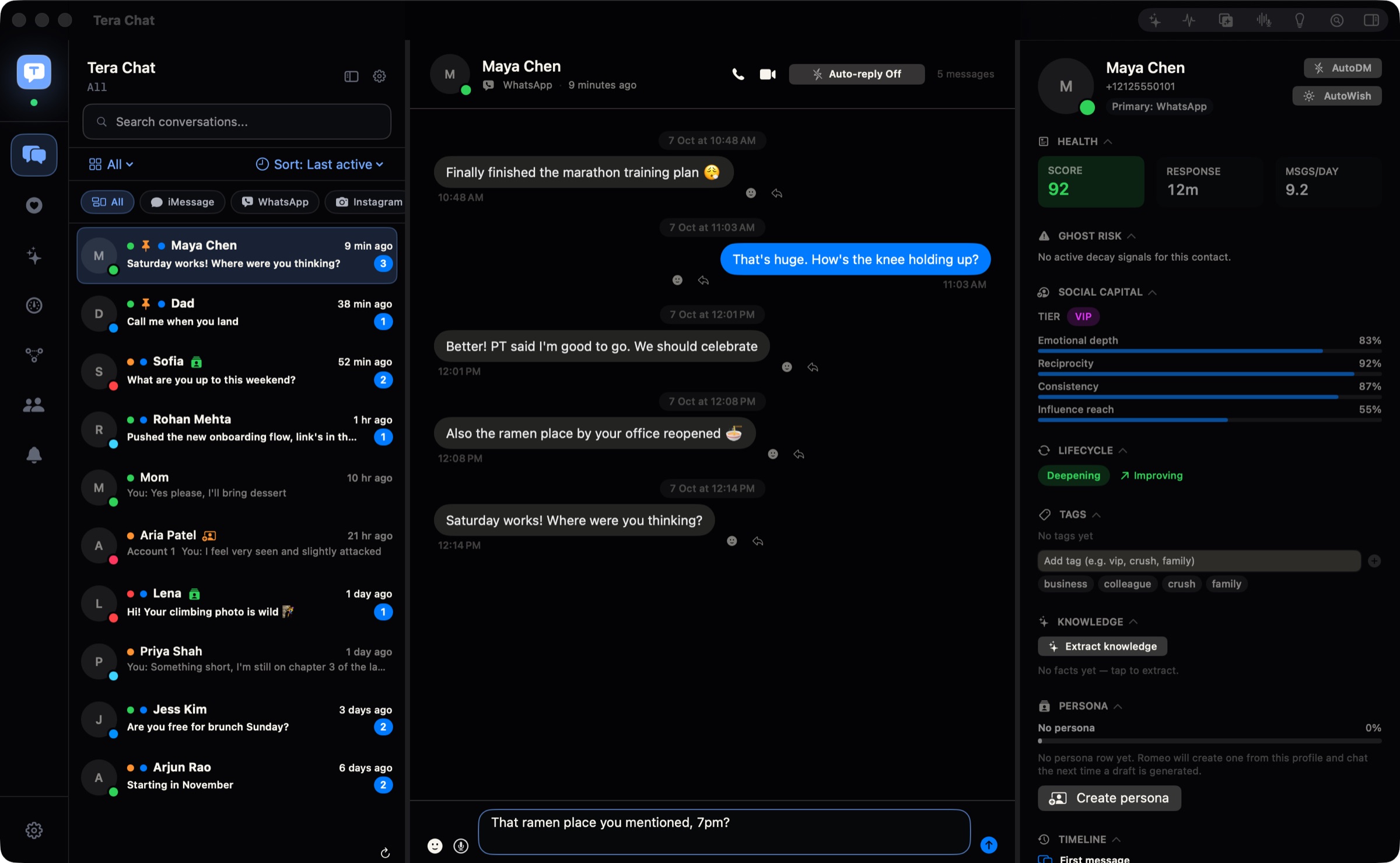
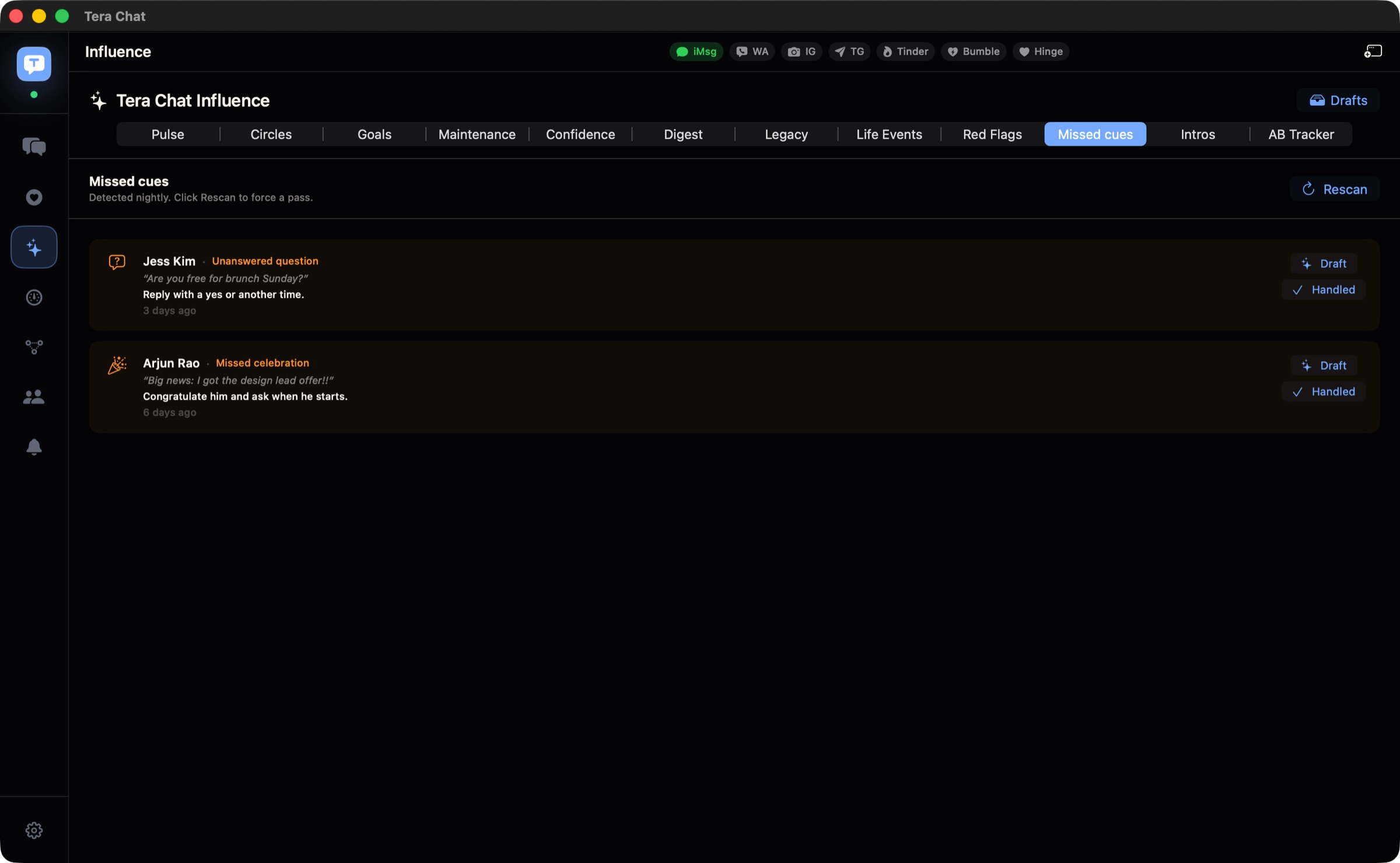
The limits: it runs only on Macs with Apple silicon and macOS 15 or later, so there’s no iPhone app. Bumble isn’t available yet. You sign in to Tinder in a private browser window that the app opens, which needs Google Chrome, Brave or Microsoft Edge installed. It doesn’t notify you of every new message, so keep your phone’s message notifications if you rely on them. The inbox is free; reply drafts for Tinder and Instagram chats need a Tera Chat AI plan or your own ChatGPT account through OpenAI’s Codex. More on the dating features.
A note on the rules. Tinder’s Terms of Use (effective 5 March 2026, §2c item 22) and Hinge’s Terms (effective 25 August 2025, §2c item 22) ban using third-party apps or services that directly interact with the service without written consent, including AI systems. Tera Chat connects to your Tinder account (and Hinge, read-only, in beta), so it’s the kind of tool those clauses cover, and using it puts your dating account at risk, including a ban that can extend to other Match Group apps. We explain the clauses and what they mean in is it against Tinder’s rules to use AI? Tera Chat isn’t affiliated with Tinder, Hinge, Bumble or Match Group.
What to do today
- Count your live chats across every app and pick your cap from the table above.
- Close anything stalled for more than a week, using one of the scripts.
- Choose your two daily check-in times and turn off like and match notifications.
- Start a one-line note for each match you’re still talking to.
- Pick your best chat and suggest a date this week.
The goal isn’t to manage more matches. It’s to give a few people a real chance, and to get off the apps and onto a date sooner.
Frequently asked questions
Is it bad to talk to several people on dating apps at once?
No. In the early stage, talking to more than one match is the normal assumption on dating apps. What matters is being honest if someone asks, not stringing anyone along, and not keeping more chats open than you can answer well.
How many dating apps should I use at once?
Two is enough for most people: one large app and one that suits what you're looking for. A third app usually adds more chats to manage rather than better matches, and if you're feeling burned out, one is plenty.
Do I have to tell a match I'm talking to other people?
Not in the first messages or first dates, because it's the default on dating apps. If someone asks you directly, answer honestly, and when you want to be exclusive with someone, say so and close your other chats.
Is there an app that puts Tinder and Hinge in one inbox?
On a Mac, Tera Chat shows Tinder chats and, in a read-only beta, Hinge chats alongside iMessage, WhatsApp, Telegram and Instagram. Because it connects to your dating accounts, it's the kind of third-party tool Tinder's and Hinge's terms restrict, so read the rules before you decide.
Can I get banned from Hinge for something I did on Tinder?
It's possible. Tinder's and Hinge's terms both say someone who breaks the rules can also be banned from their affiliated apps. Having accounts on both is normal; breaking the rules on one can cost you both.
Published . How we write and check our guides. Spotted something out of date? Email hello@terachat.co.