How to catch up on hundreds of unread messages without reading them all
How to catch up on unread messages without reading every one: a four-pass triage for WhatsApp, iMessage and Telegram, with AI summaries and reply templates.
The short answer
- Don't read a backlog top to bottom. Triage it in four passes: clear the noise, pull out what needs you, summarize the long groups, then reply in one batch.
- What needs you is usually a short list: one-to-one chats from people who matter, questions addressed to you, mentions in groups, plans that never got a date, and anything time-sensitive.
- Built-in tools do much of the work: WhatsApp's Unread list and Read all, the @ markers WhatsApp and Telegram show when you're mentioned, and View > Unread Messages in Messages on a Mac.
- AI summaries help most on long group chats, but each tool covers different things: WhatsApp's and Apple's summarize only unread messages, and Telegram's only channel posts.
- A short holding reply ('saw this, I'll answer properly tonight') is better than silence while you work through the rest.
To catch up on hundreds of unread messages, don’t read them in order. Triage them in four passes: clear the noise (channels and big groups you only skim), pull out what actually needs you (one-to-one chats, direct questions, mentions, plans without a date), summarize the long groups, then reply in one short batch, starting with holding replies.
Below is the method step by step, with the exact built-in tools in WhatsApp, Telegram and Messages on a Mac that make each pass faster, where AI summaries help and where they don’t, and reply templates you can adapt.
The four-pass triage at a glance
| Pass | Goal | What you do | Built-in help |
|---|---|---|---|
| 1. Clear the noise | Shrink the pile | Mark as read, mute or archive channels, broadcasts and big groups you skim | WhatsApp Read all; Messages Mark as Read; mute and archive everywhere |
| 2. Find what needs you | Make a short “needs me” list | Scan one-to-one chats, questions, mentions, dateless plans, deadlines | WhatsApp Unread list and @ markers; Telegram’s @ button; Messages View > Unread Messages |
| 3. Summarize the rest | Get the gist of long groups | Use an AI summary instead of scrolling | WhatsApp message summaries; Apple’s summaries in Messages; Telegram channel summaries |
| 4. Reply in a batch | Clear the list | Holding replies first, then real answers, then the rest | Templates below |
Pass 1: Clear the noise first
Start by removing everything that doesn’t need a reply from you, so the number you’re facing is honest. That usually means channels, broadcast lists, community announcement groups, delivery and booking updates, and big groups where you’re one of 80 people.
In WhatsApp: tap and hold a chat and tap Mark as read. To clear everything at once, use the menu and choose Read all (WhatsApp Help Center). Only do that after you’ve noted the chats you need, because it clears the unread markers you’ll use in pass 2. Mute or archive the groups you only skim.
In Messages on a Mac: select a conversation and choose Conversation > Mark as Read (Apple’s Messages guide).
In Telegram: mute or archive channels you follow for news. Telegram’s own AI summaries cover long channel posts, so channels are the one place it can help you catch up.
A note on read receipts. Marking a chat as read in WhatsApp may show the sender blue ticks if you both have read receipts on. Save that for groups and channels; for one-to-one chats, read them properly in pass 2.
Pass 2: Pull out what needs you
Now look only for these five things and write them down as you go (a note on your phone or a sticky note is fine). This list, not the unread count, is your real backlog.
- One-to-one chats from people who matter. A message from your sister outranks 200 group messages.
- Questions addressed to you. Anything ending in a question mark with your name or “you” in it.
- Mentions and replies to you in groups.
- Plans without a date. “We should get dinner”, “let’s do it again soon”, “next week?” These quietly die unless someone puts a date on them.
- Anything with a deadline. Today, tomorrow, “by Friday”, RSVPs, payments.
Shortcuts for finding them:
- WhatsApp’s Unread list. WhatsApp has four default lists (All, Unread, Favorites and Groups). Swipe down in Chats to see them, and tap Unread to see only chats you haven’t opened (About lists). Then tap Favorites to check the people who matter most.
- WhatsApp mentions. When someone mentions you or replies to your message in a group, an @ appears next to that chat in your chats list (WhatsApp Help Center).
- Telegram mentions. Inside a group, an @ button jumps you from one mention to the next; long-press it to mark them all read (Telegram API docs).
- Messages on a Mac. Choose View > Unread Messages to hide everything you’ve read, and click Go Up in a conversation to jump to the first unread message.
- Search inside a chat for your name, “you free”, “let’s”, “should we” or a date word like “Saturday” to surface questions and plans.
Pass 3: Summarize the long groups instead of scrolling
Whatever’s left is mostly long group chats where you need the gist, not every message. This is where AI summaries earn their place, as long as you know what each one covers:
| Tool | What it summarizes | Limits |
|---|---|---|
| WhatsApp message summaries | Unread messages in one chat | Off by default; English, Indonesian, Portuguese and Spanish; limited countries (WhatsApp) |
| Apple Intelligence in Messages | Unread messages, shown as a summary in the conversation list | Mac with M1 or later and a supported language (Apple) |
| Telegram AI summaries | Long channel posts and Instant View pages | Not private chats or groups (Telegram) |
| Export + ChatGPT or Claude | Any chat you export | You upload everyone’s messages to that company |
Ask for the parts that need you, not a generic summary. A prompt that works in any AI tool:
Summarize this chat in 5 bullet points. Then list separately:
- questions addressed to me ([your name])
- plans or invitations that don't have a date yet
- anything with a deadline
- anyone who seems upset or is waiting on me
Our guides go deeper for each app: summarizing a WhatsApp group chat and summarizing iMessage threads on a Mac. Before you paste a friend’s messages into any AI, read is it safe to let AI read your messages?
Pass 4: Reply in one batch
Work through your “needs me” list in this order: holding replies, then quick answers, then the replies that need thought. Sending a short holding reply first stops people waiting while you write the longer ones.
Holding replies (examples, made up for this guide; change the wording to sound like you):
- “Just saw this, sorry. I’ll reply properly tonight.”
- “Catching up on messages now. Yes to Saturday, details in a bit.”
- “Haven’t forgotten your question, I need to check my calendar first.”
Catching up in a group:
- “Just caught up. I’m in for Friday, happy to book if nobody has yet.”
- “Sorry, I was offline all week. What do you need from me?”
Rescuing a plan that never got a date:
- “We said dinner ‘soon’ two weeks ago. Thursday or Sunday?”
- “Still keen on the climbing thing? I’m free the weekend of the 8th.”
Closing something kindly:
- “I can’t make it this time, but have a great one.”
- “I’m going to bow out of planning this one, I’m stretched thin. Count me in for the next.”
If you’re late by weeks rather than days, what to say when you forgot to text someone back has scripts sorted by how late you are.
Doing this on a Mac with every app in one place
If your unread messages are spread across iMessage, WhatsApp, Telegram and Instagram, the slowest part of triage is switching apps. Tera Chat is our app, so weigh this accordingly: it’s a free Mac app that puts those chats in one inbox, so you work through one list instead of four apps.
- Needs Reply and Unread views across every connected app, with filter chips per network.
- Summarize (⇧⌘S) a thread you’ve fallen behind on. It reads the latest messages, up to the last 100, so for a bigger backlog combine it with pass 2. Ask about this chat (“did she ask me anything?”) answers from the last 50 messages plus what Tera Chat knows about the person.
- Missed cues: a nightly scan on your Mac flags questions you never answered, celebrations you missed, requests for support you didn’t respond to and interests you never followed up on, each with a Draft button. The scan itself works without any AI set up.
- Drafts in your own texting style that you edit and send yourself (how this compares with other tools is in AI that replies to texts in your style).
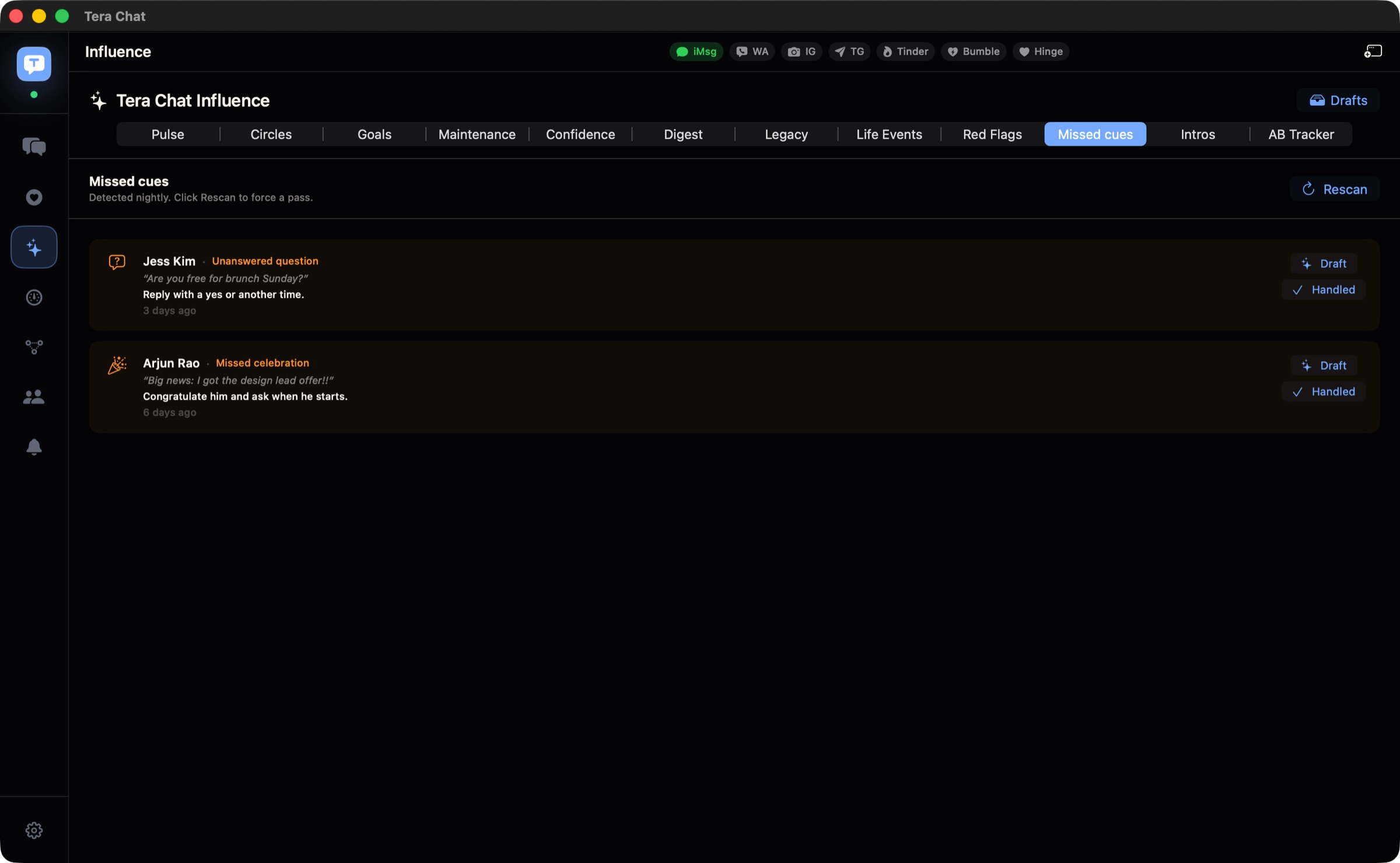
Limits: it’s Mac-only (Apple silicon, macOS 15 or later), iMessage needs Full Disk Access, and it doesn’t show a notification for every new message. The inbox is free; the AI features work with your ChatGPT account (through Codex) or a Claude or Grok API key, or with AI Plus at $9.99/month. Messages stay on your Mac; the text AI works on goes to the provider you choose.
Stop the next pile-up
Catching up once is easy. Staying caught up is about making the important messages visible:
- Mute groups and channels, not people. Notifications for the people you care about; silence for everything you skim.
- Use one short reply window a day. Ten minutes after lunch beats a guilty two-hour session every few weeks.
- Archive finished groups. The hen party, the house move, the trip: archive them once they’re over.
- Reply to plans with a date. “Yes, Thursday?” closes a loop; “yes, soon!” opens a new one.
If the pile keeps coming back however often you clear it, the cause is usually the system rather than willpower; the related guides below cover why that happens and how to spot the questions and plans that slip through.
Frequently asked questions
Is it rude to mark messages as read without reading them?
For channels, broadcast lists and big groups you only skim, no: nobody expects you to read everything. In WhatsApp, marking a chat as read may show the sender blue ticks if read receipts are on, so for one-to-one chats it's better to read and send a short holding reply.
How do I find messages where someone mentioned me?
In WhatsApp, an @ appears next to the chat in your chats list when you've been mentioned or someone replied to you. In Telegram, an @ button appears inside the chat; tap it to jump between mentions.
Can AI tell me which messages need a reply?
Yes, if you ask specifically. Paste or export the conversation into an AI and ask for questions addressed to you, plans without a date and anything time-sensitive. Some inbox apps do a version of this automatically.
How do I stop unread messages piling up again?
Mute the groups and channels you skim, keep notifications for people, and set a short daily reply window. Archiving finished groups (a trip, a party) also helps.
Published . How we write and check our guides. Spotted something out of date? Email hello@terachat.co.