Franz alternative for Mac: Tera Chat vs Franz, one inbox or tabs?
Looking for a Franz alternative on Mac? Tera Chat vs Franz in October 2026: one merged inbox vs tabbed web apps, services, AI, privacy and price.
The short answer
- Franz and Tera Chat for Mac work differently: Franz shows each service's own website in a separate tab, while Tera Chat merges your chats into one conversation list.
- Franz wins on breadth: 75+ services plus any website, native Signal and email, and apps for Mac, Windows and Linux.
- Tera Chat suits personal chats on an Apple silicon Mac: iMessage, WhatsApp, Telegram, Instagram and Tinder in one free inbox, with AI drafts in your own style.
- As of 20 October 2026, Franz is free for three services and $60 a year for Pro; Tera Chat's inbox is free for every network it supports, with one WhatsApp account and up to three Instagram accounts.
Franz and Tera Chat for Mac solve different problems. Franz puts 75+ services (WhatsApp, Slack, Gmail, Telegram, Discord, Microsoft Teams and more, plus a native Signal client and its own email app) side by side in tabs on Mac, Windows and Linux, with AI help; it’s free for three services and $60 a year for Pro as of 20 October 2026. Tera Chat merges iMessage, WhatsApp, Telegram, Instagram and Tinder into one conversation list on an Apple silicon Mac and drafts replies in your own style, and its inbox is free. Pick Franz for work tools, or if you’re on Windows or Linux. Pick Tera Chat if you want your personal chats, including iMessage, in one list.
This page explains the two models (tabs vs one inbox), then compares services, AI, privacy and price, and lists where each one wins. Tera Chat is our app; we’ve tried to be fair, and we say where others are the better pick. Franz facts come from its website, pricing page, support center and changelog, checked on 20 October 2026. We didn’t install or test Franz.
Tera Chat vs Franz at a glance
Franz is a workspace for the services you use at work; Tera Chat is an inbox for the people in your life.
| Tera Chat for Mac | Franz 6 | |
|---|---|---|
| What it is | One merged inbox for personal chats | A desktop workspace with each service in its own tab |
| Made by | Tera Labs, launched October 2026 | Franz, built in Vienna since 2016 |
| Latest version | 1.1.2 | 6.9.2 (12 October 2026) |
| Runs on | Apple silicon Mac, macOS 15 Sequoia or later | Mac (Apple silicon and Intel), Windows, Linux |
| Services | iMessage, WhatsApp, Telegram, Instagram DMs, Tinder; Hinge (beta, read-only) | 75+ services plus any website as a custom service; native Signal and email |
| iMessage | Yes | No |
| Dating apps | Tinder; Hinge (beta, read-only); Bumble coming soon | None on its services list |
| One list across networks | Yes | No: unified notifications and unread badges, each service in its own tab |
| Free plan | The whole inbox, no time limit | 3 services, 1 workspace, basic AI on your device |
| Paid plans | AI Plus $9.99/month, AI Pro $19.99/month, AI Max $49.99/month | Pro $60/year ($6/month), Max $120/year ($12/month), Lifetime $199 launch price (then $239) |
| AI | Drafts in your style, summaries, questions about a chat, voice drafts, relationship insights | Catch-up assistant, smart snippets, Smart Translate, voice dictation, email triage |
| Account needed | No | No, for the free plan |
| Analytics | Daily feature counts, never message text, can be turned off | A few anonymous product events, can be turned off |
Franz sources: pricing, home page, changelog, Franz vs Beeper page (account and platforms). Prices in US dollars, before any VAT.
Tabs or one inbox: what’s the difference?
Franz shows each service’s own web app in its own tab, so you still read WhatsApp in the WhatsApp tab and Slack in the Slack tab. Tera Chat connects to each network and puts every conversation in a single list.
How Franz works. Each service “runs in its own isolated container,” and Franz’s support center says the messages you see are “still served by that provider through its web app or integration flow.” That means you get each service’s full interface: Franz says you can join calls and share screens inside it, and you can add any website as a custom service. On top, Franz gathers notifications and unread badges across services, lets you group services into workspaces (personal, a client, a team), and its Magic Bar finds messages and jumps between services from one shortcut. What you don’t get is one conversation list across apps.
How Tera Chat works. Every thread from every network sits in one list, tinted by where it came from, with filter chips per network and views for Needs Reply, Unread, Pinned and Archived. You can sort by last active, name or relationship health, and your messages are indexed in macOS Spotlight. The trade-off: Tera Chat isn’t a full client for each network. Sending is text only on WhatsApp, Instagram, Telegram and Tinder (photos and files go only on iMessage), reactions you add aren’t sent to the other app, and WhatsApp and Instagram calls open those services’ own websites.
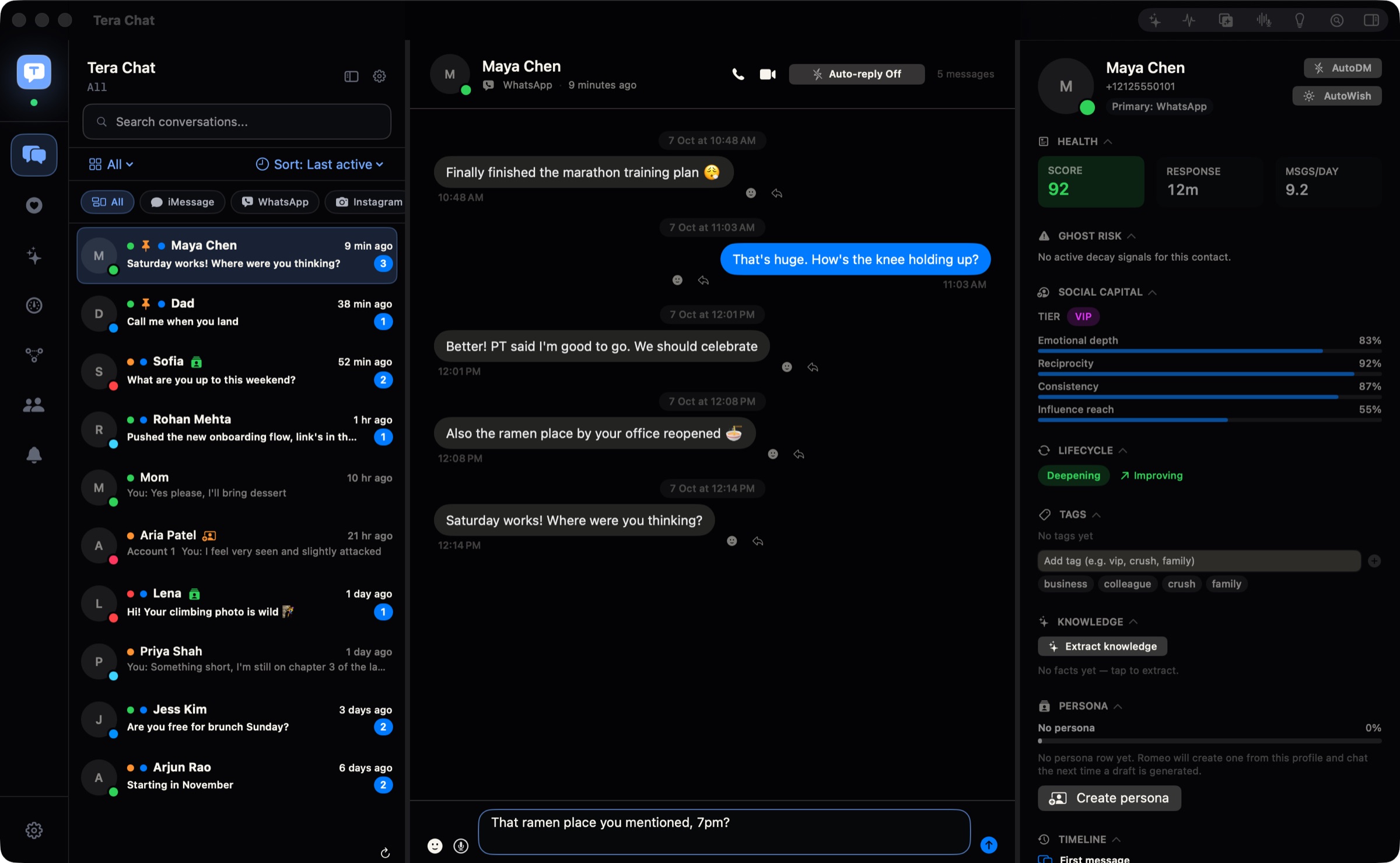
The model also changes your account risk. Franz loads each service’s official website, which the services themselves provide. Unified inboxes, Tera Chat included, connect to networks like WhatsApp and Instagram unofficially, which those services’ terms restrict. Our guide to whether all-in-one messaging apps are safe explains the difference, and our plain explainer on unified inboxes covers wrappers, bridges and native apps.
Which services does each one support?
Franz covers far more services. Tera Chat covers two things Franz can’t: iMessage, and Tinder in the same list as your other chats.
| Service | Tera Chat for Mac | Franz |
|---|---|---|
| iMessage | Yes: reads your Messages history on your Mac (needs Full Disk Access) and sends through the Messages app | No |
| Yes, paired as a linked device (sending is text only) | Yes, in its own tab | |
| Telegram | Yes | Yes, in its own tab |
| Instagram DMs | Yes, up to three accounts | Yes, in its own tab |
| Tinder | Yes, in the same list as your other chats | Not on its services list (tinder.com could be added as a custom website tab) |
| Hinge | Beta, read-only | No |
| Signal | No | Yes, as a native client |
| Slack, Microsoft Teams, Discord | No | Yes |
| No | Yes: Franz Mail, plus Gmail, Outlook, iCloud Mail and others | |
| Google Messages | No | Yes, in its own tab |
| Any other website | No | Yes, as a custom service |
Sources: Franz services and home page. In Tera Chat, Telegram and Tinder sign in through a browser you already have, so Google Chrome, Brave or Microsoft Edge must be installed. iMessage access depends on Full Disk Access, which is optional and can be revoked in System Settings; here’s what Full Disk Access allows.
AI: a work assistant vs drafts in your voice
Both now have AI, aimed at different jobs. Franz’s AI is built for client work and email; Tera Chat’s is built for personal conversations.
Franz 6 (from its pricing and home pages):
- Starter (free): basic AI that runs on your device.
- Pro: AI runs on the model you set up, either your own provider key or a model on your Mac (its support center has a guide for local AI with Ollama), plus plain snippets, Smart Translate and voice dictation (which needs macOS 26 or later on an Apple silicon Mac).
- Max: smart snippets that fill in the person, topic and date from the open conversation, email sender intelligence, 50 web research runs a month, and Franz Cloud AI with 5 million tokens a month, hosted in France with zero retention.
- Also shown on its home page: an assistant that catches you up across email, WhatsApp and Signal and drafts a reply, a Morning Briefing for email, and native Signal with voice transcription, summaries and action items. The pages don’t say which plan each of these needs.
Tera Chat for Mac:
- Replies in your style. It learns your slang, emoji and how long your messages run, and drafts replies you pick, edit and send.
- A different tone for different people. Tag contacts (family, colleague, crush, VIP) and set the tone for each tag.
- Summarize (⇧⌘S) and Ask about this chat (“did they ever mention their birthday?”).
- Voice drafts (⌥⌘V): pick the audio file of a voice message someone sent you; Tera Chat transcribes it on your Mac and drafts a reply.
- Relationship insights. Missed cues (questions you never answered, celebrations you missed), fading chats, life events with Add to Calendar, a weekly digest and a health score for every contact. Missed cues, fading chats and the health score work without any AI.
- AI on your terms. Free with your ChatGPT account through OpenAI’s Codex app, or a Claude or Grok API key (you pay your provider, with a daily spend cap that defaults to $5). Or a Tera Chat AI plan from $9.99 a month that runs on Anthropic’s Claude.
By default you read and send every message in Tera Chat. Its Autopilot (in every Tera Chat AI plan on built-in AI: 5 chats on AI Plus, every chat on AI Pro and AI Max) is off until you turn it on for a service or a single chat, and its replies then wait in Pending drafts for you; automatic sending is a separate per-chat Beta switch we don’t recommend.
Privacy and accounts
Both keep your messages off their own servers and neither requires an account for the free plan. The differences are in analytics and in where the AI runs.
- Franz: you can install it and use up to three services without an account. A Franz account, if you make one, syncs your setup (workspaces and the services you added), not your conversations, which stay with each service. Franz says “your messages don’t pass through our servers” and stores passwords and tokens in your operating system’s keychain. On Pro and above, its Privacy Shield blocks trackers inside the services you use, and Franz Mail blocks email tracking pixels. It counts a few anonymous product events (app starts, the first service you add, upgrade clicks, first AI use) and catches crashes on its own EU servers; you can turn both off in Settings (Franz’s logging policy).
- Tera Chat: an account is optional (you can choose Continue without an account). Messages, contacts and relationship stats stay on your Mac and are never uploaded to a Tera Chat server. AI keys and your Tera Chat account sit in the macOS Keychain; sign-ins to WhatsApp, Instagram, Telegram and Tinder stay in Tera Chat’s own storage on your Mac. The app reports usage counts, such as how often each feature is used, its version and which networks are connected, never message text, which you can turn off in Settings. The AI sees the conversations it works on: with your own key that text goes to your provider, and with a Tera Chat plan it goes to Claude through Tera Chat’s server, which passes it on and doesn’t keep it.
What does each one cost?
For three services or fewer, both are free. Beyond that, Franz charges for the number of services, Tera Chat only for built-in AI. Prices in US dollars as of 20 October 2026.
| Your setup | Tera Chat for Mac | Franz |
|---|---|---|
| Up to three services, no paid AI | Free | Free (Starter) |
| Four or more services | Free (all five live networks) | Pro: $60/year or $6/month |
| AI help with replies | Free with your own ChatGPT account or a Claude or Grok key; or AI Plus at $9.99/month ($99.99/year) | Pro with your own key or a local model; Max at $120/year ($12/month) with Franz Cloud AI |
| One payment, no subscription | No lifetime plan | Lifetime: $199 launch price, then $239 |
| iMessage in the same window | Free | Not possible |
| Tinder with AI openers | Any Tera Chat AI plan, from $9.99/month, or your own ChatGPT account through Codex | Not possible |
| Slack, Teams or email in the same window | Not possible | Free within three services; Pro beyond |
Trials differ too. Franz gives a 14-day Max trial that starts on its own when you set up Franz outside the Mac App Store and needs no card; afterwards it drops back to the free plan and nothing is deleted (Franz trial details). Tera Chat’s AI plans have no trial: a plan starts, and is charged, at checkout, and you can cancel anytime. Tera Chat’s plans are on its pricing page.
Where Franz wins
Franz is the better pick for many people:
- Far more services. 75+ services plus any website, including Slack, Microsoft Teams, Discord, Signal and email. Tera Chat supports none of those.
- Windows, Linux and Intel Macs. Franz has builds for all three; Tera Chat runs only on an Apple silicon Mac with macOS 15 or later.
- The full official interface. Because each tab is the service’s own web app, you can join calls and share screens inside Franz. Tera Chat sends text only outside iMessage and opens WhatsApp and Instagram calls in their own websites.
- Lower account risk. Loading a service’s own website is closer to normal use than an unofficial connection.
- Work features. Workspaces, several accounts per service (Tera Chat takes one WhatsApp account and up to three Instagram accounts), native email with a priority inbox, calendars from Google, Microsoft and Apple, a to-do list, snippets and translation.
- AI that can stay on your machine. Even the free plan runs basic AI on your device, and Pro works with a local model. Tera Chat’s drafts always come from a cloud AI provider.
- A lifetime option and a long track record. Franz has been around since 2016, says it has been downloaded over a million times, and offers a one-time licence.
Where Tera Chat for Mac wins
- iMessage next to everything else. Franz can’t show iMessage at all.
- One list, not a row of tabs. Every conversation sorted together, with a Needs Reply view, so you see who’s waiting without opening each app.
- Dating apps. Tinder sits next to your other chats, with a New matches rail and openers drafted from the match’s own bio; Hinge is in beta (read-only). Tinder’s terms restrict third-party apps that connect to your account, AI included, and Tera Chat is that kind of tool, so read what Tinder’s rules say about AI and stay the author of what you send.
- AI that writes like you. Drafts in your style with a tone per tag, plus summaries and questions about any chat, across every network it supports.
- Relationship insights. Fading chats, missed cues, life events and a Sunday digest. Franz’s AI is aimed at work follow-ups, not friendships.
- Every network on the free plan. All of Tera Chat’s networks are in the free inbox, and no plan adds networks or accounts; Franz’s free plan stops at three services.
- Mac-native touches. A menu bar app, a ⌘⇧M hotkey that brings Tera Chat up from anywhere, and Spotlight search for your messages.
- Counts, never content. The app reports usage counts, such as how often each feature is used, its version and which networks are connected, never what’s in your chats, and you can switch that off in Settings → General.
Can you use both?
Yes, and for some people it’s the sensible setup: Franz for work tools like Slack, Teams and email, Tera Chat for iMessage, WhatsApp, Telegram, Instagram and Tinder with AI drafts. The two apps don’t share anything, so each just needs its own sign-ins.
Who should pick which
- Pick Franz if your day runs on Slack, Teams, email and WhatsApp Web, you use Windows, Linux or an Intel Mac, you’d rather each service stay official and complete, or you like the idea of a one-time licence.
- Pick Tera Chat for Mac if you’re on an Apple silicon Mac, your important conversations are in iMessage, WhatsApp, Telegram, Instagram and Tinder, and you want them in one list with drafts that sound like you, for free.
- Pick something else if you need a merged inbox with Signal, Slack and Discord, or a phone app. Our guide to the best messaging apps for Mac covers every option, and our Franz vs Rambox vs Ferdium comparison covers the other tab apps.
How we compared
On 20 October 2026 we read Franz’s home page, pricing page, services list, changelog, Franz vs Beeper page, its “Ten Years of Franz” post and its support articles on accounts, data storage, logging, trials and Mac downloads. Tera Chat facts come from our own product documentation for version 1.1.2. We didn’t install or test Franz, so this page makes no claims about its speed, memory use or battery life.
Frequently asked questions
Is Franz free?
Franz's Starter plan is free for three services and one workspace, with basic on-device AI, and you can use it without an account. Pro costs $60 a year (or $6 a month) for unlimited services, as of 20 October 2026.
Does Franz support iMessage?
No. Franz shows each service's website, and iMessage has no website. On a Mac, apps like Tera Chat or Beeper show iMessage by working with the Messages app and its history on your computer.
Is Franz a unified inbox?
Not in the merged-list sense. Franz gathers notifications and unread badges in one window, but each service stays in its own tab. A unified inbox like Tera Chat or Beeper shows every conversation in one list.
Which computers do Franz and Tera Chat run on?
Franz runs on Mac (Apple silicon and Intel), Windows and Linux. Tera Chat for Mac needs an Apple silicon Mac with macOS 15 Sequoia or later and has no Windows or Linux version.
Which is better for privacy?
Both keep your messages off their own servers: Franz loads each service's site and says your messages don't pass through its servers, and Tera Chat stores your inbox on your Mac. Both count how their features are used and let you turn that off: Franz with a few anonymous product events, Tera Chat with daily usage counts (features used, app version, region, connected networks) that never include message text.
Published . How we write and check our guides. Spotted something out of date? Email hello@terachat.co.