The best AI dating assistants (rizz apps) in 2026, compared
The best rizz apps and AI dating assistants compared on how they read your chat, true monthly cost, desktop support and dating-app terms risk. Checked 20 Oct 2026.
The short answer
- There's no single best rizz app: screenshot apps (RIZZ, WingAI) are the most used on iPhone, keyboard apps (YourMove, Smoothspeak) skip the screenshot, and ChatGPT or Claude does the same job free if you give it a good prompt.
- Weekly plans cost more than they look: $6.99 a week is about $30 a month, and $9.99 a week is about $43.
- Few assistants work on a computer: several run in a browser, Zirp has a Mac build, and Tera Chat (ours) reads Tinder chats in a Mac inbox without screenshots.
- All but one tool here leave sending to you by default. AutoDate.ai swipes and messages for you, which is the clearest breach of Tinder, Hinge and Bumble's rules.
- Hinge's free Convo Starters is the only option built into a dating app, and it gives tips rather than lines to paste.
There’s no single best rizz app; the right AI dating assistant depends on how it gets to your chat and how you pay for it. Screenshot apps like RIZZ and WingAI are the most-reviewed dating assistants on the US App Store, keyboard apps like YourMove and Smoothspeak skip the screenshot, ChatGPT or Claude does the same job for free with a good prompt, and Hinge’s own Convo Starters gives tips inside the app. Whichever you use, treat it as a wingman: take the idea, rewrite it in your own words, and send it yourself.
This guide compares eleven options on how they read your chat, what they really cost per month, whether they work on a computer, whether they send for you, and how they sit with the dating apps’ rules. Tera Chat is our app; we’ve tried to be fair, and we say where others are the better pick.
How we compared: we checked each app’s App Store listing or website and its prices on 20 October 2026. We didn’t buy every subscription or run the same profiles through each app, so this compares how they work, what they cost and what they risk, not which one writes the best lines. Prices are in US dollars and change often.
The short list
- Free: ChatGPT or Claude, with a few of your own texts as a style sample. Our prompt guide has templates.
- For Hinge: Hinge’s own Convo Starters. It’s free, built in, and gives tips, not lines.
- Most popular on iPhone: RIZZ or WingAI, both screenshot apps.
- No screenshots on iPhone: a keyboard app such as YourMove AI or Smoothspeak.
- Cheapest on the web: SmoothRizz’s free plan or Winggg at $9.99 a month.
- On a Mac: Zirp if you want a paste-in assistant; Tera Chat if you want your Tinder chats next to iMessage, WhatsApp, Telegram and Instagram with no screenshots.
- Avoid: anything that swipes or sends for you, such as AutoDate.ai.
How the AI dating assistants compare
Most of these tools work the same way underneath: you hand them your chat, they suggest lines, you copy one into the dating app. The differences are in how the chat gets to them and how you’re billed.
| Tool | How it gets your chat | Price (20 Oct 2026) | On a computer? | Sends for you? | Dating-app terms risk (our read) |
|---|---|---|---|---|---|
| RIZZ | Screenshot of the chat or bio | In-app purchases $3.99–$99.99; one-year plan $69.99 | Runs on Apple silicon Macs as an iPad app (“not verified for macOS”) | No | Medium: your match’s messages go to a third party |
| WingAI | Screenshot; iMessage extension | $3.99–$79.99; plans labelled monthly at $3.99, $9.99 or $19.99, yearly at $29.99 or $79.99 | Runs on Apple silicon Macs, not verified | No | Medium |
| YourMove AI | Keyboard; profile screenshot for openers | iOS weekly $4.99, annual $49.99 | Web app | No | Medium |
| Smoothspeak | Screenshots plus a keyboard | $2.99–$49.99 (periods not listed) | Runs on Apple silicon Macs, not verified | No | Medium |
| SmoothRizz | Screenshot or pasted text | Free (12 replies a day); Premium $5.99 a week, with monthly and annual options | Web app | No | Medium; low if you paste only your own words |
| Winggg | Web tools for profiles and conversations | 5 free uses; $2.99 a week, $9.99 a month or $44.99 for 6 months | Web app | No | Medium |
| Zirp | Screenshot read on your device, or paste | First 10 replies free; $9.99 a month after a 3-day trial | Mac app (macOS 14+), iPhone, iPad | No | Medium |
| Tera Chat (ours) | Signs in to Tinder and reads chats where they are | App free; dating drafts with your own ChatGPT account via Codex (no Tera Chat charge), or a Tera Chat AI plan from $9.99 a month | Mac only (Apple silicon, macOS 15+) | No by default; a per-chat auto-send switch exists (Beta), and we recommend against turning it on | High: it connects to your Tinder account |
| ChatGPT or Claude | You paste or describe the chat | Free tiers available | Web and apps | No | Low if you write the final message |
| Hinge Convo Starters | Built into Hinge | Free | Phone only (Hinge has no web version) | No; tips only | None: it’s Hinge’s own feature |
| AutoDate.ai | Runs your Tinder and Bumble accounts | Free beta; €49 lifetime | Web | Yes: swipes and messages | Highest |
RIZZ and WingAI lead by reviews, with about 40,000 and 24,000 US App Store ratings respectively on 20 October 2026.
How do AI dating assistants work?
There are five designs, and the design decides your privacy and your rules risk more than the brand does.
- Screenshot apps (RIZZ, WingAI, Zirp, SmoothRizz). You screenshot the chat or their profile and upload it. Easy, but your match’s photos, bio and messages go to the app’s servers, and often on to an AI provider. Zirp says it reads the screenshot on your device and sends only the text.
- Keyboard apps (YourMove AI, Smoothspeak). You switch to their keyboard inside Tinder or Hinge and it suggests lines. Fewer steps; you’re giving a third-party keyboard access to what you type.
- Chatbots (ChatGPT, Claude). You paste or describe the chat yourself, so you decide exactly what leaves your phone. Most control, most effort.
- Connected inboxes (Tera Chat). The app signs in to your dating account and reads the chat where it is. No screenshots, and it works from the chat history it has synced, but connecting to the account is exactly what Tinder’s and Hinge’s §2c item 22 covers.
- Built-in coaching (Hinge Convo Starters, Prompt Feedback). Inside the dating app, within its rules, and deliberately limited to tips.
One design to avoid entirely: autopilot services that swipe and text for you. More on that below.
The assistants, one by one
RIZZ: the most-reviewed screenshot app
RIZZ (TREND IT LLC) suggests replies from screenshots of your chat and your match’s bio, and its listing says it adapts to your tone and humor. Its developer also promotes a separate keyboard app. The App Store lists ten in-app purchases from $3.99 to $99.99; only one is labelled with its length (one year, $69.99), so check the period before you tap.
- Best for: iPhone users who want the most-used option.
- Watch out for: unclear plan lengths, and billing is the biggest theme in its low-star reviews. The most recent update listed is dated 29 January.
WingAI: screenshot app with an iMessage extension
WingAI (Ignition Dating) works from screenshots and adds an iMessage extension that suggests replies inside Messages. Recent versions added a coach, chat memory across threads and an interest-level read. Prices run from $3.99 to $79.99, with plans labelled monthly ($3.99, $9.99 or $19.99) and yearly ($29.99 or $79.99). Its listing claims a 2.5x reply rate but gives no method.
- Best for: people who also want help in iMessage after moving off the app.
- Watch out for: an unsupported reply-rate claim; several duplicate plan names.
YourMove AI: keyboard and profile writer
YourMove AI puts its AI inside your keyboard: view a profile and get three openers, or get replies in an ongoing chat. It also writes profiles and has a web app and an Android app. On iOS it’s $4.99 a week or $49.99 a year.
- Best for: fewer screenshots, and people on Android or a laptop.
- Watch out for: you’re installing a third-party keyboard; give it access only if you’re comfortable with that.
Smoothspeak: screenshots plus a keyboard
Smoothspeak (ProdTrace) combines Cue, a coach that reads screenshots and explains its suggestions, with a keyboard it says works in Tinder, Hinge, Bumble, iMessage, Instagram and WhatsApp. You can pick a persona such as Friendly or Playful. In-app purchases range from $2.99 to $49.99, without plan lengths listed.
- Best for: people who want reasons, not just lines.
- Watch out for: its privacy label lists your texts, photos and contact details as data linked to you.
SmoothRizz: the most generous free plan we found
SmoothRizz works from a screenshot or pasted text, in a browser or on iPhone. Its free plan gives 12 AI replies a day and basic style learning; Premium is $5.99 a week (about $26 a month), and the pricing page also offers monthly and annual billing (its own comparison table lists $12.99 a month).
- Best for: trying an assistant without paying.
- Watch out for: weekly is the plan it highlights; pick monthly if you’ll use it for more than a couple of weeks.
Winggg: cheap and web-based
Winggg helps with openers, replies, profile tips and asking someone out, in a web app. It gives 5 free uses, then $2.99 a week, $9.99 a month or $44.99 for six months, with a 7-day money-back guarantee.
- Best for: a laptop or Android user who wants a low monthly price.
- Watch out for: its site doesn’t say exactly how you give it your chat.
Zirp: a paste-in assistant with a Mac build
Zirp (FuturaApp) runs on iPhone, iPad and Mac (macOS 14 or later). You paste a message, or screenshot a chat on a supported device, and it explains the message and drafts replies; you copy and send. The first 10 AI replies are free, then $9.99 a month after a 3-day trial.
- Best for: Mac users who want a simple paste-in helper and monthly billing.
- Watch out for: its App Store privacy label says “Data Not Collected”, while its description says chat text goes to its server and then OpenAI, which may keep it for up to 30 days for abuse checks.
Tera Chat (ours): Tinder next to your other chats on a Mac
Tera Chat is a free Mac app that brings iMessage, WhatsApp, Telegram, Instagram and Tinder into one inbox and drafts replies in your own texting style. For Tinder, you sign in at tinder.com in a private browser window Tera Chat opens (Chrome, Brave or Edge needs to be installed), and your matches appear next to everything else, with a New matches rail for people who haven’t heard from you yet.
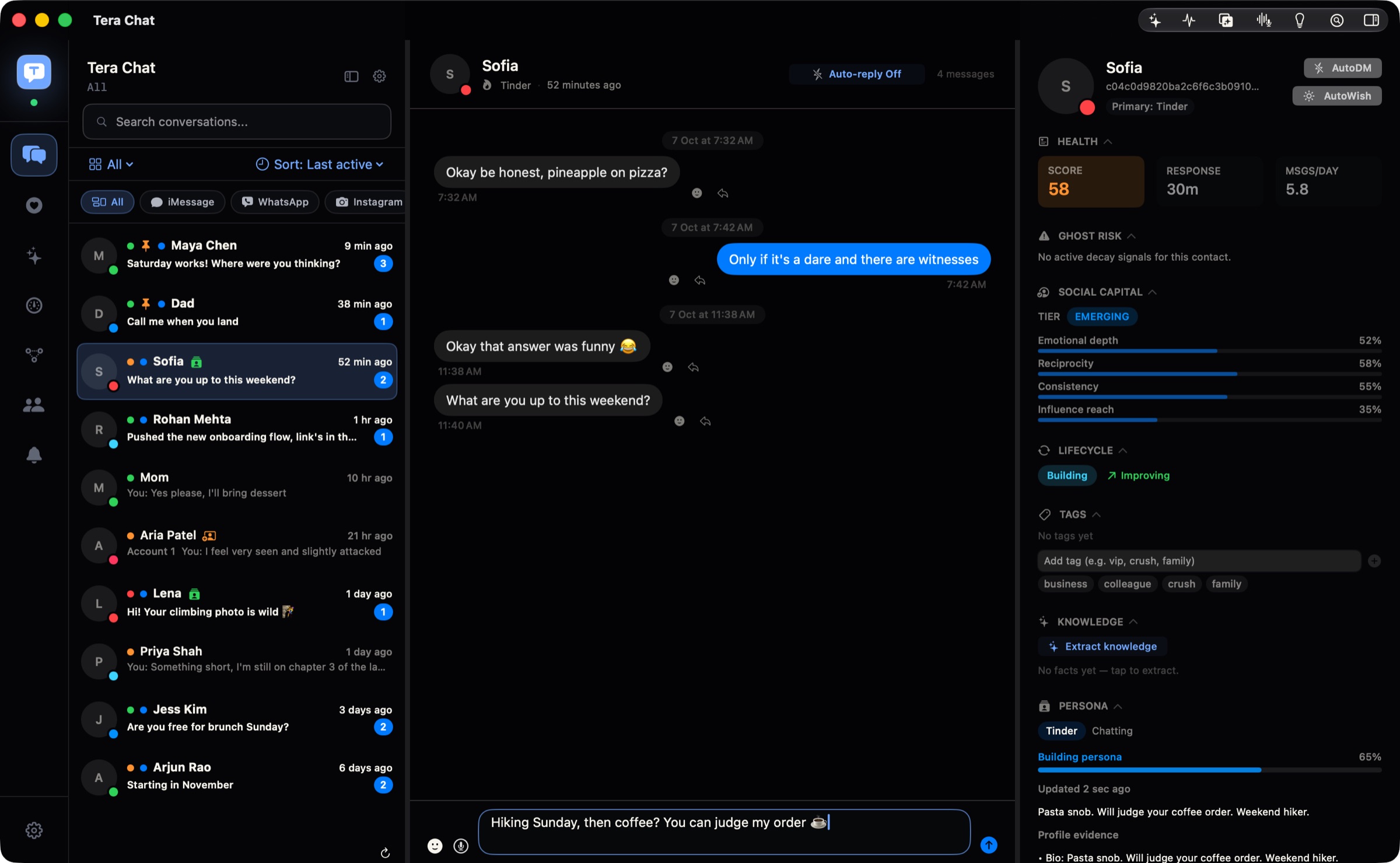
- What it does: openers built from the match’s own bio and prompts, replies in your voice when a chat goes quiet, flags for questions you never answered, and Plan a date, which suggests three ideas based on what you’ve talked about. When a match shares their Instagram, the conversation continues next to the Tinder chat it came from.
- Price: the app and inbox are free. Dating drafts need either your own ChatGPT account connected through OpenAI’s Codex app, or a Tera Chat AI plan from $9.99 a month or $99.99 a year (cancel anytime). Claude and Grok API keys aren’t used for Tinder drafts. There are no weekly plans.
- Best for: Mac users who date on Tinder and want those chats in the same place as iMessage, WhatsApp and Instagram, without screenshots.
- Not for: iPhone, Android or Windows users (it’s Mac-only, Apple silicon, macOS 15 or later); sending on Hinge (Hinge is in beta and read-only); Bumble (not available yet).
- The honest caveat: Tera Chat connects to your Tinder account, so it is the kind of third-party tool Tinder’s terms ban without written consent. Here’s what those terms say. You read and send every message yourself by default; Autopilot is off until you turn it on, and we recommend against turning on auto-send on dating apps.
More detail is on our dating page.
ChatGPT or Claude: free, if you do the work
A general chatbot can write openers and replies much like a rizz app does; RIZZ’s own listing says it runs on GPT-based AI, and Zirp sends your text to OpenAI. The difference is the prompt: give it three or four of your own texts so it can copy your style, paste only what you need from the chat, and ask for short options. You decide exactly what you share, and there’s nothing new to install. Our ChatGPT and Claude guide has copyable templates and a “reads like AI” checklist.
- Best for: anyone who doesn’t want another subscription.
- Watch out for: chatbots default to polished, long messages. Cut them down before you send.
Hinge Convo Starters: the one built into a dating app
When you like someone on Hinge, Convo Starters shows three tips based on their photo or prompt (in the US since 8 December 2025, and the UK since 23 February 2026). Hinge says its generative AI tools “do not provide pre-written language for daters to copy and paste”: you get a direction, and you write the comment. Hinge also reports that likes sent with a comment are twice as likely to lead to a date.
- Best for: Hinge users. It’s free and within Hinge’s own rules.
- Watch out for: nothing to buy, but it only works on Hinge, and only on your phone.
AutoDate.ai: the one we’d avoid
AutoDate.ai says it swipes on profiles, opens with “a line that sounds like you” and keeps conversations going on Tinder and Bumble while you do something else. It’s a free beta with a €49 lifetime plan. Its site doesn’t mention the dating apps’ terms. A tool that swipes and messages on your account is the clearest breach of Tinder’s, Hinge’s and Bumble’s rules, and your matches are talking to software without knowing it.
What does weekly pricing really cost?
A weekly plan costs about 4.3 times its sticker price per month. Many rizz apps lead with a weekly price, so do the math before the free trial ends.
| Weekly price | Per month | Per year |
|---|---|---|
| $2.99 | about $12.96 | $155.48 |
| $4.99 | about $21.62 | $259.48 |
| $5.99 | about $25.96 | $311.48 |
| $6.99 | about $30.29 | $363.48 |
| $9.99 | about $43.29 | $519.48 |
For comparison, Zirp and Winggg’s monthly plans are $9.99, Tera Chat’s AI plans start at $9.99 a month, and YourMove’s annual plan on iOS is $49.99. If you only need help for a few weeks, a monthly plan you cancel is usually cheaper than a weekly one you forget. Our rizz app alternatives guide has cancel and refund steps.
When shouldn’t you use an AI dating assistant?
Skip the assistant whenever the message needs to be unmistakably yours.
- When you’d send it unedited. Generic lines are easy to spot, and on Hinge, text you didn’t write arguably breaks §2d item 11 of its terms.
- When they’ve told you something personal. A reply to bad news or a vulnerable moment should come from you.
- When it would make you someone you’re not. If the AI’s version is wittier than you’ll be on the date, the gap shows when you meet.
- When a tool wants your dating login or offers to send for you. That’s the risk the terms are written for.
- When you’re arranging to meet. Plans, places and safety details are worth writing carefully yourself.
The wider principle is Hinge’s own: AI as a wingman, not a ghostwriter. Here’s where that line falls in practice.
What do Tinder and Hinge’s rules say about these tools?
Tinder’s Terms of Use (effective 5 March 2026) ban third-party apps or services that directly interact with Tinder or members’ content without written consent, “including but not limited to artificial intelligence or machine learning systems” (§2c item 22). Hinge’s terms have the same clause and also ban content you didn’t write yourself. Bumble bans automations that interact with profiles or messages. Screenshot and keyboard apps don’t connect to the dating app, so they sit in a grey area; connected tools like Tera Chat are covered; autopilots are the clearest breach. The full breakdown with every clause is here.
The verdict
- Most people: start free. ChatGPT or Claude with your own texts as a style sample, or SmoothRizz’s free plan, will tell you whether an assistant helps you at all.
- Hinge users: use Convo Starters first; it’s the only option inside Hinge’s rules by design.
- iPhone users who want an app: RIZZ or WingAI if you don’t mind screenshots; YourMove or Smoothspeak if you’d rather use a keyboard. Check the billing period before you subscribe.
- Laptop or Android users: Winggg, SmoothRizz or YourMove on the web.
- Mac users: Zirp for a simple paste-in helper; Tera Chat if you want Tinder in one inbox with iMessage, WhatsApp, Telegram and Instagram and accept that it connects to your Tinder account.
- Everyone: rewrite what the AI gives you, send it yourself, and never hand a tool the keys to swipe or text for you.
Frequently asked questions
Is there a free rizz app?
SmoothRizz has a free plan with 12 replies a day, Winggg gives 5 free uses and Zirp's first 10 AI replies are free (as of 20 October 2026). ChatGPT and Claude's free tiers also work if you give them a few of your own texts as a style sample.
Is there a rizz app for PC or Mac?
Web-based assistants such as SmoothRizz, Winggg and YourMove run in any browser. On a Mac, Zirp has a Mac build, several iPhone rizz apps run on Apple silicon Macs as unverified iPhone or iPad apps, and Tera Chat (ours) is a native Mac inbox that includes Tinder.
Do rizz apps actually work?
They're good at getting you unstuck and weak at sounding like you: generic or cringe lines are a common complaint in their reviews, after billing. They work best when you treat the output as a rough draft and rewrite it in your own words.
Can Tinder ban you for using a rizz app?
Tinder's terms ban third-party tools that directly interact with the app, AI included. Screenshot and keyboard apps don't connect to Tinder, which makes them a grey area; tools that sign in to your account or send for you are covered. We found no public bans for reply tools as of 20 October 2026.
Which AI dating assistant is best for Hinge?
Start with Hinge's own Convo Starters, which is free and within Hinge's rules. If you use another tool, rewrite its suggestions yourself, because Hinge's terms ban content you didn't write or that was automatically generated.
Published . How we write and check our guides. Spotted something out of date? Email hello@terachat.co.